




ian-inhome
Members
-
Joined
-
Last visited
-
ESim After entering my pin number incorrectly 3 times I lost access to my primary user account. I eventually managed to get back in as primary user by changing the email address and password to the same on the log in on the car, on the app and on the Skoda digital I’d website. I created a new email address and password for these 3 log ins. This email address I intended to use only for the car. Everything worked perfectly for a couple of weeks until 2 days ago when Google blocked that email address citing unusual activity. After appeal I have managed to get the email address unblocked.. According to AI Google doesn’t like the fact that I have the setting for data ticked as the esim. I don’t pay a subscription to Cubic. I could untick the box and use my mobile but looking at my data usage on my phone it is very low, I have Android auto on all the time and the latest update 0334 download must have come via the esim because it is certainly not on my phones data record. Over air Map updates are around 30. GB so I would prefer to leave the esim switched on. Has anyone else had the problem of Google blocking their email address and if so how did they resolve it. I have tried all the suggestions given by AI without success. According to AL“When you start the car and it attempts to authenticate your Škoda ID (the primary user account), the vehicle uses its built-in eSIM (connected via Vodafone/Cubic Telecom in Europe/UK). Because the car's data is routed through a centralized regional telecom hub rather than a local mast, your email security provider sees the login coming from an entirely different region, triggering the "unusual activity" flag on your mobile phone.”
-
When I had my recent problems I was told by the technical team that they have an update that would cure it. They would send the update to the local Skoda dealership who would install it for me. Only problem was that the dealership wanted £200+ to do the update.
-
I have finally sorted out my problem. After trying numerous things which resulted in various messages on the screen about timing out/ failed to connect/ try again later etc. I created a new email address, which I will use exclusively for the car. I then went to the Skoda ID portal logged in and changed the email address to the new one. Next I went to the My Skoda app deleted everything. Then uninstalled the app. Reinstalled the app with the new email address and password. Went to the car deleted all user information, then registered with the new email details. It then allowed me to become primary user and all my Skoda connect details were again available Glad that I didn't pay Skoda the £200+ that they wanted to sort out the problem.
-
Thank you for the replies. I have tried doing a factory reset 3 times without success. I have also tried removing the fuses that feed the unit and also the ones that feed the SIM/sos unit without success. I think that it is somehow linked to the account settings. I have tried deleting that account and setting up a new account on the app which appears to go through successfully and I get a welcome message. If I enter those new details in to the unit it just comes up with incorrect password even though the app says that the new password is correct. According to the screen when you delete a user account that existing user get a message to tell them that their account has been cancelled. I have never received any email saying that the account was cancelled, even though the new account that I tried setting up was with a completely different email address.
-
For some reason the infotainment system started asking for a pin number. I couldn’t remember it and after 3 attempts I got locked out. Now I get the message no primary user. After trying numerous times to become primary user and following numerous hints on the internet I am no further forward. Every time I start the car I get an email saying that Skoda Connect services are deactivated as the vehicle is in private mode. Even though It is actually set to share my position. I contacted Skoda and was told that they have an update to solve the problems if I book the car into the dealer and let them know who the dealer is they will send an update to that dealer to sort out the problem. I visited the dealer to ask how much this would cost and was told that they would charge an initial Diagnostic charge of £185 plus a charge per hour for doing the update. As they don’t know how long the update would take they couldn’t give me a final cost. I have complained that the cost is extortionate to correct a problem with poorly written software that 100s of people all over the world are complaining about. I am hoping that the OTA update 0334 might solve the problems but there are conflicting reports on whether you only get the update if the car has a primary user registered. I am currently running version 0332.Any advice please.
-
Thank you for the reply sussamb I had forgotten about that switch. I tried it yesterday with just the ignition on and it made no difference. This morning I had another try with the engine running and it worked. So problem seems to be solved. Thank you. I hadn't pressed that switch originally that I am aware of. Sometimes I think that the car has a mind of it's own. I normally have the MFD on MPH but every time I start the car it's on something different, and often whilst driving it will change to something else. Thank you again.
-
Thanks for the reply no other error light doors/ seatbelt appear to be working correctly. Doesn't appear to be a problem with the battery, it was replaced 6 months ago. I tried error checking with Carista and that came up with 8 errors.. I cleared them but 3 returned. 1 with the infotainment system 1 with telematics and 1 with the multi functional module I'm on holiday at the moment so further investigation when I get home
-
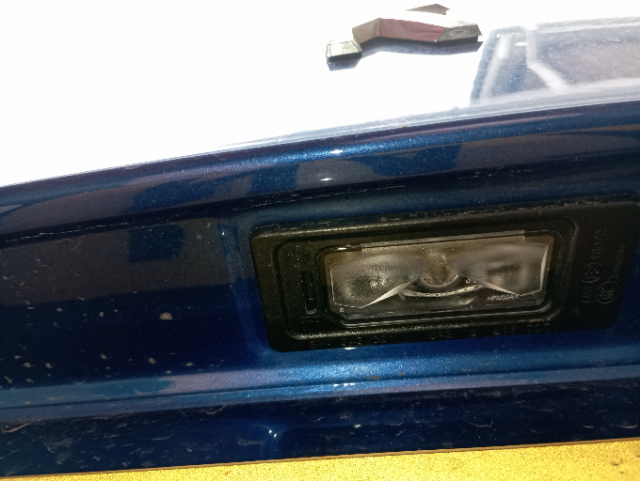
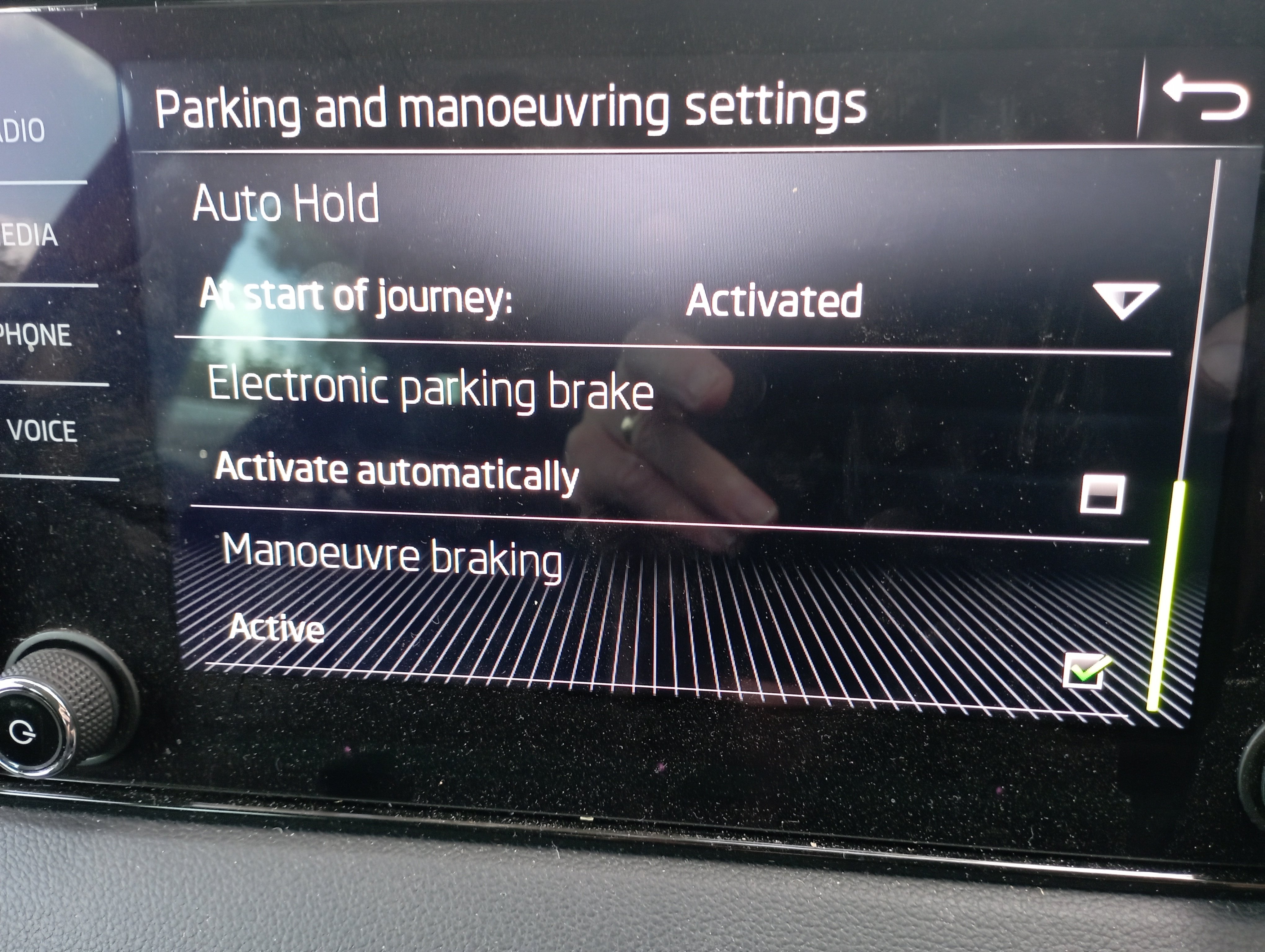
Thank you for the reply Auto hold is activated. But if I press to try and change it. I get the same message " this function is currently unavailable"automatic electronic parking brake. Parked the car as normal but left it in gear as I always do. Returned to the car pressed the clutch to take the car out of gear and start the car. Car started to roll forwards. Braked to stop the car. Then drove away. Next time I stopped I noticed that the automatic handbrake not working. Went into settings no tick in the box for automatic handbrake so tried to turn on the automatic handbrake but get the message “This function is currently unavailable” Any suggestions please Handbrake working correctly manually.Driving down to Spain. Are you aware that it is illegal to change a wheel on French motion. If you get a puncture on a French motorway (autoroute), do not attempt to change the tyre yourself on the hard shoulder, as it is extremely dangerous and illegal to do so. Instead, follow the official ASFA Safety Advice to pull over, evacuate safely behind the barrier, and call for authorized towing assistance via an orange SOS box or by dialing 112. Immediate Safety Steps Pull over safely: Move your car as far to the right onto the hard shoulder as possible and turn on your hazard warning lights. Gear up: Put on your high-visibility safety vest before stepping out of the vehicle (required by French law for all occupants). Evacuate the car: Have all passengers exit via the right-hand side (away from traffic) and climb over the safety barrier. Set up a warning triangle: Place the warning triangle about 30 to 100 meters behind the vehicle only if you can do so safely without exposing yourself to traffic. Calling for Help Use SOS phones: Walk behind the safety barrier to the nearest orange emergency SOS phone box (placed every 2 km). This automatically connects you to the motorway operating company's control center. Call 112: If using a mobile phone, dial 112 or use the SOS Autoroute app if downloaded beforehand. Official recovery only: Under French law, private or insurance-dispatched recovery trucks are not allowed onto the motorway hard shoulder. You must use the official towed rescue dispatched via the orange phones or 112, which operates on a fixed government-regulated tow fee. They will tow your vehicle to a nearby safe area (aire) or off the motorway exit, where you can then contact your insurance or a mobile service like Emergency Tyre France for a replacement. If you'd like, share: Your exact location or route number (e.g., AP-7 / A9 border area) Whether you have a usable spare tyre or tire seaI haven't tried them but they are always advertising. https://www.newcastle-car-keys.co.uk/I have managed to get the lights out by pushing a credit card underneath the end of the light. This pushed the clip inwards. I had watched a couple of videos which said push the light to one side to release them that didn't work for me. The car was in for service a couple of weeks ago. Yesterday I had the lights on for the first time since the service and the error message appeared, I wonder if when the did the service they have not coded correctly for the led number plate lightsA warning symbol has come up on my Karoq "check number plate lights ". Both bulbs are illuminated , I have tried clearing it with Carista but it is still there. I have tried to remove the bulb holders to check without suscess . I have tried pulling, sliding pushing a thin blade into the slot but I cant get them to move . How do you get the bulb holders out? (Full LED headlights with adaptive front light system and LED daytime running lights)
 I updated mine to 0330 with help from Rainesh try sending him a message to see if he can help you.

Important Information
Welcome to BRISKODA. Please note the following important links Terms of Use. We have a comprehensive Privacy Policy. We have placed cookies on your device to help make this website better. You can adjust your cookie settings, otherwise we'll assume you're okay to continue.