



Skip to content

vRS!

Featured Replies

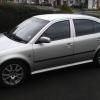
as you all know i have just purchased a fabia 1.4 16v as a runaround for college and work! I recently won a few races and pleased with the smooth running of a diesel on the track and the great response to the vrs on here i have decided to invest in one as an ocasional and fun car for track and weekens! (and whooping chavs!!)

1. What do i need to look for?

2.Is there anything that is worth err sporting up on it suspension prehaps ive herd a few bad bits about it!

3. im looking for the limited edition one in blue (just apealed to me) is this a good choice?

4. Is there one in the pipeline for the fabia 2 that mite come out soon?

Looking foreward to replie on this one!!

Edited by lex2311

Things to look out for. Wet/damp carpets, easily fixed, by resealing door carriers with sealant. Front suspension consul bushes at rear of wishbone can break up and cause poor handling (MOT fail) Can be replaced with solid type from SEAT Cupra.

Full service history to show it's been looked after, must use VW 505.01 oil, or PD cam lobes can wear quickly.

SE Models command a good price, can be hard to find.

As for mods, the skies the limit, but even as standard it's a decent warm hatch. Main area where it shines is mid range grunt between 30 to 70.

Things that fail if not looked after. Clutch and or Dual Mass Flywheel. Turbo, camshaft if wrong oil used.

I'm keeping tabs on the vRS SE's for sale as its my preffered upgrade to my current car , garage prices are ranging from £8995 to £10K at the moment.

  • Author

well its well within my budget so thats good!

Create an account or sign in to comment

Recently Browsing 0

  • No registered users viewing this page.

Important Information

Welcome to BRISKODA. Please note the following important links Terms of Use. We have a comprehensive Privacy Policy. We have placed cookies on your device to help make this website better. You can adjust your cookie settings, otherwise we'll assume you're okay to continue.

Account

Navigation

Configure browser push notifications

Chrome (Android)
  1. Tap the lock icon next to the address bar.
  2. Tap Permissions → Notifications.
  3. Adjust your preference.
Chrome (Desktop)
  1. Click the padlock icon in the address bar.
  2. Select Site settings.
  3. Find Notifications and adjust your preference.
