



Skip to content

Too Good To Be True

Featured Replies

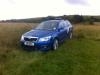
And what's wrong with the dirver's airbag - there's no Skoda badge in the middle either. Looks very wierd.

Someone's also removed the badges off the right side of the boot, and it looks like the gunk from it is still there. :dull: Very suspicious!

Anyone know what a October 2010 MOT certificate is?

Anyone know what a October 2010 MOT certificate is?

Probably one that runs out in October 2010 Chris - only a hunch :rofl:

And what's wrong with the dirver's airbag - there's no Skoda badge in the middle either. Looks very wierd.

And the problem is............? :giggle:

P1080194-1.jpg

And the problem is............? :giggle:

P1080194-1.jpg

DUB-wanabee! :p At least you have a badge of something :D

DUB-wanabee! :p At least you have a badge of something :D

And what will I be if I put a set of these on

bbs-calito.jpg

DUB-wanabee! :p At least you have a badge of something :D

Think he is making up for his wasted time as an adolescent youth :giggle:

And what will I be if I put a set of these on

bbs-calito.jpg

An AUDUB-wanabee I guess :giggle:

Description says its a Cat D [insurance write off] :wonder:

Fuel Warning Light is on too :p

I'm not so sure about the unbranded airbag thing I have to be honest.

Previous owner a doctor... hmmm yes just a touch odd that advert.

If it is a CAT D, I guess it was front end damage that caused the airbag to go off, due to the oddities such as missing badges being at the front .

  • Author

did a quick check and car was cat d loss date 22-05-2009

repair costs do not exceed pre-accident value

still too cheap for me

Create an account or sign in to comment

Recently Browsing 0

  • No registered users viewing this page.

Important Information

Welcome to BRISKODA. Please note the following important links Terms of Use. We have a comprehensive Privacy Policy. We have placed cookies on your device to help make this website better. You can adjust your cookie settings, otherwise we'll assume you're okay to continue.

Account

Navigation

Configure browser push notifications

Chrome (Android)
  1. Tap the lock icon next to the address bar.
  2. Tap Permissions → Notifications.
  3. Adjust your preference.
Chrome (Desktop)
  1. Click the padlock icon in the address bar.
  2. Select Site settings.
  3. Find Notifications and adjust your preference.
