



Skip to content

Pulled By The Rozzers!
Featured Replies

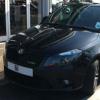
Got pulled by Mr Traffic Policeman today, this is how it went. I'm in a Fabia Mk2 vRS and had a hoody on due to the driving rain just before I got into the car so might not looked exactly kosha! He's parked further up on a straight road.

I trundle past in traffic doing about 25mph.

He pulls out behind me and starts flashing his headlights.

I pull over of course.

He stops behind me, gets out and walks up to my window.

I say hello

He says he stopped me because I had my fog lights on.

I reply that this car doesn't have front fog lights?

He stands up, walks to the front of the car and has a look

The engine is still running at this point so my lights are as they were

Oh FFS I've done it again! It's these f***ing DRL's.

Ok, have a good day, carry on.

I drive off as he sits in his car, quietly p***ing myself.

:giggle: :giggle: :giggle: :giggle: :giggle: :giggle: :giggle: :giggle:

brilliant !

Love it!

Also nice that there are some police that are bothered by people using their fogs when not needed.

Glad he had a sense of humour too.

Phil

Oh that is good, at least he admitted his "error" !

Youd think there was no crime in this country if theyv got the time to pull folk over for having "fog lights" on :giggle:

Saying that i have had the same mondeo driver flash his lights at me for the drls (i think thats why) for 4days in a row now and its getting quite anoyying

Sounds like a decent copper, same thing happened to my mate but he wouldn't believe him/admit he was wrong and took his details, said he would check at the station. Lol

Pity PC Plod wasnt doing his shift on the M1 today. The rain was shocking it was as Black as night and people were driving with no lights or the total opposite everything illuminated. No wonder there are accidents.

Just point out the correct 'E' marking on the lens if things get difficult. Obviously, don't be a smartass, they do look like foglights initially.

Create an account or sign in to comment

Recently Browsing 0

  • No registered users viewing this page.

Important Information

Welcome to BRISKODA. Please note the following important links Terms of Use. We have a comprehensive Privacy Policy. We have placed cookies on your device to help make this website better. You can adjust your cookie settings, otherwise we'll assume you're okay to continue.

Account

Navigation

Configure browser push notifications

Chrome (Android)
  1. Tap the lock icon next to the address bar.
  2. Tap Permissions → Notifications.
  3. Adjust your preference.
Chrome (Desktop)
  1. Click the padlock icon in the address bar.
  2. Select Site settings.
  3. Find Notifications and adjust your preference.
