



Skip to content

My new Fabia vRS + Bluetooth preparation
Featured Replies

Hello all,

Long time lurker and occasional poster here..

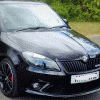
Yesterday I picked up my new vRS in black with the black pack and black alloys. I love it so far, the DSG gearbox is amazing.

Vindis Skoda in Cambridge gave an excellent service throughout the whole buying process. I would definatly reccommend them.

As it was a car that someone had specced and ordered, then cancelled it cam with the bluetooth kit. I've managed to link my phone in ok, however the menu navigation using the phone button, A/B and reset button just doesn't seem to make any sense.

When the car picks up my phone, the maxidot goes to the phone screen. Sometimes you can navigate the menu using A/B to go up and down and then push down on the phone volume wheel to select an option. Other times it won't do anything, such as trying to select 'Back' to go to the main maxidot screen. The handbook says you can also use the reset button to go back, but this only returns to the previous phone menu item. I then just end up stuck on the phone menu screen.

Am I doing someting wrong here?

Please help!

Quick photo I took in the rain last night:

post-49079-0-11155000-1335601015_thumb.jpg

Edited by Gumby

Hi

Press & Hold the top part of the rocker switch in on the right hand stalk this gets you back.

I like the black. Looks stealth.

  • Author

Thanks, got it working now!

Very nice, just one thing though........make it low!!!

  • Author

Very nice, just one thing though........make it low!!!

Thanks...Yep, its on the list :rock:

Edited by Gumby

Create an account or sign in to comment

Recently Browsing 0

  • No registered users viewing this page.

Important Information

Welcome to BRISKODA. Please note the following important links Terms of Use. We have a comprehensive Privacy Policy. We have placed cookies on your device to help make this website better. You can adjust your cookie settings, otherwise we'll assume you're okay to continue.

Account

Navigation

Configure browser push notifications

Chrome (Android)
  1. Tap the lock icon next to the address bar.
  2. Tap Permissions → Notifications.
  3. Adjust your preference.
Chrome (Desktop)
  1. Click the padlock icon in the address bar.
  2. Select Site settings.
  3. Find Notifications and adjust your preference.
