



Skip to content

VRS newbie and a quick question
Featured Replies

Hi guys ...

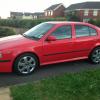
Just picked up myself a lovely Mk1 Octavia VRS.

Its been meticulously looked after by one owner from new.

Anyway, he finally parted with it, and after two extensive test drives i parted with the reddies and its now mine.

Drove lovely on the way home. However, the engine management light has come on.

Firstly, it has not altered how the car is driving :-)

I have googled it, and it seems generally speaking its a minor sensor type fault?

Any clues would be appreciated.

No obvious faults on terms of how its performing.

Should it be okay to drive?

Thanks in advance

Hi and welcome aboard.

If you ask on the Octavia section, someone there will help.

  • Author

Hi guys - thought i would introduce myself properly

Anywho - got the engine management sorted. It was a dodgy thermostat.

What a b1tch of a job that is !

Anyhow, while doing this we found the radiator thermo swtich to be faulty - so that's been done now.

All is well with the world.

Got rid of two crappy front tyres and the car is truly licking the sticky edge of the performance envelope!

The car is a 2002 52 plate VRS in red. Stunning overall condition with a ridiculously OCD maintenance record!

The car is completely blemish free apart from two alloys which need to be refurbed desperately!

So - the car is going along just tickitiboo at the mo and loving my first skoda experience.

I am what you would call a Ford fan generally speaking - and I am a member of numerous forums that way on with one or two of them being excellent.

Have to say - this site and forum is just as good and an excellent resource - so congrats to all conerned.

Edited by czechitout

Create an account or sign in to comment

Recently Browsing 0

  • No registered users viewing this page.

Important Information

Welcome to BRISKODA. Please note the following important links Terms of Use. We have a comprehensive Privacy Policy. We have placed cookies on your device to help make this website better. You can adjust your cookie settings, otherwise we'll assume you're okay to continue.

Account

Navigation

Configure browser push notifications

Chrome (Android)
  1. Tap the lock icon next to the address bar.
  2. Tap Permissions → Notifications.
  3. Adjust your preference.
Chrome (Desktop)
  1. Click the padlock icon in the address bar.
  2. Select Site settings.
  3. Find Notifications and adjust your preference.
