



Skip to content

newbie saying hi

Featured Replies

Hi

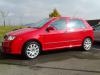
Stuart here from sunny Bradford :-( i've just bought a Fabia vrs 2004 looking forward to picking it up end of week a nice 6 hours on a bloody coach from Bradford to Whitehaven in Cumbria

vrs_zpsd7e213d7.jpg

Hi and welcome aboard.

Just think of the fun driving the new car back.

  • Author

Hi and welcome aboard.

Just think of the fun driving the new car back.

cheers,yeh some cracking roads coming back should be fun

Hi and welcome. Congrats on your purchase.

Plenty of us in halifax with fabia vrs's too.

  • Author

Hi and welcome. Congrats on your purchase.

Plenty of us in halifax with fabia vrs's too.

cool i'm Cleckheaton side of Bradford just down the road from Fax :-)

Aye not far. Plenty of us in West Yorkshire that's for sure.

Have you organised a day to collect?

  • Author

Aye not far. Plenty of us in West Yorkshire that's for sure.

Have you organised a day to collect?

yeh mate next wednesday

Cool. Not far off now. What did you have before?

  • Author

just a ****ty little Fiesta,i'm into my motorbikes too but just fancy a car with a bit of poke :-)

Got ya. I must admit I miss my bike but mrs isnt keen on the idea of me getting another.

  • Author

2 more sleeps till i pick up my new toy

One more now mate.

  • Author

well that was a long day but i am now officially a vrs owner,bloody hell its quite nippy :rofl:

Edited by stu1250

Congrats mate

Create an account or sign in to comment

Recently Browsing 0

  • No registered users viewing this page.

Important Information

Welcome to BRISKODA. Please note the following important links Terms of Use. We have a comprehensive Privacy Policy. We have placed cookies on your device to help make this website better. You can adjust your cookie settings, otherwise we'll assume you're okay to continue.

Account

Navigation

Configure browser push notifications

Chrome (Android)
  1. Tap the lock icon next to the address bar.
  2. Tap Permissions → Notifications.
  3. Adjust your preference.
Chrome (Desktop)
  1. Click the padlock icon in the address bar.
  2. Select Site settings.
  3. Find Notifications and adjust your preference.
