



Skip to content

Not a skoda! But clean :)
Featured Replies

null-1.jpg

null-3.jpg

null-2.jpg

null.jpg

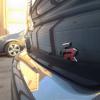
Photos don't do it any justice, she is really clean and I gave her the first coat of wax since ownership 8months ago.

I did:

2 bucket wash & dry

Clayed with megs clay

Wash & dried again

Poorboys black hole

Megs carnauba wax

windows cleaned

Poorboys trim restorer

Poorboys wheel sealant

Hoover inside & AG hi foam on affected areas

also debadged the rear 'I B I Z A' while I was there and I think it looks so much better.

Eric

Looks excellent.What a shine:)

It does look better without Ibiza on the rear.Much fresher look.

Well done :)

Looks great

Did you not fancy polishing it after the claying?

  • Author

thanks for the comments. I did want to polish but run out of AG SRP so thought it would be ok to go straight to the PB black hole.

Just as I do this, some mug must've hit my bumper earlier in the day because I've noticed some flakey paint in the corner now. Brilliant, more money needed.

I was meaning a polish with abrasive content to remove swirls and light scratches rather than to fill them

I was meaning a polish with abrasive content to remove swirls and light scratches rather than to fill them

  • Author

maybe next time, never used a machine polish myself so don't really want to do It myself.

It can be done by hand very effectively and some body near you with experience will help out Im sure

Create an account or sign in to comment

Recently Browsing 0

  • No registered users viewing this page.

Important Information

Welcome to BRISKODA. Please note the following important links Terms of Use. We have a comprehensive Privacy Policy. We have placed cookies on your device to help make this website better. You can adjust your cookie settings, otherwise we'll assume you're okay to continue.

Account

Navigation

Configure browser push notifications

Chrome (Android)
  1. Tap the lock icon next to the address bar.
  2. Tap Permissions → Notifications.
  3. Adjust your preference.
Chrome (Desktop)
  1. Click the padlock icon in the address bar.
  2. Select Site settings.
  3. Find Notifications and adjust your preference.
