



Skip to content

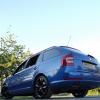
My 2008 Octavia VRS Wagon, CLEAN!
Featured Replies

Cleaned the wagon up today, was in need of it badly. Just about to hit 100k.

Heres some pics.

DSCF3386_zps13b45d2f.jpg

DSCF3387_zpsb4a57aaf.jpg

DSCF3393_zps70a4ac8c.jpg

DSCF3391_zpse86dd9f0.jpg

DSCF3392_zps349a7d1f.jpg

DSCF3394_zps86824e5b.jpg

DSCF3398_zps81a315e4.jpg

DSCF3406_zpsa84c46ff.jpg

DSCF3407_zpsff06ad51.jpg

DSCF3408_zpsdfde3729.jpg

DSCF3409_zpsb4c1eb96.jpg

DSCF3410_zpsc2683784.jpg

DSCF3411_zpsc659d096.jpg

DSCF3389_zps933153ad.jpg

DSCF3390_zps09b1cc2a.jpg

Minty mint :)

Mint, come and clean mine if you're bored. Its race blue so you can just pretend its yours.

Crying out for a black or coded grille. Not really a fan of Neptunes but thats the only car I've seen with them on that looks good!

  • Author

Next on the list buddy!

Very nice.Those Neptunes suit the Race Blue.Not a fan of Black wheels but they look great:)

  • Author

Thanks for the comments, it's now coverd in a thick layer of dust after our trip to wookey hole today :(

Create an account or sign in to comment

Recently Browsing 0

  • No registered users viewing this page.

Important Information

Welcome to BRISKODA. Please note the following important links Terms of Use. We have a comprehensive Privacy Policy. We have placed cookies on your device to help make this website better. You can adjust your cookie settings, otherwise we'll assume you're okay to continue.

Account

Navigation

Configure browser push notifications

Chrome (Android)
  1. Tap the lock icon next to the address bar.
  2. Tap Permissions → Notifications.
  3. Adjust your preference.
Chrome (Desktop)
  1. Click the padlock icon in the address bar.
  2. Select Site settings.
  3. Find Notifications and adjust your preference.
