



Skip to content

anyone got a custom vrs badge?
Featured Replies

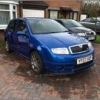
Changed the middle logo on mine today with a pastyboy badge, i like the standard fabia vrs badge but not a fan of the green bit, does anyone sell one with black or anyone painted it black etc?


9hn.JPG

Lots of people have painted them a few different colours. I was just going to put vinyl in mine and cut to shape.

The mk3 vRS badge has got a black v with a hint of red and green next to it. :thumbup:

I like the MK3 VRS badge but they are costly, and when you'd need to buy 2!

I personally think a mk1 badge should be on a mk1 and mk2 on mk2 etc....sorry guys just my opinion dont hate me.

I just put black insulation (electrical tape) over the V and trimmed it with a Stanley, looks just as good as painted and It is reversible. I also have a pastyboy badge similar to yours.

Also agree the mk1 badge should be on a mk1!

  • Author

Electrical tape, I can try that!

Thanks for the suggestions

20131006_150713_zps0892631a.jpg

My prototype. White Hammerite and black leccy tape. Would like to do it with plastidip ideally but I'm pleased with it atm. Rear is standard with the black tape.

Did you sort your armrest in the end?

  • Author

Yeah mate, posted pics and mentiond you in my project thread, cheers :)

Yeah mate, posted pics and mentiond you in my project thread, cheers :)

Ahh gd gd ;-) Mrs didn't chop it to bits then lol

Create an account or sign in to comment

Recently Browsing 0

  • No registered users viewing this page.

Important Information

Welcome to BRISKODA. Please note the following important links Terms of Use. We have a comprehensive Privacy Policy. We have placed cookies on your device to help make this website better. You can adjust your cookie settings, otherwise we'll assume you're okay to continue.

Account

Navigation

Configure browser push notifications

Chrome (Android)
  1. Tap the lock icon next to the address bar.
  2. Tap Permissions → Notifications.
  3. Adjust your preference.
Chrome (Desktop)
  1. Click the padlock icon in the address bar.
  2. Select Site settings.
  3. Find Notifications and adjust your preference.
