



Skip to content

Photo challenge

Featured Replies

Love this idea! I'm really into my photography - hopefully the idea will catch on and I'll be able to play in a few months when mine comes!


Assuming it does catch on, save people reading back to see all the previous ideas, suggest adding to the rules, each new challenge has all previous challengers, their challenge and the winner listed...

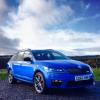
IM in when I get my car lol

I guess it doesn't have to be your own car - if you can find an Octy 3 and a fire engine you can enter!

Love the idea. Can I get extra points if the engine has its siren sounding? I promise to tell the truth...

  are fire engines painted 'corrida red'?  one way to find out  :rofl:

Not a Mk3...would I get half points??


34982

post-108567-0-77156600-1392478939_thumb.jpg

Any excuse to test their lights still work ;)

Good pic though, I'd be ashamed to get a pic of our motors!

  • Author

attachicon.gif image.jpg

Brilliant photo, set the next challenge.

This year being 100 yrs since the start of the Great War, the next photo should be a mk 3 Octavia showing its respect next to a Great War Memorial, in Uk or Abroad. God bless them all.

Is everyone playing both photo games? X

If mine ever turns up ill take a pic when I go to The war grave in Belgium in July )

  • Administrators

Great minds do think alike. As Richard has pointed out, there is a well established thread.


Some of the top 'players' need a bit of competition.


Lets get in the Sochi mindset and play on that thread...  


/I've locked this thread just to channel energy into current threads.

Guest
This topic is now closed to further replies.

Recently Browsing 0

  • No registered users viewing this page.

Important Information

Welcome to BRISKODA. Please note the following important links Terms of Use. We have a comprehensive Privacy Policy. We have placed cookies on your device to help make this website better. You can adjust your cookie settings, otherwise we'll assume you're okay to continue.

Account

Navigation

Configure browser push notifications

Chrome (Android)
  1. Tap the lock icon next to the address bar.
  2. Tap Permissions → Notifications.
  3. Adjust your preference.
Chrome (Desktop)
  1. Click the padlock icon in the address bar.
  2. Select Site settings.
  3. Find Notifications and adjust your preference.
