



Skip to content

new north west member
Featured Replies

Hi everyone, my name is Sim

im from a little place called upholland near skelmersdale

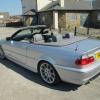
Currently drive a bmw 325ci e46 vert sport which i love to bits buts costs a fortune.

so i have recently put a deposit down on a 57' octy vrs tdi.

will mainly be staying standard, would like some oem looking drls and probably a few wheel/suspension changes.

first thing is a full terraclean, proper service and put my plate on.

hello for now anyway!

post-115036-0-55981500-1394840450_thumb.jpeg

Welcome to briskoda.I did have a skoda fabia vrs until December last year and I was looking for a Octavia vrs estate but because I'm quite picky when looking for a car there was none out there,so jumped over to Seat.You can't go wrong with briskoda with regards to advice and tips,good bunch of people on here..

  • Author

Welcome to briskoda.I did have a skoda fabia vrs until December last year and I was looking for a Octavia vrs estate but because I'm quite picky when looking for a car there was none out there,so jumped over to Seat.You can't go wrong with briskoda with regards to advice and tips,good bunch of people on here..

yea there doesnt seem to be very many at any given time.

i was looking at golf gttdis and seen the octy next door, took it out and love it!

Hello there stranger ;) I've found loads of useful tips already on here seems a good site and quite busy.

Hello and Welcome!  :thumbup:

Create an account or sign in to comment

Recently Browsing 0

  • No registered users viewing this page.

Important Information

Welcome to BRISKODA. Please note the following important links Terms of Use. We have a comprehensive Privacy Policy. We have placed cookies on your device to help make this website better. You can adjust your cookie settings, otherwise we'll assume you're okay to continue.

Account

Navigation

Configure browser push notifications

Chrome (Android)
  1. Tap the lock icon next to the address bar.
  2. Tap Permissions → Notifications.
  3. Adjust your preference.
Chrome (Desktop)
  1. Click the padlock icon in the address bar.
  2. Select Site settings.
  3. Find Notifications and adjust your preference.
