



Skip to content

Overloaded Vrs

Featured Replies

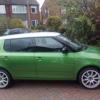
Well we thought we would give it a go 5 adults with bags for a trip down to heathrow airport in the already lowered (40mm) vrs .We all fitted in fine with 5 bags and hand luggage but rear clearence was 10 to 20 mm from tyre to wing so step in dads fabia 1.2 57 reg and swap everything over rear clearence now 40 to 50 mm not the quickest compared to the vrs but 60 or 70 bhp compared to about 210 bound to be but no problems and cruising fine on motorway just shows how a versatile little car it is and a warning to those who have lowered theirs but it does improve handling though. Sent from Goa

If the load was within maximum load capacity for the car I'd not worry about clearances really. I once loaded 950kg of stuff into VW Sharan (the old, large version) and traveled 1000miles, there was no clearance between the wheel arch and the tyre and all was fine:).

All you have to do is to avoid potholes (like you'd normally do) and do not try and mount kerbs at speed ;)

my estate has higher load, and "only" 15mm lower springs, so can still do its job ;) (20mm at front) ...


I dont think I will be going any lower... just some bilstien shocks when I can!

  • Author

Yes we did set off but after half a mile as the arches were scraping at every pot hole and undulation in the road not sure what the max load is but 5 largish adults with luggage must be up there . Did not fancy the chances on the motorway .

Create an account or sign in to comment

Recently Browsing 0

  • No registered users viewing this page.

Important Information

Welcome to BRISKODA. Please note the following important links Terms of Use. We have a comprehensive Privacy Policy. We have placed cookies on your device to help make this website better. You can adjust your cookie settings, otherwise we'll assume you're okay to continue.

Account

Navigation

Configure browser push notifications

Chrome (Android)
  1. Tap the lock icon next to the address bar.
  2. Tap Permissions → Notifications.
  3. Adjust your preference.
Chrome (Desktop)
  1. Click the padlock icon in the address bar.
  2. Select Site settings.
  3. Find Notifications and adjust your preference.
