




1150
Finding my way
-
Joined
-
Last visited
Everything posted by 1150
-
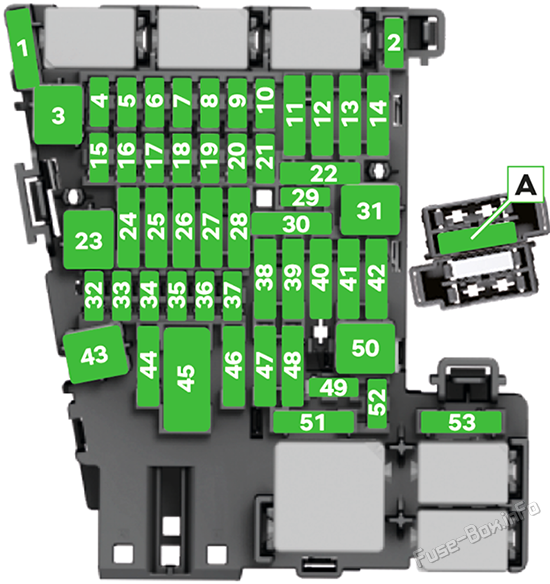
Hello Move fuse "40" one notch lower then the ignition switch will control the power plugs
-
OTTOCASTOttoAibox P3 Pro CarPlay AI BoxPowered by the new Snapdragon 6225 chip 8GB RAM and 128GB ROM running Android 13 + OttoDrive 3.0. Delivers fast startup and smooth multitasking for all apps.
-
-
Remove favorites Tap the favorite function surface and drag your finger to the left. Tap . Renaming favorites Tap the favorite function surface and drag your finger to the left. Tap .The switch is broken, I had the same problem in a similar model.Hey everyone and thanks this topic. Is it possible to code or adapt the auxiliary heater to work when the car is running Superb III Style iV 05/2020 (plugin hybrid) best regasds. SepeHello everyone, I have a Superb III 2.0 D L&K 2020, the problem is that the settings of the heating device are not remembered. Every time I start the car, the heating device is in the "auto" position, even though I have selected the air direction down and in the middle before turning the car off. If I select directions and fan speed, they remain in memory after switching off "manual setting". The only fault code comes from the air quality sensor All car "users" have the same problem. Could someone advise how to fix this? t. sepe
Important Information
Welcome to BRISKODA. Please note the following important links Terms of Use. We have a comprehensive Privacy Policy. We have placed cookies on your device to help make this website better. You can adjust your cookie settings, otherwise we'll assume you're okay to continue.