Bexhillian
Members
-
Joined
-
Last visited
-
https://www.briskoda.net/forums/topic/332801-amundsen-sat-nav-total-failure/. does this help at all? (from elsewhere on Briskoda) Also, in your Navigation menu do you have a function key in the form of a small rectangular oblong screen with something like an eye superimposed over its lower left corner? Pressing that function key seems to open the door to the extra window split screen. Sorry that I'm having to do this from my own download but the original car and manual have moved on and copy/paste disables all the manual's icons and other characters
-
-
-
GPS satellite signal The unit uses the GPS (Global Positioning System) satellite signal for route guidance. Outside the range of the GPS satellite signal (e.g. in dense vegetation, in tun- nels, parking garages, etc.), the unit navigates only with restrictions using some on-vehicle sensors (such as speed sensor or steering angle sensor). The unit offers the possibility to show in the split screen display the following Position » Fig. 32 on page 48 information about the current geographical po- sition of the vehicle and the satellite signal. Geographical longitude Geographical latitude elevation Number of received/available satellites To view the information on the longitude and latitude of the current vehicle position display requires the reception of GPS signals from at least three satel- lites. To view the elevation information of the current vehicle position display re- quires the reception of GPS signals from at least five satellites. Navigation data Navigation data source The navigation data is stored on an Original SD Card . In order to ensure the function of the navigation, the Original SD card, with the navigation data, must be inserted in the respective slot » page 25. If the original SD card should be damaged or lost, a new original SD card can be purchased from the ŠKODA Original Accessories. With a Non-original SD Card, the navigation does not work. Finding out the version of the navigation data ›Press in the Navigation menu the function key → Version information. Update navigation data We recommend that you update the navigation data on a regular basis (e.g. Due to newly developed roads and changed traffic signs etc.). The information on updating the navigation data is to be obtained from a ŠKODA partner or on the following ŠKODA Internet pages. http://infotainment.skoda-auto.com Main menu Fig. 31 Navigation: Home menu ›Press the button. The Navigation main menu opens » Fig. 31. If no map is displayed, then press the button again. Description of the function keys A Entering a new destination, ending the route guidance, route information, entering a traffic obstruction Storing of a destination flag, list of stored destinations, home address Tour input / tour edit, tour memory POI input / POI search Map presentation options Navigation (Amundsen) 47 Operation of the radio / media playback Navigation settings Pop-up windows Fig. 32 Extra window Switch display on/off ›Press in the Navigation menu the function key → Split screen. The split screen can also be switched off by operating the function key. Select extra window content The display of some additional information is possible in the split screen A » Fig. 32. ›Press the function key . ›Select one of the following split screen menus. ■ Audio - Operation of the radio / media playback ■ Compass - Displays the current vehicle location in relation to the compass di- rections ■ Routes - Display of three most commonly travelled routes for the current time and geographical position ■ Manoeuvre - Graphic display of driving recommendations (there is a route guidance) ■ Position - Displays the geographical coordinates of the current vehicle loca- tion 48 Navigation New destination Does this help? Unfortunately the resultant copy / paste does not exactly reproduce the manual and won't allow copying of Figs 31 & 32 but I trust you will get the idea.
-
"Where on the sat nav menu does it give a report on how many sats its receiving, I've missed that if it does" I sold my 2016 L&K last November and bought a new Volvo XC40 BUT I kept downloads of the Yeti Main and the Amundsen2 Infotainment Manual (for nostalgia's sake). Pages 47 & 48 of the Infotainment Manual have reference to Number of received / available satellites information. I'll cut and paste stuff to here if you don't have a manual yourself. Just ask.
-
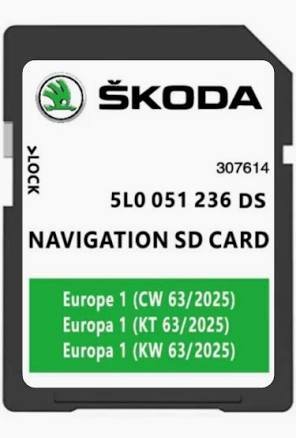
SatNavWorld are offering OEM SKODA SD Card 2025 for MIB2 Amundsen SatNav 5LO 051 236 DS at £48.99 with free shipping (Dealer £150.99). Comprehensive UK and all Europe coverage. I bought from them in September last year, just before deciding to sell my Yeti. Next day delivery, worked straight out of the (little) box. (Just too lazy to do the usual back-up, download, format, unzip, copy etc)
-
I bought an XC40 in November after 'doing the rounds' with likely candidates. (XC40 B4 Ultra). Quiet, comfortable, well spec'd. Yes, it was over £40k but agreed a competition beating trade on my Yeti. The Volvo clincher was their promotion at the time which was 50% deposit (covered by the trade and some spare cash) with the balance over three years at ZERO% interest. (Audi et al take note!) If you have set a £40k limit, why not try a dealer warranted pre-owned one and see what you think?
-
One of the best colours. There's one near me I see frequently, always pristine. Christmas & New Year greetings
-
I came within a final signature of buying a new Karoq Sportline (keeping the faith) but hesitated and went along the road and sat in the Volvo. Much more comfortable and suited to a pair of 75 year olds, who themselves are built more for comfort than for speed. I did look at a T-Roc, a Tiguan and a Q3. Might have been a coin toss between the Audi and the Volvo, if the same spec'd Audi was not silly money.
-
After 58k miles from new (and with no sunroof leaks) we are changing our Yeti. Still polishes up like new and 52+ mpg cumulative on the spreadsheet. Super car, travelled all over the continent, no short journeys - we use our Fiat 500 for those. Sorry to say goodbye but 8+ years old...... About to take delivery of a new Volvo XC40 Mild Hybrid B4 Ultimate. Will keep reading here daily and will post opinions as we start putting on the miles. Kind regards to all.
-
Genuine OEM Whole Europe. As shown on Skoda update portal. £44.99 from SATNAVWORLD Not Chinese or eBay copy. An easier way than my usual download, unzip, format........... I emailed SATNAVWORLD yesterday morning to double check compatibility. Response almost immediate. Ordered. Delivered by postman this morning. Works perfectly.
-
So it ceased to work in 2019. Maybe it doesn't really bother you that much? As your radio also has not worked either, think 'back to source'. Undo the aerial and check for rust/water which might be the cause of no signal getting to the head unit. (or you could buy SWMBO a new car....think how many points you would score)
-
So, two SD memory cards, Amundsen2. Left Free Choice SD Card for Music & Images, Right Official Skoda Navigation SD Card (ref nos. like CW 45/2015 or CW 48/2019) Presumably you have had them working at some stage? Could the cards have been removed and inadvertently switched around ?
-
Amundsen2 Owners Manual Page 47 The unit uses the GPS (Global Positioning System) satellite signal for route guidance. Outside the range of the GPS satellite signal (e.g. in dense vegetation, in tun- nels, parking garages, etc.), the unit navigates only with restrictions using some on-vehicle sensors (such as speed sensor or steering angle sensor). The unit offers the possibility to show in the split screen display the following Position » Fig. 32 on page 48 information about the current geographical po- sition of the vehicle and the satellite signal. Geographical longitude Geographical latitude elevation Number of received/available satellites To view the information on the longitude and latitude of the current vehicle position display requires the reception of GPS signals from at least three satel- lites. To view the elevation information of the current vehicle position display re- quires the reception of GPS signals from at least five satellites. (sorry, text has shrunk) The four boxes above are actually icons in the manual GLong is a solid globe GLat is a striped globe e is a mountain profile N is a satellite dish Press in the Navigation menu the function key → Split screen. the icon shown in the manual is like a map with an eye in the lower left corner The split screen can also be switched off by operating the function key. the icon shown is an X
-
re windscreen My L&K had the cracked, heated windscreen replaced (Autoglass). It has original Pilkington glass in doors and tailgate and original VAG Automotive glass in both rear quarters. I cannot remember whether the original screen manufacturer was P or VAG but now it has a FUYAO. I remember querying the replacement with the fitter (thinking I was being subbed a cheaper replacement) but he reassured me that it was a better suited replacement for the original. Whether or not..........it doesn't leak but then neither did the original. However, a fingertip test around the black/clear border suggests 'embedded'. Certainly not surface mounted top of the screen shading as WAYNE TRACY back in the day.