TerryMcK
Members
-
Joined
-
Last visited
Everything posted by TerryMcK
-
I had this and if you search within the forum you will find my entry for it. Essentially the batteries had reduced in charge on all Kessy keyfobs and the system got confused as to which key was in use so set a flag within the controller which stopped the seats and mirrors moving. The dealer, after a lot of head scratching, worked this out. Take all three key fobs with you, get them to replace the batteries and then the dealer should be able to reset whatever flag was unset. This will bring the seat/mirror module back into use. I did find afterwards that the foot operated boot closing override has disappeared from the menu and may or may not be related. I never used that override so not too bothered. Of course the dealer may find it is something else but that is my experience.
-
I had this issue over 12months ago. I got the dealer look at it before the warranty expired. Just for reference my car has Kessy and three key fobs. The batteries hadn't been changed from new and were running low - there was an indication on the computer. This is what I was told by the dealer who interpreted the error codes: "At one point the car couldn't work out which key was in the car as the fob battery power was low and therefore didn't know which driver profile to apply. So it disabled the seat memories and the mirror settings." I personally don't know what the codes were and frankly don't care.The main thing was giving the car to the dealer with all three keys, they installed fresh batteries and then did some jiggery pokery with a programmer and all was good again. They had three technicians on it as even they had not seen it before. It cost me the price of three batteries to get it fixed. So I will now replace the key batteries every 18 months.
-
I had a reason to use the removable torch in mine the other day. I hadn't used it at all from day one of having the car but glad it was there. Surprised they removed it from yours as it must add pennies to the overall price of manufacture.
-
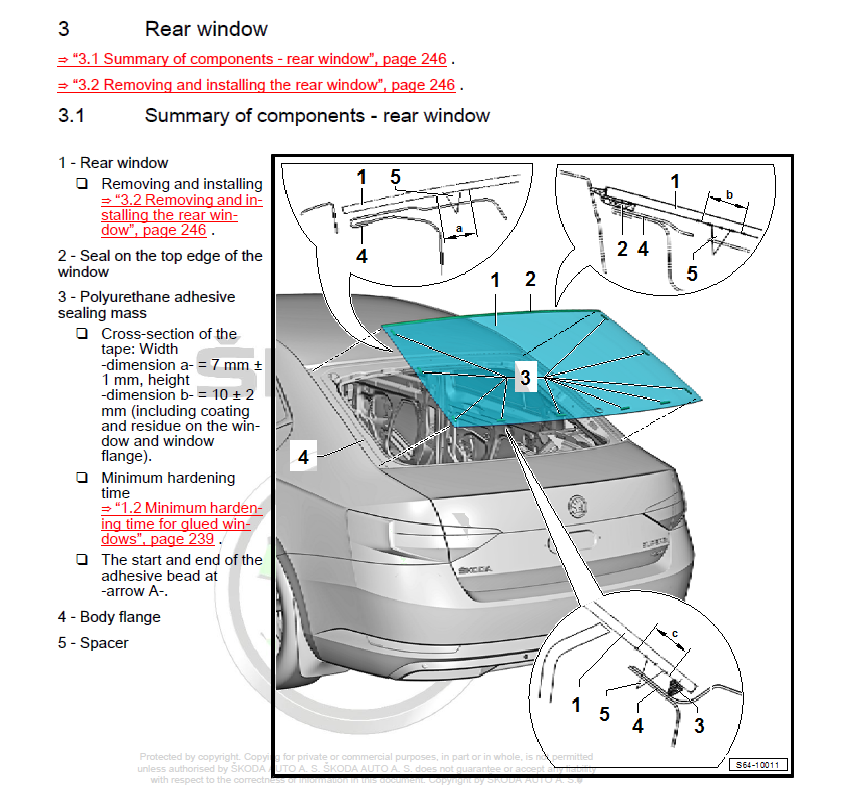
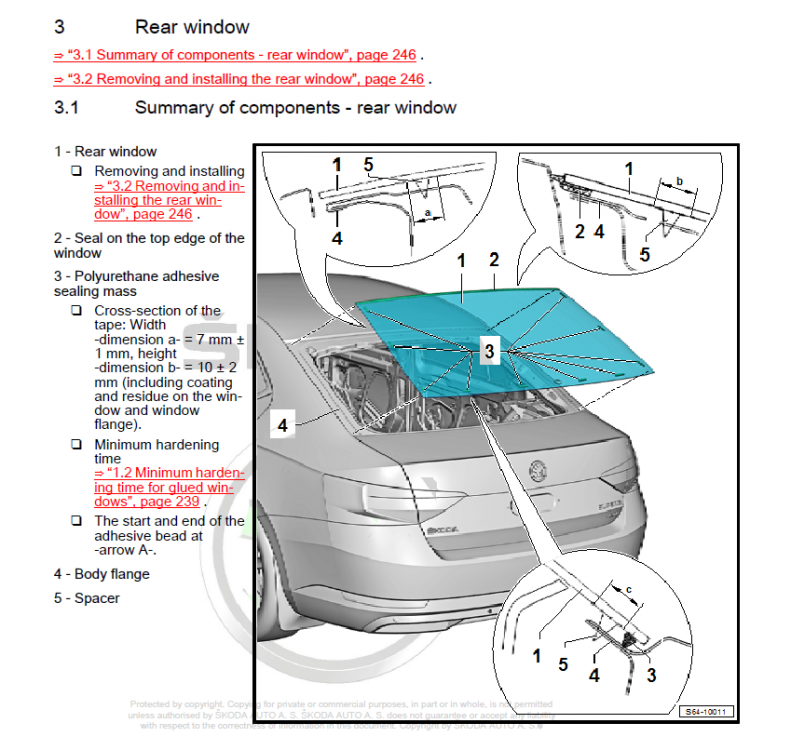
There is a rubber seal (Item 2 on the diagram below) on the top edge of the glass in the rear window on the tailgate (Saloon model). On mine it has damage amounting to a couple of nicks in the rubber. I believe they had been there since I took delivery of the car but didn't notice. There is no damage to the bodywork so it isn't as if something has been trapped. I took it into my local Skoda dealer and they are keeping it in for a few days to get approval from Skoda to repair it under warranty. Essentially the rubber seal, so they are telling me, is an integral part of the glass and therefore the whole rear screen needs replacing. They've told me "If Skoda are not willing to repair this I shall have to pay myself". They car is still under warranty just 2 years old and only 4900 miles (yes a very low mileage I know but I don't get out much 😃 ). Not like ye olden dayes when you could replace a rubber seal on its own! I wonder if the rubber needs coding like everything else VAG 🤣 There isn't any water leak into the interior as the seal seems to just prevent water from falling directly in the water channel/gutter at the top edge of the door frame. However if you look at your own you will see gaps where the seal ends at the LH and RH sides (about 2" long) where rain water actually goes. Let's see what the outcome is over the next few days. I'll keep you posted.
-
My L&K has 19" factory fit rims with the crappy P7s fitted. As the bad weather is coming soon what do the forum users recommend for rims (I'm fine on using 17" for winter BTW) and suitable winter tyres to get me through the winter safely? I'm in the UK.
-
 Superb III manual in English