
TigerTony
Finding my way
-
Joined
-
Last visited
-
Its not the cable or the rear dashcam that causes problems. Its the nasty little cheap Chinese 12v-5v dc "Buck" convertors sold on ebay and Amazon that create electrical noise on the 12v vehicle supply. These "Buck" convertors switch or chop the 12v signal down to 5v at very high frequencies. I've monitored some of these little convertors with an oscilloscope and the electrical noise they make is criminal ! These things are normally ok with just one front camera attached, its when you add the second camera they become overworked and create many more harmonic frequency's which can interfere with some radio signals and god knows what else of the Enyaqs control systems. Easy answer is to fit a higher quality (higher power) "Buck" convertor (££) - usually the ones recommended and sold by the camera supplier are ok (or should be !). My solution was to build and fit (I'm an electronics engineer) a simple 12v to 5v LINEAR power supply which creates no electrical noise whatsover. I've used this type for a while now in my Enyaq with no issues at all. My latest install is the VIOFO Pro duo HD 4k, which is one of the best front and rear camera setup. Rear camera lead is simply fed along headlining (away from airbags) and through the rear grommets into the tailgate. Its one of the easiest install I've done.
-
TigerTony changed their profile photo
-
They're probably the puddle lamp logo projectors. Check at night time when you open the door
-
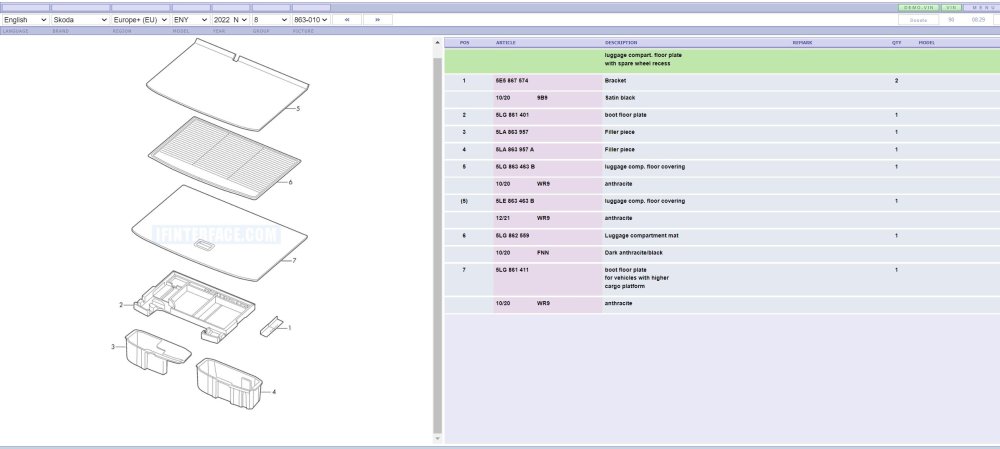
You'll need parts 2 and 7 from drawing which you have already stated. And also part number 5LG 868 077 which is a large trim piece and goes behind the rear seats to support the new raised position boot floor.
-
Apparently OBDeleven have a simple APP in which you can set the Lane assist to have 3 settings using the standard buttons :- 1 - Always ON after ignition (standard) 2 - Always OFF after ignition. 3 - Memory - resorts to last setting after ignition. Must admit I havent tried it yet as I dont mind the lane assist.
-
I presume you mean the rear bench ? It simply pulls up at the front ( a good hard tug). But you may need to replace the plastic securing clips on the floor when refitting the bench.
-
It all depends on what you want to do when you get your new car. For simple battery monitoring whilst charging you can use the free 'EV Notify' app on your phone or tablet together with a suitable bluetooth adaptor - I use the Veepeak BLE+ ( It works fine with all my Android devices), others have used similar OBD2 bluetooth adaptors. I'm afraid I cant comment on using ABRP yet. For more access to the data within the vehicle there are numerous basic systems about. Free ones like the Car Scanner app that has been mentioned earlier will connect to the Enyaq ok and allow you to monitor most aspects of vehicle and do simple diagnostics too. Also it will allow resetting of simple faults and resetting service intervals etc. Again you will need a bluetooth OBD adaptor ( again I can confirm the Veepeak BLE+ does work with my Android devices) For more in depth viewing and modifications to your vehicle you will have to pay to get better software and OBD adaptors. The OBDeleven is the popular one for VAG vehicles. You basically buy their dedicated OBD adaptor and again you use your phone or tablet to do the viewing, all by bluetooth connection. They offer an excellent diagnostics facility together with fault resetting and some simple improvements. But you will need to buy a licence from them to unlock the higher level of services required for serious modifications to your vehicle - if you're brave enough !! Excellent for home modders. Quite a few members on here seem to own one. Will work with both Android and IOS. For professional use the VCDS system from Ross-Tech is the one to go for. It uses their own OBD adaptor with their usb cable and you need a suitable laptop to download their software onto. Its basically the same as the dealers use so will have everything available on it to do virtually anything you need, and have excellent technical backup. Very pricey, but if you're a VAG mechanic or serious modder you need it. I just use the OBD eleven system which I've found easy to use. I've used it many times in the past for diagnostics and a few modifications to previous vehicles. The app is regularly updated and also the firmware on the adaptor too. Hope that helps a bit.
-
Just tried Car Scanner app with Veepeak BLE+ and it works fine. Bought mine from Amazon. Cant beat the OBDeleven product tho, so much better IMO
-
I also have the OBDeleven scanner app installed on my phone and tablets, but it uses its own dedicated dongle/OBD adaptor. I also use EVnotify app to monitor charge status of my vehicle and that works in conjunction with a VEEPEAK adaptor - OBDCheck BLE+ This adaptor seems to work fine with the Enyaq and ID3/4 systems. Should be fine for the Carscanner app too according to their website. https://www.veepeak.com/product/obdcheck-ble-plus/
-
First thing I would check is in the passenger fusebox. If there are a pair of fuse contacts in each of the empty fuse locations then the wiring is probably there to a certain extent. Might be missing the final small loom to each actual item tho. Fuse 37 is the electric bootlid Fuse 48 is the rear USB module. Also relay J807 But as Wino has said its unlikely to be there if you never specified it during ordering.
-
There is a retrofit software upgrade available in the Dutch market. Skoda part number 5LA054831A Not sure if available in all markets yet. Heres a link to the Dutch Skoda website using google translate :- https://shop-skoda-be.translate.goog/nl ... pto=nui,sc
-
Todays update from Skoda UK. My build date is postponed until further notice ! I've been waiting for this bad news for weeks, so its no real surprise. Oh well, it is what it is. At least I can delay installing my home charge point for a few more months (got until April 2022 to still claim the grant) !
-
Hi Ian, On my iV60 I chose the following options: Loft interior, Race Blue metallic paint, 100kW charging, 20" Vega Alloys, Retractable Towbar, Climate package PLUS, Convenience package PLUS, Transport package, Light and View package BASIC, Assisted drive package BASIC, Parking package BASIC, Chrome package.
-
I only ordered my iV60 at end of July 2021 (week 35) and was given a build week of 46 by Skoda, which I thought was a bit optimistic of them. Today I received an updated build week of 43 (late October 21). But how long it will take them to build it and ship it is anyone's guess !
-
I'm sure it'll be included soon. It'll just be another excuse for an expensive "options package " though !
-
He has performed a typical dash cam install. The A post trim has special fixing clips which are a right pain to remove. There is a special procedure for removing and replacing them to prevent damage. These are designed to limit movement of the trim piece if the side curtain air bag goes off. You dont want to be smacked in the face with a piece of plastic ! Getting the cable round the back of the curtain airbag at the top is the most critical part, its fiddly but not impossible. You need small fingers and no sharp objects. He has fed the cable correctly down the inside of door seal and not against the compressible part of the door seal. it doesn't show it very clear in his video. He's using his thumb to push it in place. I usually pull this rubber door seal away from the vehicle to give greater access to install the cable neatly. It just simply pushes back in place afterwards. The headlining is quite resilient, you can pull and bend it and it will usually pop back into shape ok. All edges are usually covered by other trim. Wait till you have to install the rear camera as well, now that is a challenge !