CityScout
Members
-
Joined
-
Last visited
Everything posted by CityScout
-
Thank you. 👍 It will be next week before I'm home again and my new (32Gb) card should be here by then. Wish me luck. ps. Did you glean anything from the photos I put up? Is there a need for new software, or an update I should be doing?
-
Thank you. That's a much better guide than I've seen anywhere else. I'm going to print it and stick it in the glovebox. I have ordered a 32Gb 'clone' card to see if it helps and I'm going to try and find a Linux, or Windoze machine to use for the job. In the meantime, I'll leave the old card alone (it's working for now, don't tempt fate) accept the older info and make my journeys next week. I'll have a Co-Pilot with me who has a 6th sense for direction - I kid you not, he's uncanny.😁 When the clone arrives, I'll play with that and see where I get to.
-
Thanks for that. The SKODA card I have reports at 16Gb. I tried the UK and western Europe map, (ECE 1) downloaded it, formatted the card FAT32, then unzipped the map onto the card with 'Unarchiver' which seems to have a decent reputation with Mac OS. The zipped file is 8Gb and the site says a 16Gb minimum is needed. Should be fine. The result of that effort is what appears in photo 4. A fail. Simply selecting NAV, then following the prompt to insert the card tells me it's accepted the card OK as a source of Nav data - but then it says it can't use it or words to that effect. Doesn't seem to make sense. I'm just wondering if the Mac OS is putting something else on there that I can't see when the file is being unzipped which then screws up the card.
-
Quick update: I'd had the sense to back up the old map files on the Skoda SD card. I formatted the SD card to FAT32 and put/copied them back onto the card. Then I deleted the two files the Mac seems to have added. I put it back in the unit and I have maps back, even if well out of date and limited to UK and parts of Europe. They will do for now - but I still need to get this thing updated and new maps installed. If there is a Firmware update and a 'patch' that will get round some of these issues, I would be very grateful for the information on how to do that.
-
How? Cairus: I need more information, a drip-feed, a link to something that explains in terms clear enough for an idiot. I do not even seem to now have an SD card that the system will read, let alone load with a firmware update. Even if I did, where is that firmware?
-
Got it. Hope these help: Eerrrrrr! Excuse all the dust. Need hoover


-
Thanks. I can get the first three stages, no problem. When I get to Software Update, it offers the current, then a second choice. I am nervous of the 'poke and hope' approach, so where do I go next and what card should be in the SD (1?) slot? Can I also ask what you mean by ''then picture"?
-
OK, forgive the ignorance. What do I need to do/add to an ordinary SD card to make it work as the Satnav data storage? (that's if it can be done .... )
-
Please explain. I'm O-L-D. 😁😁 What is 'Patch Unit'? If using anything other than a Skoda original/coded SD card, is it possible to use a card larger than 32Gb? (I have several ......)
-
I guess this has been asked and answered dozens of times but I've trawled and found nothing recent. A few problems. I'm really struggling to update the Nav system. I only have access to a Mac, on OS 26 Tahoe. Can I use a new card that IS NOT a Skoda original, or must I stick with what I have? The Mac seems to insist on writing extra files to the SD card and messing up the install. Can I simply 'unhide' and delete these files, or is something else needed? Naturally this has all caught me out with 2 days to go before a big trip - when a Satnag would be very useful ........... The Skoda Update Portal seems to say any SDS card will do - but it won't ......... unless I've missed something fundamental. HELP!!
-
I've searched every way I can think of but can't find anything at all on the Forum regarding the actual cambelt change job for The Memsahib's 2012, 3 cylinder, 1.0 litre petrol (with a CHYA motor) Regardless of mileage/age, I'm doing it and have a kit. Anyone know if this is the right tool set?: eBay UKPetrol Engine Timing Tool Set For VW Golf Audi 1.0 1.2 1....1.2 TFSI: CJZA,CJZB. 1.4 TFSI: CMBA, CXSA, CHPA. 1.2/1.4 for TSI. 1.4 for TSI Multi Fuel CPVA. 1.0 for TSI 3-cylinder, engine code CHZE, CHZC, CHZA, CHZB, CHZC, CHZD, CHZJ. 1.2 for TSI 4-cylinder, enghttps://www.ebay.co.uk/itm/365369596077 Don't take too much notice of the engine codes in the image, the listing has a longer list. The Fleabay seller 'says' it's right but then so do several others with a kit that looks nothing like the above, yet others offer the same kit and quote different engine codes. The usual ebay crappy control of listings, I guess .............. That apart, I'd be very grateful to anyone who's got any info/links to anything where someone has actually done the job? Will ps. love the pair of gloves, don't want dirty fingernails now, do we? 😊
-
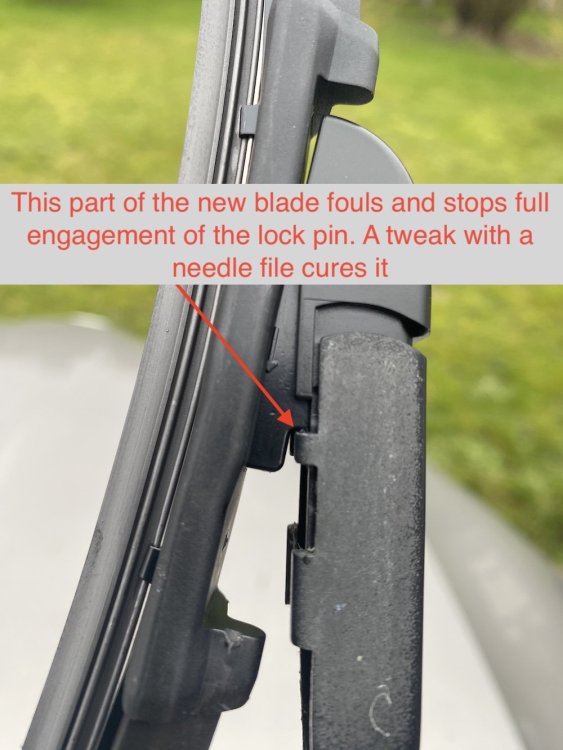
Thank you. 🙏 I can certainly see the need for the RHD/LHD distinction with aero wipers. Now you point it out the ones on the car have some sort of aero function, with a slightly raised spoiler towards the top edge of the blade and the attachment clip is not symetrical, so they can't be reversed. Makes sense now. Below is a picture of some cheap ones I tried - which were sadly a bit of a fail and went back. They looked the part but needed a small mod with a needle file to make them fit - which they did very securely after doing it. No great drama there but the real spolier (pun intended) was that in their efforts to avoid damage in transit they had protected them well but crammed them into a bag that was much too short. The result was that they took a 'set', were too bowed and wouldn't make proper contact with the screen in the middle of the blade. A waste of otherwise decent wipers. Other example I've found where buyers have shown pictures of what arrived were more promising - but no mention on being RHD/LHD handed. That's what sparked the question.
-
I was trying to discover if one or two vendors actually knew something specific about RHD and LHD vehicles and had different blades available - or if they just didn't know what they were talking about. I begin to suspect the second option but perhaps some kind soul has access to a parts list to set the record straight. 🤙 There were no part numbers involved, just 'LHD' and 'RHD'
-
Yep, I know they are a different size, it's the question of whether RHD, or LHD are different fitting/part number.
-
Does anyone know if the wiper blades are handed - as in terms of right and left hand drive? I see listings in a couple of places that distinguish between the two but as far as I can see, the crank on the end of the arms might differ but not the blades themselves.
-
Has anyone any hints and tips when it comes to replacing the alternator on a 2015 Scout, CRMB engine? How to get at it without skinning every single knuckle? How to identify the correct type before removal? The crankshaft pulley, belt and idler have been replaced already, a year later and judging by the noise, it now seems the alternator bearings are giving up.
-
It would slide up and out but unfortunately it's potted in place and the pot is quite hard, so will probably destroy all behind it when removed. The simplest will be a cut/splice/solder replacement - if I can source a buld holder that fits
-
I am a well known exponent of the Art of Fine Bodgery. If it works, I won't turn my back on it. What I did was take the snapped off contact - a bit of soft brass (which I would have expected to be stiff and springy ???) - and rearranged its shape to jamb between the remaining bit of contact and the side of the bulb holder, protruding into the bulb socket to make contact with the side of the bulb. It's worked OK but I will try and source a suitable holder if I can and solder/splice it in to the harness. I baulk at paying £50 for a few bits of wire in order to replace a 50p bulb holder.
-
Don't know how I worked out it tallied with yours. I'll use the excuse it was late ......... Mine's a late '16 Scout, so my numbers seem correct, now that I've worked my way around the K8B/K8D difference - Notchback, or Wagon/Avant Naturally the one I need is twice the price ................🙄 It will most probably be a scrapper and/or cut and splice.
-
No, I hadn't seen it and thanks for the link. I had come up with: 5E9945257A which tallies with yours as the one that's broken is the left side. 5E9945258A is for the right hand side.
-
No probs. I think I've found the loom and its part number - but the only place at a reasonable price for a new one (€25+tax) was in - Czech ......... or Czechia ..... or Czech Republic ............ or whatever it's know as this week. It's the scrappers ...........
-
A thought - or rather a question: Do you perchance have a part number for the loom - nearside if it makes any difference?
-
Ta for that. I could see there was a loom pushed into the back of it and I guess it's a start if it's replaceable as a part unit. Having said that, at £55 a pop, it'll probably be a visit to a Scrappers .......... 🙂
-
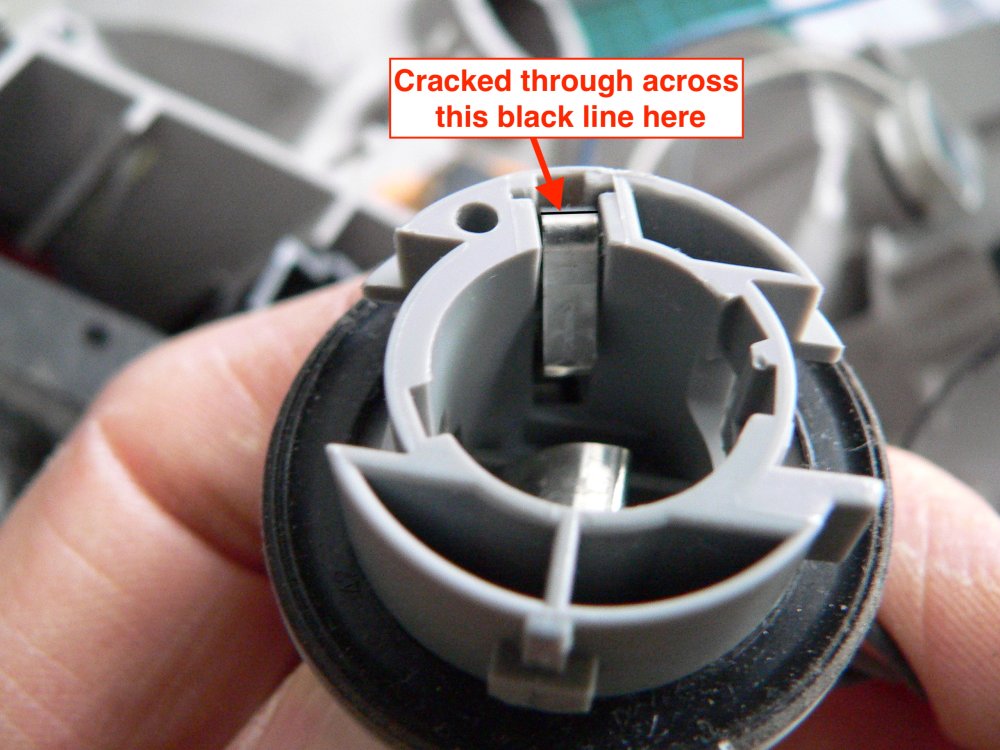
Anyone come across this one? Got a brake light fail warning, so stopped and checked. Yep, bulb out, check boot, spares at home. Rats. Make note to head for Halfords at destination as I'm 200 miles from home and headed in the opposite direction. On restart, noticed 'Fail' warning was gone - but reappeared 50 miles later. Check again after stopping and - it's working. Just in case it's a dodgy bulb, I put a new one (from Halfords) in. Repeat process 20 miles later: Fail warning, bulb out, restart, fail gone etc, etc. Eventually discovered that the earthing contact in the bulb holder has broken and hanging loose, making contact now and again, hence intermittent fault. The picture shows a similar contact from the same light unit but not the brake light - I bodged that one up to keep contact and didn't want to disturb it. It had snapped right at the top and fell out as soon as I tried to move it. I assume there's no way to replace the individual bulb holders as they look to be 'potted' with something fairly immovable? I'm not beyond the ability to cut and splice a new holder in but wondered if anyone knew of the problem, or a solution that doesn't require replacing the whole light unit?
-
Did you get anywhere with it?