SkodAlan
Members
-
Joined
-
Last visited
Everything posted by SkodAlan
-
I think it was all cameras at the same time. Though since I ran an OBD11 scan, and fixed errors, it hasn't happened again...yet!
-
Sorry for the delay, been ill. It happens on all cameras (360).
-
Anyone know why my camera (L&K 2020 TSi) keeps becoming unusable (dark, fuzzy,wobbly)? Not always, but increasingly often. I've tried soft resets, which fixes it for a while.
-
Standard Without
-
Sorry, mistake. Please ignore. Don't know how to delete.
-
I have assumed it is just a computer glitch. All computers experience them for who knows whatever reason. I have worked with computers, and sometimes they just glitch. Often caused by power fluctuations. As it is quite a rare event in my car, I am happy just to restart it.
-
I've had the same thing on my 2020 L&K 2 or 3 times. Don't know why it happens, but stopping the car and starting it again cures it.
-
I remember him saying: 40K; spark plugs, pollen filter, oil and inspection. Haldex was done last year.
-
Just been quoted £595 for a 40K!
-
Can anyone help with the typical costs of a service? I have a Kodiaq 2.0Tsi Auto L&K, 2020, 23,000 miles. It will be four years old in July. Looking for the typical price of 30K and 40K service. (Haldex was replaced last year.)
-
Not exactly the same problem, but My 2020 L&K kessy stopped working. Would lock and unlock by pressing the buttons on the key, but not by touching the handle. I had to have the door mechanism replaced. Fortunately it was under warranty. Mine was also only happening on the driver door.
-
I have MY2020 L&K (UK), and have had no success in disabling this. The process shows that I have succeeded, but when I come to use it, it is not disabled.
-
Nope, never experienced it on my 2020 Kodiaq.
-
Did you try a hard reboot? (Hold on/off till it turns off and then turns back on again with logo.)
-
My L&K MY2020 push out hot air on request.
-
I bought my MY2020 L&K in July 2020. During the first few months of ownership, the app was generally OK, but could be a bit erratic at times. When they combined the two original apps into one, it became rock solid. Then about 10 days ago it stopped worked altogether. Since a couple of days ago it seems to have been sorted, and everything is working as it should again.
-
My app has not worked for 4 days, and my kessy locking has stopped working! Has an update been cocked up?
-
V5.0.3, can 't see that there is a later one on Appstore.
-
There is on mine in the UK on Android.
-
So just tried it again, and it wouldn't refresh the current state. I use Android (One Plus 6T), so I went into the app, checked settings/permissions, and saw that the app had NO permissions allowed. This is because on Android there is a setting that removes all permissions if the app is not used for a period of time. I have now switched this off, and have enabled all the permissions. Everything is now working perfectly, well almost. I notice that if I send a remote lock/unlock to the care, it does do what I ask, but does not refresh the app to the current state. I therefore have to refresh manually. Apart from that, all is now good.
-
L&K MY2020. It has been very reliable ever since Skoda introduced the new app some time ago. However, it has been a little more flaky over the past week. Seems to be OK again now though.
-
Certainly is available on my MY2020 L&K.
-
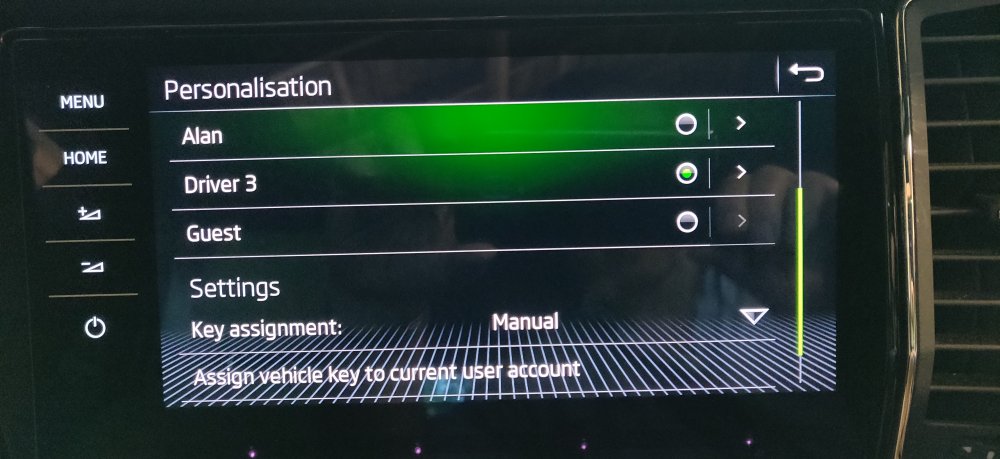
I find that it's best to have the personalisation set to manual, then after you make an adjustment select key assignment to store the changes. I think it asks you to press a key on the fob to confirm. This way you don't find that changes are being saved that you didn't intend.
-
Have you assigned your key in Vehicle settings/personalisation?
-
Have you tried rebooting infotainment? Hold power button till it goes off completely and then Skoda logo appears, then release.