Bryfly
Members
-
Joined
-
Last visited
Everything posted by Bryfly
-
When I dow nloaded only had the option of 2022, but noticed today they are both there, who knows what VW /Skoda are thinkin😉
-
On my laptop after I hit the download button, the top right it opens the download details and says "zip cannot be downloaded securely", I hit the 3 dots On the right-hand side, which opens other options i then hit "Keep" another warning opens up which says "keep anyway" which I agree to and the download starts...hope this helps
-
Followed your advice and put the USB stick into the USB c socket and as you said nothing appears to happen, drove for 45 mins and low and behold when I checked the maps had updated from 19.11 to 21.7, would be handy to have a display that says something is happening
-
Which models is this function available on?
-
Yep...I tried that and got the same message, I ignored the message and started download anyway, then I saw 2hr to 3hr download time and gave up, don't really know how they expect that to download to the unit with a built in Sim card?
-
OTA = over the air, which is the way MIB3 systems are supposed to update via a built in Sim
-
Which system are you on in your car Amundsen MIB2 or MIB3?
-
Been following this and similar threads since I got my Karoq in March and the update system is as clear as mud to me, I along with others thought updates for maps would be done over air ?, I had some sort of update a few months ago which didn't seem to change anything, this morning I put my VIN into the portal and it shows a map update sitting there, when I scroll down the page it lists the MIB 3 when I click on that it tells me to download update onto a key etc, does this mean OTA updates are no longer working and we need to download them manually??
-
Not sure if it is VW or Skoda who hasn't got a clue, but somebody needs to get a grip, as what's the point of putting downloads on their portal for the latest MIB3 system if when you download them, like you did, they don't work..🤬
-
Been following this and similar threads since I got my Karoq in March and the update system is as clear as mud to me, I along with others thought updates for maps would be done over air ?, I had some sort of update a few months ago which didn't seem to change anything, this morning I put my VIN into the portal and it shows a map update sitting there, when I scroll down the page it lists the MIB 3 when I click on that it tells me to download update onto a key etc, does this mean OTA updates are no longer working and we need to download them manually??
-
Totally agree, not much use, would be handy just to switch it off
-
-
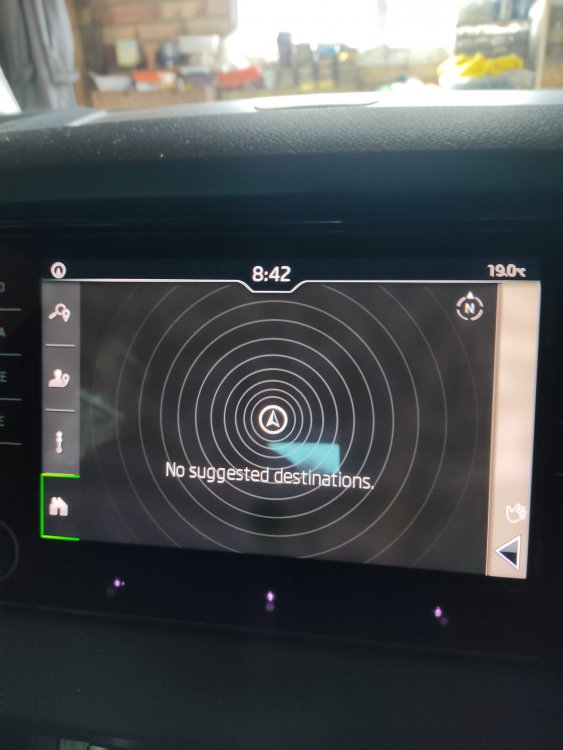
Whenever I start my karoq the Sat Nav never starts by showing the maps just this black screen with white line circles, can and how would Ichange it to default to maps.
-
Copied this from Jelugs transcript with Skoda ........which says needs to be activated which I assume would mean registered, it seems to me that nobody is 100% sure how updates happen, apart from some boffin sitting in an ivory tower at Skoda.... The KAROQ does have the feature to do automatic updates as long as the following conditions are met: The “Infotainment Online” online services are activated. An update of the navigation database for the current vehicle position or route destination is available...
-
It's about time Skoda / VW told us what system they use for Navigation Database updates, im the same as olderman1, still on 19.11 after 5 months, there has been one update that it notified me about and as far as I know it did it, but the system information didn't change... It seems like Skoda employ the Mushroom syndrome, keep us in the dark and feed us on B.S.
-
Sure will be interesting to see if they update, but surely Skoda are not using an update system that depends where you drive in the UK, however it would explain why I'm still on 19.11 though as I have not left my local area since I got the car in March.
-
Hi Chris, I'm still on 19.11 since delivery in March this year, I have had updates applied, but none that update the 19.11...bry
-
Ive always thought that mark up by car companies on spares needs to be looked into, years ago I used to work for a mirror company where we charged £5 for a fiesta mirror that was marked up to £83 as a spare and a Jag mirror £50 that was marked up to £500+ as a spare, at the time you could work on about 10x Mark up.
-
-
Had some funnies started today, radio keeps switching itself on and off for a couple of seconds, keep getting message vehicle settings have changed, last message that came up on screen "how can we help you" , looked for a system reset button, only ref I found was hold on/off button for 10 secs, anybody else had this problem, or know of an other reset method..
-
Reading this forum there seems to be so much a bit iffy with this latest infotainment system it makes me wonder if it ever left development before going into full production
-
Just noticed that with ignition off and radio on in the car that the time shown does not update until you switch ignition on, is that normal never seen that happen on other cars I've had, I guess all the karoqs are the same?
-
Chris, Think it probably is a red herring as I've made no changes to anything, either in the car or on my app, seems like this Skoda / VW infotainment system is not bug free....🤭🤭
-
Has anybody experienced getting a random message on the infotainment screen that says "your vehicle settings have changed" OK or cancel, I always cancel as I have not changed anything, don't want to say OK as it doesn't tell you what it has changed, weird..
-
Can happen warm or cold, but seems to be less apparent when it is cold, but as I said sometimes it is fine..