




Slick2097
Finding my way
-
Joined
-
Last visited
Everything posted by Slick2097
-
So I found the following: Particle Filter, soot mass calculated: 10.53g Particle Filter, soot mass measured: 3.27g Particle Filter, Oil ash mass: 22.89g As you said, these were in the Engine section, under the Live Data header. 👍
-
Hi, I have OBDEleven and I am curious to know where I would find the values that people always look for in VAG DPF to see if there car is re-genning too much. I believe its the Soot Calculated, Soot Measured and Oil Ash Content values? (any i've missed?) Is it in a nice easy to find place or do I need to go hunting? I appreciate it will probably not give me a nice visual like VAG DPF but if the values are there then I can at least see them without shelling out on another OBD11 dongle just to see them. Many thanks.
-
Love parkrun, its the best thing about the weekend for me. It sets you up for your Saturday. I'm currently making my way through the A - Z of parkruns for the Alphabeteer achievement (i#m aiming for one each month rather than trying to fit them all in as soon as possible), for this you need to take part in a parkrun whose name starts with every letter of the alphabet, A - Alderley Park, B - Birkenhead, C - Chester etc etc A week or two back I travelled up to Spennymoor (closest one) to take part in the Jubilee ParkRun to bag the J. There are only 4 parkruns in the UK starting with a J, Jubilee in Spennymoor, Jesmond Dene in Newcastle, Jersey Farm daaarn Saarth and the parkrun on the actual island of Jersey. K is next in a few weeks time, which my closest one is going to be "Kew Woods" in Southport. If you use parkrun, and you haven't already, I highly recommend the "5K" app (in your local app store), you put in your parkrun number and it will grab all your stats and show your details for all your parkruns and then you can also keep an eye on your achievements (there are lots).
-
Yep, all sorted in an hour or two when they picked the car up on Tuesday.
-
Quick update, after leaving a crappy review on the Skoda "Would you like to review your experience at Skoda on Tuesday" email service, got a call back from the Assistant Manager yesterday and its being looked at today. Fingers crossed. Ste.
-
Hi, Long story short on this one ... Had one of my keys stolen (but not the car) so insurance insisted I change locks and keys. This was done by the Skoda Dealer. Since then, the Smartlink, Sat Nav, Bluetooth, Online systems all now no longer work on my columbus (to confirm, all these worked the morning I took the car in). I didn't check them until I had driven away unfortunately. The earliest appointment they can fit me in to do a "diagnostic" check (which I may have to pay for, even though they broke it) is a month and a half away. I'm assuming its something to do with the key reprogramming removing a link between unit and ECU or something? Part No: 565035021E, SW ver: MHI2_ER_SKG13_P4526 (1440) Sat Nav says: "Navigation data in infotainment system not valid. Check data." Navigation database shows up as N/A in System information. Smartlink says: "you can activate the function by means of an activation key. Please contact your dealer" Bluetooth says: "Unable to switch on Bluetooth" in the service menu, Installed Codes, every single one of the Function Enabling Codes states: "Temporarily rejected" Am I just going to have to wait for the dealer appointment and have no phone, no sat nav and no personal music (i know I can put on SD card etc but its not the point) for a month and a half? Or is there something I can do with odbeleven (which I own) or can something be done with VCDS to save me waiting and having to listen to god awful commercial radio each day? Thanks, Stephen.
-
Hi, To get the unit registered with Skoda you will either need to: a) put in a sim card with an active data plan b) connect the columbus unit to a WIFI source in the settings c) connect a mobile phone which can share the data connection (pretty sure there is a setting somewhere to allow the data apps on the unit to use your mobile connection) you should then be able to register the device with your MySkoda account. If you want the live services when you are out and about (and registered) you can indeed just pop a data sim in and it should connect. You'll notice a red globe / circle at the top middle of your columbus screen, this will go white when connected to the mobile network. Not 100% sure if the tethered mobile phone option will work for this as well? I have a sim card in mine (but I don't subscribe to the live services as I use Apple CarPlay which does pretty much everything I need) but its there as a handy backup. I used a sim card from RWG mobile (EE network), They used to have a "free" sim which gave 50 minutes, 50 SMS and 250mb a month for an initial top up of £5 then free after that, but that offer has gone now. Their "free" sim is now an initial top up of £15 which gives you 100 minutes / 100 SMS and 750MB of data which is then free after the first month. Could still be an option for you. https://www.rwgmobile.wales/rates-plans-eng-per/ and look for the "free £15" sim. Hope this helps. Slick2097.
-
Tolkien trail was a tough race, I walked up most of the hills (530ft of elevation in all) but I had done it previously so I knew what was to be expected. Next race, Colshaw Hall 10k on Sunday, a nice flat (ish) road race around the beautiful Cheshire countryside. Lots of races coming up, a lot still which were postponed from Covid lockdowns.
-
Hi, Runner here, like to partake in local parkrun's and ex-run leader and member of a local running club in Warrington. Looking forward to joining in the running chats. 👍 Next race: Tolkien Trail race on Saturday. Cheers, Stephen.
-
Hi, The info by @dreema below is sound advice, Follow that and you'll be well on your way. Some clarification though please: You say you are trying to access a share on the windows 10 machine, but the information you provided indicates that you are then trying to connect from the Windows 10 machine back to the windows 7 machine? Which way round are you trying to go? Assuming you are trying to access a shared folder on the windows 10 machine from the windows 7 machine, the information below is all based on that, if it is the other way round, then swap the details around. You say that the windows 10 machine can see the windows 7 machine, that'g good, but it looks like the windows 7 machine can't see the windows 10 machine? I'm assuming this is in network neighbourhood. I would check that they can talk to each other by pinging between them. Bring up a command prompt (It'll be in something like Start, Programs, Windows Administrative Tools, or just enter "cmd" in the run box). Type "ping nameofwindows7machine" from the windows 10 machine, and "ping nameofwindows10machine" from the windows 7 machine (without the ""'s) You should see 4 good ping responses. If you get "Ping request could not find host X." then you have a DNS issue so cannot talk between them using the windows hostnames, in this case, you'd need to find the IPAddress of the windows 10 machine. In the same command prompt, type "ipconfig" (again without the quotes) and you should see something like: Ethernet adapter blah blah (or Wifi adapter blah blah): Connection-specific DNS Suffix . : Link-local IPv6 Address . . . . . : fe80::xxxx:xxxx:xxxx:xxxx%57 IPv4 Address. . . . . . . . . . . : 192.168.0.4 Subnet Mask . . . . . . . . . . . : 255.255.255.0 Default Gateway . . . . . . . . . :192.168.0.1 The IPv4 address is what you are after, ping those from the alternate machines (so ping the Win7 IP from Win10 and vice versa). If you then get 4 good responses from each machine, use the IP in the share name \\IPofwindows10machine\networksharename and try that. Another thing that can trip people up is NTFS permissions. Creating the share will grant access to the share, but not the file system underneath. You also have to grant the windows7 user (as dreema suggested, if it doesn't exist, create it on the windows 10 machine) access to the folder via the Security tab in the properties for the <name of win7 pc user> folder that you have shared on the Windows 10 machine. Hopefully this will all set you on the right path to sorting it out. Stephen.
-
Hi, I've searched, but most of the posts seem to relate to the Saloon / Hatch which has the washer jet in the wiper arm. Symptom: Motor engages, a decent amount of water comes out but it is coming out like a tap rather than misting or "spraying". The flow is limited to the top of the wiper blade area. As such, I have to have it on longer to wash the window (to try and get they water nearer to the bottom of the window as the wiper blade wipes it away), and a good amount of it is deposited on the boot sill when the wiper goes past where it can pool. On my estate, the washer nozzle is contained in the rear reflector on the top of the boot (above the window). Does anyone know if I can: a) take it off easily to have a look and blow some air through it or something b) if not, and I have to get a replacement, can I replace just the washer nozzle or do I need to replace the entire reflector (and what would the part number be)? Any help or pointers gratefully received. Thanks, Stephen.
-
Hi John, Hope you managed to get this working (I wrote the article Kenny linked to). It does work, but you do need to turn the Canton surround value up to between +7 & +9 before you will be able to hear the true audio separation. Also, whilst other lossy formats will work, FLAC or ALAC seems to work best with lossless 5.1. Any questions, please let me know and i'll try and help. Thanks, Stephen.
-
As I said, on mine (iPhone) I have to have the myskoda app open and connected via USB to get it to use and update the Smartlink+ applications. On Android, maybe there is something you need to set in the individual app permissions to allow it to share the phone's connection? Seems that it must be something specific to that app if the rest of the Smartlink+ stuff is working as you said above. For what its worth, smartlink+ on mine is very limited, it basically shows me what fuel I have in the car and the mileage, and thats it, and even that is usually out of date. Slick2097.
-
Glad you've traced the squeak. I'd honestly try and make time and get it changed if you can .. its probably less than 30 minutes for a garage mechanic to whip the wheel off and replace it, I know you are busy, but it would drive me mental if I left it
-
Quick question, are you connecting it with a USB cable? If you are, are you sure this cable it capable of transmitting data as well as charging (try playing some music from your phone, does it show up in the media section when plugged in via USB)? Not all cables are the same, some cheaper ones are just for charging only, and not data transfer. Hope this helps, Slick2097.
-
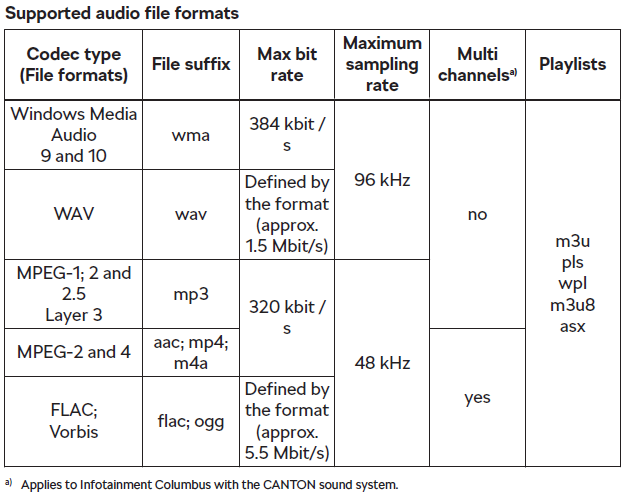
Hello, So, the manual states: So this implies to me that I can put a FLAC file on a USB or SD card, plug it in, and then my Columbus system will play the file in 5.1. Great, I have a collection of 5.1 audio at home so why not rip it and get it working in the car! I tried it with my Tubular Bells 2003 (ripped to 5.1 FLAC from my own DVD Audio Disc), and it didn't seem (to my ears) to do anything apart from downmix it to stereo.... This annoyed me and I set about trying to find out what settings I needed to get this working properly. However, the problem was not the system. It was the PICNIC* who was trying to operate it! These were my original sound settings: Canton Optimisation: Front Canton Surround: 0 Canton Subwoofer: 7 I downloaded some 5.1 test tones from this other forum: https://www.quadraphonicquad.com/forums/threads/multichannel-test-files-flac-with-various-channels-sample-rates.24032/ Popped them on an SD card and trundled out to the car again. I picked the 192/24 folder and played the Channnel Test 5.1.flac file and to my astonishment, it played on all 5 channels clearly, but the rear channels were really quiet (maybe 2 * quieter than the fronts), so the TB2003 file was playing in surround, its just the fronts were drowning the rears out and so I thought (incorrectly) it was downmixing it. 😖 So I headed in to the sound settings, and started to balance it all out for my cloth ears. I ended up with the following settings: Canton Optimisation: Front Canton Surround: 7 Canton Subwoofer: 8 This is now very balanced for my ears and surround channels are clearly discernable and work in unison when required. My mistake was, I assumed that Surround "0" was "normal" surround, and that a +'ve figure would bring the rears up to louder than normal settings (the manual states that -9 is "stereo" and +9 is "full surround") However, this is correct but the "normal" surround is so quiet I thought it wasn't working. So ... happy days, all sorted. But I didn't stop there. The manual also stated that the following formats should play: MPEG 2 & 4 (aac, m4p, m4a) at 320kbit/s (48 kHz) Vorbis (Or ogg as its more commonly known) "defined by the format" (whatever that means) So I tried them. I converted my source TB2003 audio to 5.1 Apple Lossless ALAC (m4a) which played perfectly even though the system stated that it would only support m4a at 320kbits and makes no mention of ALAC. I also tried 5.1 aac (apple vbr) at 320kbits, this also played in 5.1. I tried Ogg Vorbis, full quality setting which resulted in a file of 1439 kbps, this also played in 5.1 fine. So you can rip to lossy 5.1 if you so desire and want to save a few MB of space (i'd stick with FLAC or ALAC though personally). So, I hope this helps even 1 person to save some time and settings when trying to get 5.1 audio working on their car, i've been trying to suss this out on and off for a week or so. Now I can rip the rest of my DVD / Hires audio collection ready for the car... Next thing to try is to stop it from pausing between tracks for a brief second without combining it in to one large file... Maybe ALAC will help with that? Cheers, Slick2097. * PICNIC = Problem In Chair, Not In Car / Computer (delete as appropriate)

-
@hhcd80 Keeping my fingers crossed for you Pal. Let us know how you get on. 👍
-
Just a brief update, its been a week now and not a squeak, or squeal to be heard. Cautiously optimistic but it looks like its sorted. 👍
-
I tried to use eco mode when I first got mine, I liked the coast mode, and used it a fair bit on the motorway in to work and back. I did notice that it failed to coast unless I cycled round to Eco again using the selector button after an ignition cycle. The speed of the ACC was a bit too slow when catching up traffic for my liking so I tried to use the Individual mode to get the best of both worlds... When I first set individual mode up (Drive was set to Eco, ACC in sport, Steering was I think normal), the gears shown on the little display between the rev counter and the speedo would show the gears in E mode (E1 - E7) which was fine. When I stopped the car and got back in again and didn't touch anything, when I started it up, the gear display on that screen would revert back to showing "D" gears (as in normal mode, D1- D7) until I again cycled around the selection mode to get it back to "individual" mode. I'm not sure if this was by design or not, but it was blinking annoying. Why have an "individual" driving mode (or any selectable driving mode) that deactivates when you stop and start the car unless you cycle around again? It annoyed me so much I now just leave it in normal and use my right foot to catch up to traffic in ACC mode. Slick2097.
-
@hhcd80 Sorry pal, I didn't ask which ones were removed. 😞 From the invoice, the ones fitted appear to be part: 5Q0 698 151 T (and discs: 5Q0 615 301 E) if that helps. Re: Location. Halfords was where they initially tried to send me, I simply suggested that Skoda might be better as its closer and they were completely fine with me changing it. Is there nowhere near your work where you can drop it off, work your day and then pick it up like I did? Could be a good option.
-
So, they (RRG Rochdale) had the car all day yesterday. I dropped it off at 8:30am and picked it up at 5:10pm. This is what they told me when I picked it up (in my own words). Initially, they did a brake check and noticed that there were non skoda genuine pads on the front, and that they had been replaced recently, possibly by Cinch, possibly by previous owner / service (I don't know which thanks to the ever useful electronic service record which I cannot see ... what was wrong with the old paper book? I understand the need to make it digital but why not have both? Anyway, I digress). They also noticed a slight lip on the two front discs, again they cannot be sure where this came from, previously worn pads or the new non genuine pads causing the wear... The brakes passed all checks. but crucially they were unable to replicate the squeak in the workshop. 😞 As they were parking the car up for me to collect, they heard it squeak . They then took it back in for another look and diagnosis. Came to the conclusion that the pads, whilst safe and had loads of life in them, did not fit quite right and were potentially the cause of the noise. Long story short, they then went back and to with the warranty company for the rest of the day, photos, evidence etc and then eventually the warranty company approved them to fit new genuine skoda pads and discs to the front which they did about 4pm. On the drive home yesterday and on my drive in to work this morning, no squeaks at all. I know it can take a few days for the pads and discs to bed in so i'll keep my ears peeled for a few more days but its looking promising so far. I think, (and i'm only guessing here) that Cinch may have put the new pads on when they got the car as part of the 200 thingy check?, and they have put cheap generic pads on, that when confronted with the evidence from the mechanic that they believe the pads are causing the noise, they didn't really have any option but to allow them to replace. Total cost: £0 @hhcd80 If you are still in the 90 day window, it may be worth trying? I think because I swapped the garage from a local Halfords auto center to Skoda (just for convenience really, the skoda garage is closer to work) that may have helped me as the garage can basically say "well, its got non genuine skoda parts on it, so we think thats the cause" to the Cinch warranty team .. So if it turns out that they fitted them, then they don't really have a leg to stand on. Of course, if yours are not new-ish and have been on for a while then as you said it may just be easier to live with it for a bit and replace them at your next service... Hope you get yours sorted. Good luck. Slick2097
-
Well, I dropped it off earlier, the person I spoke to at Skoda said it was just in (according to the notes from the warranty company) for a "Brake Inspection" so i'm guessing they are just seeing if anything is actually wrong rather than attempting to fix it. This could be rumbling on for a while... Slick2097
-
Will do. I also ready that in the Cinch 90 day warranty blurb, they don't cover "brakes" at all so it should be interesting to see what comes of it and if they will just take the hit themselves or try and make me pay... I guess as I complained on the day I got the car they can't really say i've caused the issue and it must have been there on handover... We shall see. Slick2097.
-
Hi, Just a little update, Cinch warranty have been in contact and its booked in to RRG Rochdale (near my work) on Monday to have the squeal / squeak looked at. Will let you know what, if anything, they find / resolve. Ta, Slick2097
-
First thing I do when getting a car is take it to a petrol station and set the tyre's to the correct pressures (and reset the TPM). Don't think they were far off the normal pressures to be honest. I have read previous articles on here from people with squeaky brakes, it does seem to be something with certain octavia's. If (like @MeteorOcty has stated above) its just something to live with, then thats not too bad to be honest. Like I said, the car stops when i'm trying to stop and feels like it will stop in an emergency if needed so I will see what (if anything) I get back from the Skoda Dealer. Again, thanks to all of you for commenting and giving me suggestions, very welcome and appreciated.



