Weeguy
Finding my way
-
Joined
-
Last visited
Everything posted by Weeguy
-
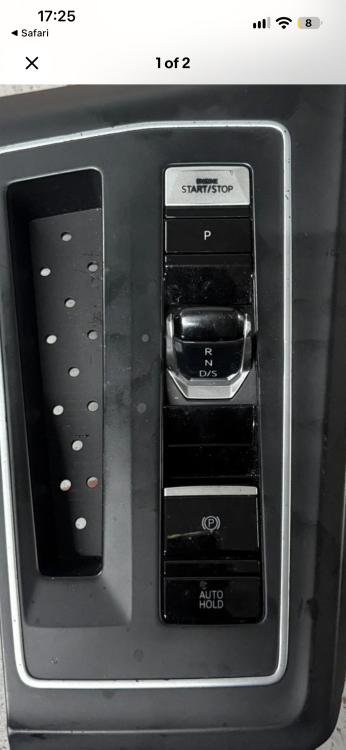
Hi Unless im mistaken, golf mk8 lever (image below) is totally different to mk4 vrs lever, so it wouldn’t fit.
-
I have a 23 plate VRS and recently had to add half a litre of coolant. No sign of fluid anywhere. Check everyday now and level hasn’t moved. Concerned im out of warranty end of October🤷♂️. Suggestion to OP, contact Skoda Assist and they will come to you and if any issue found will take to garage who im told have a week to repair.
-
And 6C is coded to Octavia MK4 NX : 03032200A53000
-
Hi thanks again for all your help. I have a 23 plate mk4 octavia and pro obd11. Is below the only coding required? 19 Gateway Configuration: Byte 15 : Change 02 to 12 Byte 16 : Change 01 to 51 Byte 18 : Change 10 to 20 Byte 20 : Change 00 to 02 5F — Adaptation Settings: function_configuration_unit → Select RVC_video_input Change FBAS to Ethernet Car_Funktion_List_BAP_Gen2_VPS_0x0B ------ Switch to activated Car_Funktion_List_BAP_Gen2_VPS_0x0B_msg_bus ------ Choose "terminal 15"
-
Thanks pins 1,6 and 7?
-
Hi, what instructions did you use? All 3 pins to connector under steering wheel or 2 pins to connector and 12v pin to fuseboard? Thanks
-
-
My Skoda dealer never mentioned it until I asked about it and they said oh yes every 2 years! When they told me oil change only via top up/drain plugs, I took it to a VAG registered indy who removed pump , checked strainer and renewed “o” rings.
-
The front diff i believe is the same as the golf gti. Skoda informed me that it requires a service every 2 years (though i had to ask!) However they were not prepared to remove pump and clean strainer, which was pointless in my estimation.
-
Hi I have a 73 plate VRS estate auto 20k miles. I had the front diff carried out by a vag registered indy at 18k because skoda only change the oil in the diff , they do not clean the filter on the pump. Both were spotless, but done for peace of mind tho i dont really thrash the car. Brake fluid is every 2 years(con in my eyes) , i had it done but when the next one comes round, it will be out of warranty and will goto an indy i know who will measure moisture content.
-
-
-
The pump does both windscreen and lights. Windscreen pipe has a filter on it. Probably blocked
-
Hi all, 73 plate VRS estate purchased new (10 miles on clock). When I purchased the car it was on variable servicing which suited as I was doing high mileage. I have a service plan (extended and pollen still to used). Car was serviced (oil service under plan , pollen changed by me) in April this year having covered 16k miles (16 months old) Usage has now plummeted as Im now retired (200 miles covered per month). Should i wait till October 26 for next service? Car info on variable indicates that. Is there anything due at 2 years old? Year 3 it will also need brake fluid, front differential oil change I assume. Sorry for long post😁
-
Thanks updated. All 👍
-
Hi all, have installed Match 5.4 DSP amp (factory settings/not connected direct to battery) to my 23 plate VRS with stock speakers. I dont want to install a sub , anyone any info on setting up amp/install files? Thanks.
-
-
-
Still no issues? Ive ordered one but after Djajdo78’s connection issue and reports of MCU’s failing after install, im a bit wary about installing
-
Octavia mk4 vrs? Does it remember last start/stop setting?
-
Ok sorry aint buying it. Will wait for OTA
-
Did you buy it? Or OTA?
-
OTA or have you a copy of the file?
-
Has the new “1969” software been released by skoda or is it modified vw/seat software?
-