Turbointercoolosis
Finding my way
-
Joined
-
Last visited
Everything posted by Turbointercoolosis
-
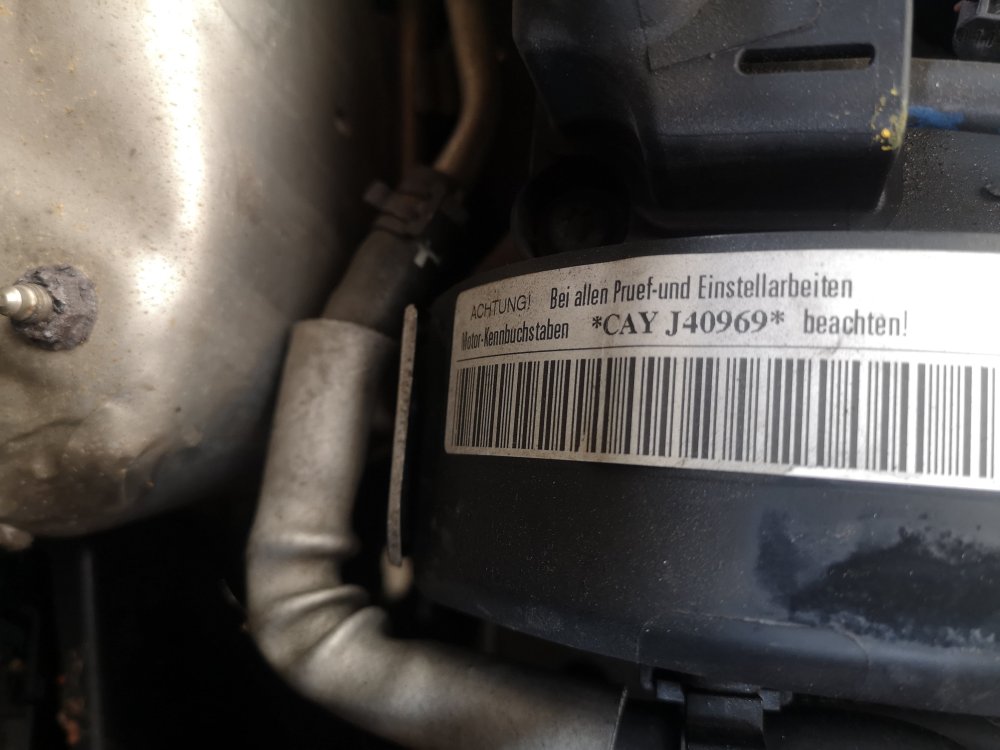
Hi guys, I can't seem to find my engine number. The only sticker I can find is this. This is not the engine number, is it?
-
Hi guys, anyone got a link where to buy new clips for the rear seat?
-
Hi, is there a way to know exactly what wheel is causing this error? Or would I have to check all of them?
-
-
Hi guys, the link is not valid anymore, any info on how to remove the glove box?
-
Hi guys, sorry to revive such an old topic. The link to the PDF is no longer valid, I'm struggling to get the screw behind the button out
-
Followed @Othen's instructions, removed the sensor, sprayed some contact cleaner on the contacts that were oxidised, problem solved! Thank you very much for your help!
-
Hi, sorry to revive such an old topic. Which fuse should I use for the yellow power cable? Many thanks!
-
-
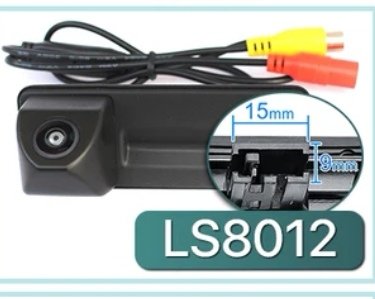
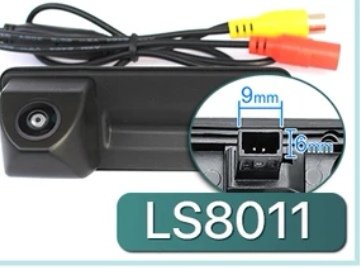
Hi, sorry to revive such an old topic. I bought an Android head unit and I want to retrofit a reversing camera. Camera has a rca jack to connect to head unit, instead of the oem connection. My question is about the tailgate switch connector size. I'm being given 2 size options : LS8011 9mm X 9mm (square) LS8012 15mm X 9mm (rectangular) does anyone know what would be the correct size for a skoda superb estate mk2 2?
-
I've got sat nav, dual zone climatronic, no leather seats.
-
Right, a bit of an update on this. I did manage to find the knob for manually leveling the headlights. Thanks for your help in clearing the doubts I had on this subject
-
I'm not sure, it's a 1.6 tdi greenline estate, seems to be a pretty basic spec
-
Yes, it's not as white as I thought it should be, that's what's got me wondering if they're really bi xenon or not
-
I thought ALS was for adaptative light system, or auto lights for short. There is a knob next to the auto lights switch, but it just dims dash lights. There is a chrome cap next to the headlight, headlight washer not working, probably due to a faulty fuse (haven't checked it yet)
-
Hi everyone, sorry to revive such an old topic. I'm a bit unclear about the bi xenon headlights. Please bear with me and my newbie questions. I thought all superb mk2 with ALS were bi xenon headlights. My recently purchased mk2 estate 2011 (pre facelift, I believe) has als and headlight washers, so I assumed it was bi xenon. The other day I looked closely at the headlight and noticed that the word halogen is written around the projector. Can anyone clarify if all mk2s with ALS are bi xenon?
-
Amazing mate, thanks for your help
-
You're right, I don't know what happened but I got my vin completely wrong. The correct vin is TMBJJ73TXC9030946
-
Sorry that was a typo. It's definitely 2011
-
Hi, sorry to hijack the thread. My headlight washers aren't working. I think it's fuse 36, can anyone tell me what size/version it is?
-
Hi, this is my first post after introduction. I'm trying to find the right brake disk sizes for my 2001 skoda superb mk2 estate 1.6tdi. Would that be possible to know that from the vin? I would appreciate if someone could help me out. My vin is TMBJJ73RXX9030946
-
Hello there 🙂 introducing my 2011 skoda superb estate mk2 1.6 tdi greenline in rosso brunello. It's a UK reg lhd, imported from the Netherlands, bought in January. I'm currently living in Southampton in the UK and I'll permanently leave the country later this year, so I was looking for a lhd estate to drive to Portugal. I'm really pleased with the car, it's my first skoda and I'm surprised about the build quality, reliability, fuel efficiency, comfort... Already got some mods planned, will keep you guys updated.