



Zea
Finding my way
-
Joined
-
Last visited
-
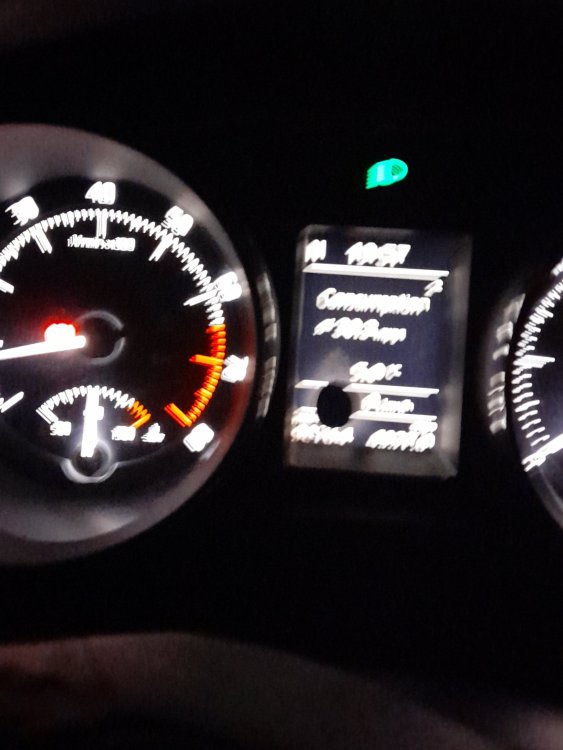
HI Briskodians, Has anyone got any idea what this black splodge in my display is and how to get rid of it? Many thanks 👍
-
-
I voted, carpet all the way for me 😁Haha, yes got my brolly, all is right with the world 🤣Hi @Jimbo7274, welcome to Briskoda. I have a Superb Elegance Hatch 2012, my first Skoda, had her for about 2 months and very happy! All the best ZeaWelcome @SanPedro_ to the forum ZeaHi @Cristina, I have a Superb Mk2 and live in the Cotswolds. Welcome to the forum 😊Welcome @Scalimetro Nice motor. Good luck with it. Your English is great! ZeaHi @Cyclone welcome to Briskoda. I have a Superb Mk2, bought a couple of months ago. I have found lots of useful info on this forum, so I'm sure you will too. Good luck with your purchase, All the best ZeaWelcome @PerkyBlinder 😊 I am afraid I don't have much useful information but have endless community spirit! Good luck with your new Scala ZeaWelcome @Pkelly13 good luck with your Superb. I am a new Mk2 owner, great cars. 🤗



Important Information
Welcome to BRISKODA. Please note the following important links Terms of Use. We have a comprehensive Privacy Policy. We have placed cookies on your device to help make this website better. You can adjust your cookie settings, otherwise we'll assume you're okay to continue.