




memoli
Finding my way
-
Joined
-
Last visited
-
Hello Skoda Felicia, is it necessary to remove the light-cutting metal sheet inside the headlights of LED headlights?
-
AkedThank you very much friends, today I took a plus-minus cable from the fan socket, I tested it and it worked, all that is left is to take the cable inside, this will be the most difficult part 😉
-
Skoda Felicia fan is on, I want to make the LED, when the fan is on, the LED will turn on and off, thank you, please inform me.
-
Hello, thank you very much for your interest, but I attach it straight like this and then it becomes inclined again. Do I need to do it on a flat surface or do I need to turn it completely to the right or left? Okay, diayum.
-
MHello, I removed the steering wheel of my Skoda Felicia vehicle, but when I installed it, the steering wheel looks crooked. What is the solution for this, how can I fix it?
-
I wish you lots of love and greetings for your interest, my friend, you were very helpful, thank you, with my respects. 🙂???????????+And - I would be very happy if you could send me a picture of all the ends marked.Friends, I am waiting for an answer to my urgent question. I would be glad if you could help me. All poles will be needed.And the polarity of the above signals will also be required 😊So, what are the polar directions of the lamps here, my friend, I thank you very much for this.
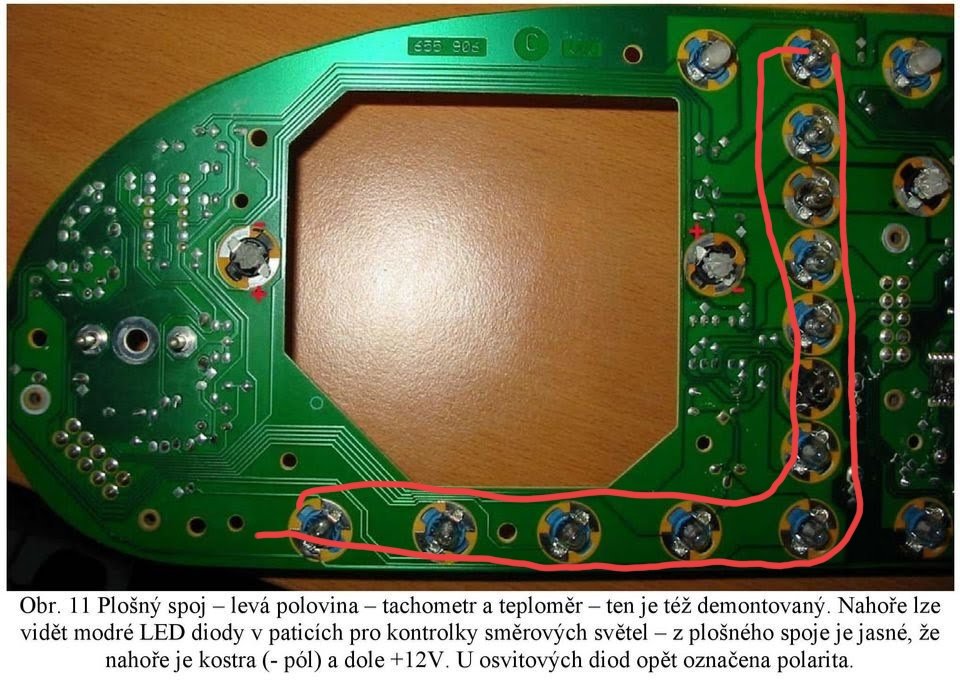 I am sure there are friends who do it, I just need to know the polar directions, it is enough to change it, my friend, I would be happy if you could help me.SI will make the Skoda Felicia dashboard LED I will do it but I don't know the + and - aspects. I don't want to deal with it twice. I need friends to help me. Thanks.

Important Information
Welcome to BRISKODA. Please note the following important links Terms of Use. We have a comprehensive Privacy Policy. We have placed cookies on your device to help make this website better. You can adjust your cookie settings, otherwise we'll assume you're okay to continue.