FilipSljeme
Finding my way
-
Joined
-
Last visited
Everything posted by FilipSljeme
-
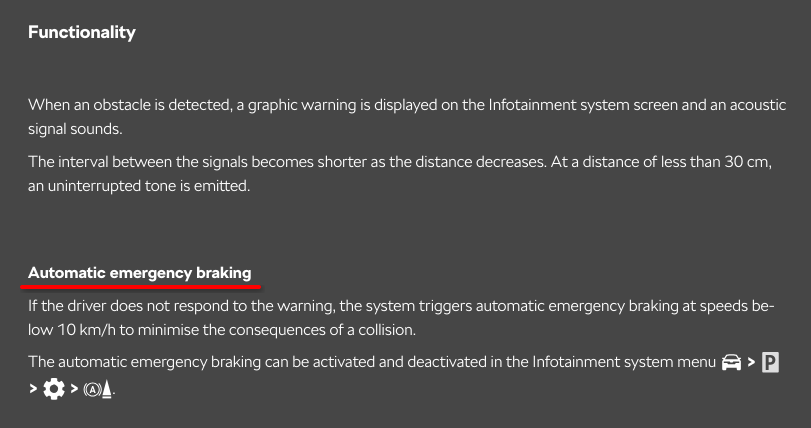
That is a bit unusual. I'm almost 100% sure the system is supposed to give a distinct warning tone (a higher-pitched alert) along with a message on the screen explaining what happened. At least that's been my experience when the system has intervened. Those are separate settings. You should be able to disable only the "Manoeuvre Braking" function (as it's called in more recent owner's manuals) while keeping the parking sensor warnings enabled. Personally, even though I've had several instances where the system reacted incorrectly, I still leave it enabled. I'd rather deal with the occasional false activation than have it fail to intervene when it's actually needed. Once you're familiar with the system's limitations, it's usually possible to anticipate and work around the situations where it's less reliable. I believe "Park Pilot" is simply Škoda's name for the parking sensor and reversing camera system, rather than a separate parking-assist feature.
-
Hi @NormanE! This does sound like the automatic emergency braking feature. Like any other driver-assistance system, it's not flawless and can occasionally react to situations it shouldn't (and vice versa). I've personally had it trigger a couple of times for no apparent reason. For example, it detected a car in a distant lane that was nowhere near me while I was trying to reverse out of a driveway. You can disable the system through the infotainment settings. Also, keep in mind that it only operates at low speeds. According to the 2024/7 owner's manual, the system functions below 10 km/h. However, it may also not activate if you're moving extremely slowly. You should also check the section on system limitations in the owner's manual (Parking assist systems > Park Pilot parking aid > Function restriction). Source: https://www.skoda-auto.com/apps/manuals/Models
-
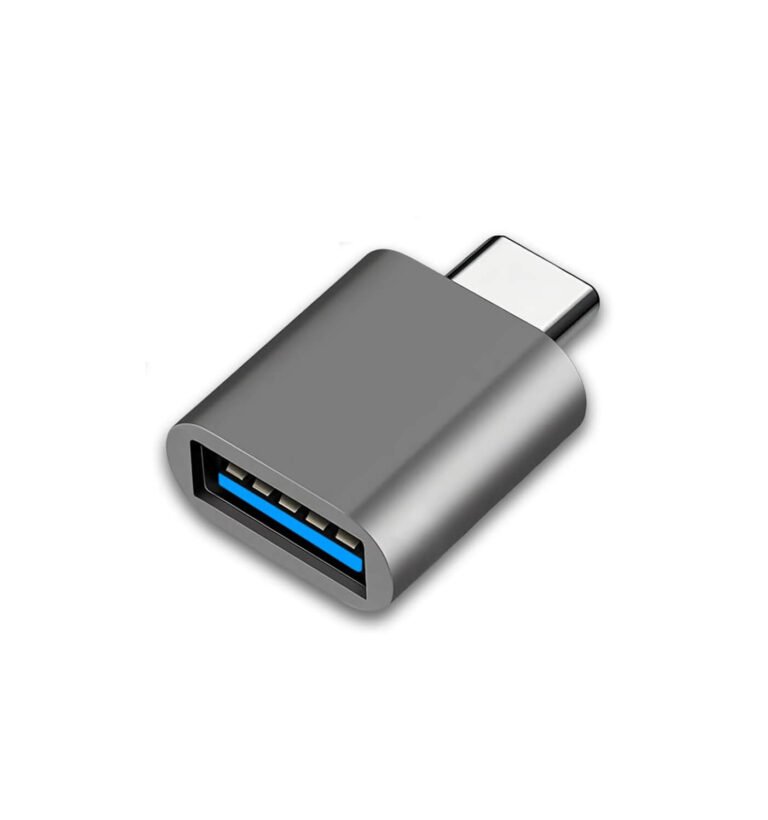
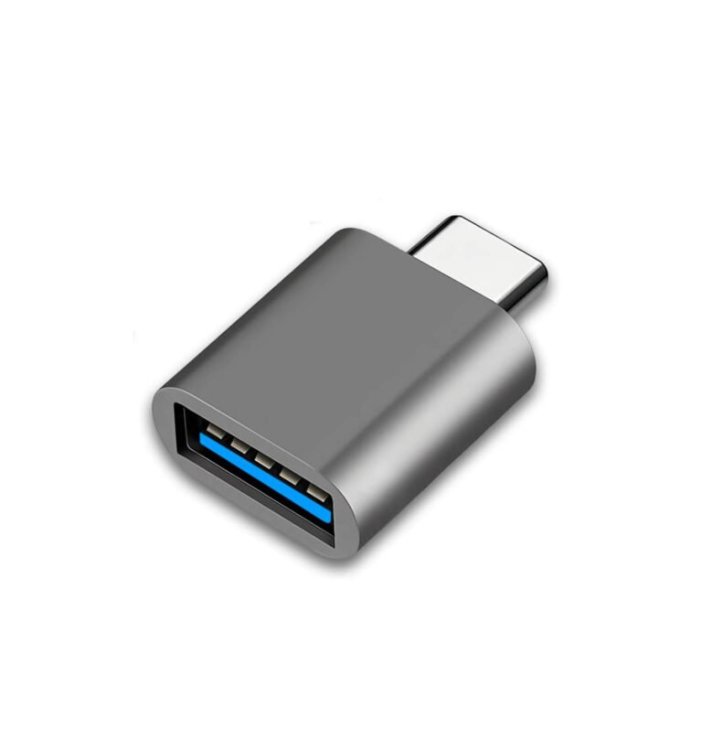
Hi! I recently wrote about the quirks of USB-C powered dash cams. Long story short: the Viofo dash cam may not work because it isn’t a fully compliant USB Power Delivery (USB-PD) device, while the car’s USB-C port acts as a USB-PD power source. This can usually be worked around in two ways: * using a “special” USB-C cable that tells the car it’s powering a legacy 5V device (which is likely what Viofo offered you), or * using a USB-C to USB-A adapter/dongle (like the one in the attached image) together with a USB-A to USB-C cable. I explain in my linked post why this workaround functions properly.
-
I think I might not have explained my point very well 🙂 I'm not trying to say manuals have more capability or traction — I completely agree with you that tyres, driver input and conditions matter far more there. And clearly you've got a lot more real-world experience with automatics in those conditions than I do. What I was trying to get at is more about how the control is delivered, not the end result. A manual gives you very direct, mechanical control over gear selection, whereas an automatic always has some layer of interpretation — even if it's very good. Modern systems do give you ways to influence that behaviour — driving modes, manual selection, paddles, etc. — but those are still indirect controls. You're essentially asking the system to behave a certain way, rather than directly commanding it. Re-reading my last response, I think that point probably came across as a bigger issue than I intended. If those edge cases were a real, frequent limitation, automatics wouldn't be as widely used as they are.
-
There are scenarios where even a very good automatic isn't ideal, although it's less about it being "worse" and more about it being less predictable — and that's where control comes in. I'm not trying to say (modern) automatics are bad — quite the opposite. In 99% of driving conditions most people encounter, they're faster, smoother, and often more efficient. But as @Aspman mentioned, it also depends on the specific implementation, so results can vary. On a personal note — as I mentioned at the start of this thread — I would have gone with an automatic, but the price and added complexity of DSG and mHEV deterred me from it. What can I say? Aversion to complexity is a professional deformation, being an engineer 😄 Driving uphill on snow or other low-traction surfaces is a good example of when automatics struggle. Systems can sometimes hesitate or "hunt" between gears if the available traction confuses the shift logic—especially at low speeds. Modern gearboxes are much better than they used to be, but they still rely on programmed responses rather than true understanding of the situation. That's essentially why different driving modes exist — they are in essence modern, more sophisticated versions of the traditional "low gear" options automatics have. The gearbox and ECU don't actually know whether you're on snow, gravel, or dry asphalt—they infer it from inputs like wheel slip, throttle position, ambient temperature, maybe even navigation data. Modes like snow or off-road then adjust throttle response, shift points, and traction control behaviour to better match expected conditions. So that "extra pedal" and gear lever still give you something no automatic fully replicates: direct, guaranteed control. If conditions change, you can react immediately by selecting the gear you want, and that's it—no interpretation layer in between. With an automatic, that adjustment can be a bit more indirect. Depending on the system, you might need to switch modes or rely on the gearbox logic to respond, and that can take an extra moment or two. Some cars make this very quick with paddles or dedicated buttons, others less so—but in all cases, the system is still interpreting your input rather than executing a purely mechanical choice. If you want to hold a specific gear, in a manual you simply do it—no second-guessing. (Even though some automatics allow manual selection, they may still override it in certain situations.) Automatics may shift faster and often more efficiently, but they aren't fully aware of the environment—they infer it. In edge cases, that difference can matter, especially when you're deliberately operating near the limits of traction. But as you wrote @Evolution13, in most conditions that additional control means nothing.
-
For a manual box, there should be a setting as @SteveTheElder noted. Here is the excerpt from the manual (Octavia MK4, production period 2022/06):


-
I also enjoy being in control, but here I meant that more as a general point for most people 🙂
-
There’s definitely still demand for manuals, but manufacturers also have a clear incentive to push automatics — they’re simply more profitable. In my case, the difference would have been about €2,500 more for the DSG/mHEV variant. I do think the comfort argument holds for most people — modern automatics are generally easier and more enjoyable to drive (from my experience, having tried one). So it comes down to how much people value that convenience. Personally, I don’t value it at €2,500, which is why I went with a manual. Also, since I’m not leasing and plan to keep the car long term, I’m not keen on the potential for higher out-of-warranty servicing costs.
-
It depends on what you need. The USB socket typically isn’t powered when the car is off, so if you want 24/7 surveillance (e.g. parking mode), you’ll need to hardwire the dashcam or use a dedicated external battery pack.
-
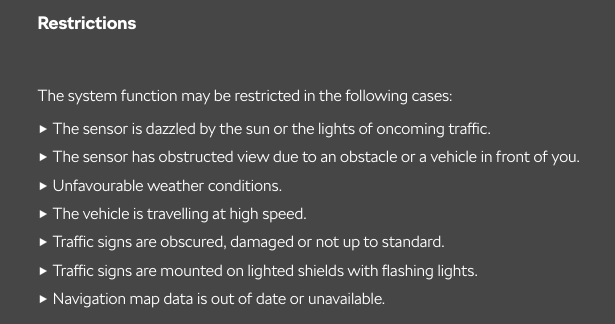
It definitely uses traffic sign recognition as well as GPS/navigation data. This is actually stated in the User Manual for several of the driver-assist systems. For example, the Speed Limiter documentation says something along the lines of: The problem is that neither source is perfect. Navigation data can be outdated or simply wrong. Traffic sign recognition can fail depending on conditions: rain, poor lighting, dirty or partially obscured signs, or signs that are visible but not applicable to your lane/direction. Here is the Traffic Sign Recognition > Restrictions section from the (Octavia MY2025) User Manual: A common example for me is motorway exits. The car will sometimes read the 40 km/h sign on an exit ramp while I'm still on the motorway and think the speed limit is 40. So the system clearly is reading real signs — it’s just not always interpreting them correctly. In general, these systems are far from flawless. Even much more advanced implementations like those in Tesla sometimes struggle with speed limit detection. So it’s not surprising that simpler implementations used across various VAG cars make mistakes. And consider also that in your experience as a driver, you probably were at some point unsure what the speed limit is — maybe you glanced at the radio at the moment you passed the sign, or it was covered by a lorry. The car is dealing with the same imperfect inputs — just with a camera and a database, and far less judgement than a human driver. That’s also why it’s important not to become complacent with these systems. Know their limits so you don’t end up trusting them in situations where you shouldn’t. The same principle applies to any driver assist feature, going all the way back to the first cruise control systems.
-
Hi, First time poster here. I went through an ordeal while trying to power a dash cam from the USB-C port behind the rear-view mirror (Octavia MY25). I have a technical background and it still took quite a bit of troubleshooting, so I can see how someone less familiar with USB-C could run into issues and end up blaming the wrong thing. So I figured I’d share what I learned in case it helps someone else, even if it's not directly answering the OP's question. TL;DR The mirror USB-C port should have enough power for most dash cams (rated at 15 W, which is plenty). The USB-C ports in the FL Mk4 Octavias are USB-PD power sources, so if your dash cam understands USB-PD, any good USB-C cable should work But, if your dash cam has a USB-C power input and a USB-C <-> USB-C cable doesn’t work, try USB-C → USB-A adapter + USB-A → USB-C cable. If your dash cam uses Micro-USB, a USB-C -> Micro-USB cable should work without issues. Also keep in mind that the USB-C port — unlike using a hard-wire kit — is powered only when the car is on or in ACC (Accessory) mode. The more detailed story My Viofo A329S dash cam powers through USB-C, so I wanted to use the USB-C port instead of hard-wiring it. I had a very short USB-C cable (~15 cm) lying around, so I decided to test with it. The camera powered up and worked normally. But that cable was too short, so I tried a longer USB-C cable. That’s when things got weird: sometimes the camera would start normally other times it would play the startup chime, shut down, and repeat in a loop At first I suspected voltage drop or insufficient power from the car. So I connected a USB power tester to see what was actually happening. The camera draws about 1 A at 5 V (~5 W) during operation (probably with a slightly higher spike during startup), which is well below the 15 W rating of that USB-C port. So power capacity was clearly not the issue. Interestingly, the cable that was unreliable before worked flawlessly when connected through the power tester. That suggested the problem was related to USB-C signaling rather than power delivery itself. What the actual problem seems to be After spending some more money on various USB cables and adapters — and doing some additional research — the likely cause turned out to be USB-C protocol non-compliance on the dash cam side. That dash cam does not implement USB-C Power Delivery (USB-PD). It simply expects 5 V power, similar to older USB devices. With a USB-C <-> USB-C cable, the power source and device communicate via the CC (configuration channel) pins. The source expects to detect the correct pull-down resistor from the device to indicate that it’s a valid USB-C power sink. Some simple devices that just "expect 5 V" don’t fully implement this part of the USB-C specification. When that happens, the power source may: delay enabling power repeatedly attempt to detect a valid sink briefly enable power and then shut it off again From what I understand, that’s what causes the startup loop. The workaround that fixed it The reliable solution was: USB-C port -> USB-C-to-USB-A adapter -> USB-A-to-USB-C cable → dash cam The USB-C → USB-A adapter contains the proper configuration resistor which tells the car’s USB-C port to behave like a legacy 5 V USB source. Once that happens, the USB-A cable simply provides constant 5 V, without any USB-C negotiation involved, and the dash cam works perfectly. Final note about cables Some USB-C <-> USB-C cables might work depending on how they’re wired internally, but fully compliant cables (especially those with an e-marker chip) will expose the (potential) lack of proper USB-C signaling from the device and the camera won’t power reliably. However, USB-PD compliant dash cams should work with those cables (and probably only with those compliant cables). So if your camera doesn’t start with USB-C <-> USB-C, don’t immediately assume the port lacks power — it’s often just a USB-C compatibility quirk. And this issue generally only appears with USB-C <-> USB-C connections. Traditional USB-A connections simply provide 5 V power without USB-C negotiation, which is why the adapter workaround works.