



Skip to content

car reving itself

Featured Replies

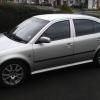
My fabia 1.4 16v elegance 2001 decided to start reving itself today at the lights i put it in nuetral and the revs dropped nearly stalled then picked itself up again and reved from just under 1k revs to just over 1k revs! Anyone know whats going on?

New air filter needed maybe or my mate says blast a bita carb cleaner up the air intake that mite sort it. Im gona change the plugs and leads soon aswell and put a green panel filter in. so need to know whats wrong before i do!

The car is fine again once you drive off or give it a few revs. Also noticed that it has a tuning sticker under the bonnet for ace performance is shefield so it may have had an ecu chip i duno lol!

Might need throttle body cleaned, or evap canister purge control could be faulty. Code scan first to rule out severe faults.

FBW throttle modules are also quite common failures.

Sometimes this happens for no reason at all, mines done it 2 or 3 times in the last 5 years, and I know there's nothing wrong. It seems to be a feature of this particular throttle motor.

Edited by kwacka

Likewise. Did it once in the rain at some traffic lights. Restarted the engine, revved it a bit and it was fine. Never done it again.

Just leave it and see if it becomes a regular occurance or not - and try turning the A/C on if it does it again, as I know this can settle down the idle on the 8v 1.4's.

Create an account or sign in to comment

Recently Browsing 0

  • No registered users viewing this page.

Important Information

Welcome to BRISKODA. Please note the following important links Terms of Use. We have a comprehensive Privacy Policy. We have placed cookies on your device to help make this website better. You can adjust your cookie settings, otherwise we'll assume you're okay to continue.

Account

Navigation

Configure browser push notifications

Chrome (Android)
  1. Tap the lock icon next to the address bar.
  2. Tap Permissions → Notifications.
  3. Adjust your preference.
Chrome (Desktop)
  1. Click the padlock icon in the address bar.
  2. Select Site settings.
  3. Find Notifications and adjust your preference.
