



Skip to content

New to skoda!

Featured Replies

Hi all,

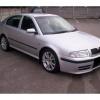
just got home from the garage, i have bought a 2003-53 Octavia vRS, cant wait to pick it up,

sadly have to wait until saturday to pick it up though, im sure it will be worth the wait

Anything i should know about the vRS before i pick it up? cheers

welcome to briskoda

Welcome :)

Check out the Octavia section for FAQ's :D

Anything i should know about the vRS before i pick it up? cheers

Yeah, you need to get it remapped to unleash the inner beast!

Oh yeah, hello and welcome an all :thumbup:

Hi all,

just got home from the garage, i have bought a 2003-53 Octavia vRS, cant wait to pick it up,

sadly have to wait until saturday to pick it up though, im sure it will be worth the wait

Anything i should know about the vRS before i pick it up? cheers

Splendid, and welcome. Looks like you will be having some serious fun. All you need to know is how to drive...the rest comes naturally!

Welcome to the forums!

All the info for the VRS is in the Octavia Mk1 forum.... and be warned, if you start modifying it it can be a slippery slope!!!

Yeah, you need to get it remapped to unleash the inner beast!

Oh yeah, hello and welcome an all :thumbup:

I have a 2003 vRS and to be honest it hasn't let me down yet. Few things to watch for as you will find out if you have a look on the Mk1 Octavia section. As for remapping. I haven't done mine and I still love it! Although most will agree that remapping is the best way to get a few extra horses for not a lot of money. But to get the best from the car, you have to spend a fortune on other things like brakes, suspension etc etc etc.......!

Welcome :)

  • Author

have already started looking at remaps but im goin to drive it as it is for now and see how it goes, anybody know of good garages for remaps around cheshire? cheers

Create an account or sign in to comment

Recently Browsing 0

  • No registered users viewing this page.

Important Information

Welcome to BRISKODA. Please note the following important links Terms of Use. We have a comprehensive Privacy Policy. We have placed cookies on your device to help make this website better. You can adjust your cookie settings, otherwise we'll assume you're okay to continue.

Account

Navigation

Configure browser push notifications

Chrome (Android)
  1. Tap the lock icon next to the address bar.
  2. Tap Permissions → Notifications.
  3. Adjust your preference.
Chrome (Desktop)
  1. Click the padlock icon in the address bar.
  2. Select Site settings.
  3. Find Notifications and adjust your preference.
