



Skip to content

Headlight tinting

Featured Replies

Hey there peeps im after some opinions on whether i should tint my headlights with lamin-x or buy new headlights from ebay which are already tinted like some other members have done on here. i got a black vrs which has a lcr front splitter and the chrome grille is now black ( transforms the car!)

only had the vrs for 4 weeks and i love it!!

Gum

Don't they work better clear?

  • Author

thats what ive heard mate, but others say that it hasn't effected the brightness that much so i don't know who to believe lol...

Depends what look you want. Whole light tinted (laminx), or the chrome inserts? The second can be done yourself if your handy with some paint and a oven.

Matt

Depends what look you want. Whole light tinted (laminx), or the chrome inserts? The second can be done yourself if your handy with some paint and a oven.

Matt

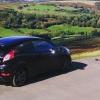
:thumbup:<a href="http://s777.photobucket.com/albums/yy59/ollymonkeynuts/VRS/?action=view&current=vrs5.jpg" target="_blank"><img src="http://i777.photobucket.com/albums/yy59/ollymonkeynuts/VRS/vrs5.jpg"'>http://i777.photobucket.com/albums/yy59/ollymonkeynuts/VRS/vrs5.jpg" border="0" alt="Photobucket"></a>

http://i777.photobucket.com/albums/yy59/ollymonkeynuts/VRS/vrs5.jpg

If the above works, I went for the charcoal? colour, what ever not the darkest is.

vrs5.jpg

There ya go! Pretty much the only option you didn't use! :p

In future, it's the [ i m g] http://i777.photobuc...ts/VRS/vrs5.jpg [/ i m g], only without any of the spaces. :thumbup:

Stunning picture and location though - looks really nice - where was it?

Edited by TriggerFish

  • Author

that vrs is absolutely amazing =0

I had dark smoke lamin x film on mine for about a year and it does reduce light output, thats why i switched to black inserts, and i got bored of the look.

Anything applied to a headlight will cut out some light output - even a clear film! Depends whether you're wanting safety and performance (nothing) or vanity (whatever)

Create an account or sign in to comment

Recently Browsing 0

  • No registered users viewing this page.

Important Information

Welcome to BRISKODA. Please note the following important links Terms of Use. We have a comprehensive Privacy Policy. We have placed cookies on your device to help make this website better. You can adjust your cookie settings, otherwise we'll assume you're okay to continue.

Account

Navigation

Configure browser push notifications

Chrome (Android)
  1. Tap the lock icon next to the address bar.
  2. Tap Permissions → Notifications.
  3. Adjust your preference.
Chrome (Desktop)
  1. Click the padlock icon in the address bar.
  2. Select Site settings.
  3. Find Notifications and adjust your preference.
