



Skip to content

1 New Badge, 2 To Go.....
Featured Replies

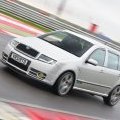
Decided to update the badges on my vRS to the MkII ones and looks good so far...

Briskoda160.jpg

Briskoda159.jpg

Just got the front vRS badge to replace but will try to do that tomorrow. B)

Im doing this aswell, who'd have thought something so small just freshens up the look :)

Looking good.

Nice and modern. B)

Is it not on the wrong side ?

  • Author

Is it not on the wrong side ?

Wrong side for Mk1 but right side for MkII. Also adds something on the left rather than just being on 1 side.

  • Author

Added the front vRS badge:

691493cc.jpg

B)

Create an account or sign in to comment

Recently Browsing 0

  • No registered users viewing this page.

Important Information

Welcome to BRISKODA. Please note the following important links Terms of Use. We have a comprehensive Privacy Policy. We have placed cookies on your device to help make this website better. You can adjust your cookie settings, otherwise we'll assume you're okay to continue.

Account

Navigation

Configure browser push notifications

Chrome (Android)
  1. Tap the lock icon next to the address bar.
  2. Tap Permissions → Notifications.
  3. Adjust your preference.
Chrome (Desktop)
  1. Click the padlock icon in the address bar.
  2. Select Site settings.
  3. Find Notifications and adjust your preference.
