



Skip to content

Hand brake Light Flashing and Beeping
Featured Replies

the hand brake light has started flashing and beeping once i set off on a jouney and stays flashing for the remainder. before you ask i have checked my handbrake switch and its all working fine and also checked and topped up my brake fluid but the problem still consists. any help would be much appreciated

cheers

Edited by weedon

Checked to see if ABS is working as it should? any other lights?

  • Author

My ABS light and tracktion control lights are also lit

Whar car? Need to get the error codes on the ABS controller, then we can help. It could be a wheel sensor.

SN

  • Author

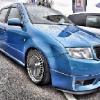
its a skoda fabia 1.4 16v 2001. ive just fitted my coilovers today and didnt know if i had kinked a brake pipe or something although we didnt remove the brakes. ive got new disks and pads to fit monday where i will be able to plug in into diagnostics to see whats up. just bugging me as i dont dare drive incase theres a brake failure

cheers sam

You fitted different wheels?

  • Author

there different wheels yes

Ok are the wheels the same size front and back? what tyre size front and back?

I am asking this because for a few days I have to run 15" on the rear which with the stupidly massive tyres meant they turned less than the front this caused the car to think the front wheels were constantly spinning when infact they werent. Gave me ABS handbrake and ESP lights on dash.

  • 1 year later...

any results on this as mine did this last night ?

Create an account or sign in to comment

Recently Browsing 0

  • No registered users viewing this page.

Important Information

Welcome to BRISKODA. Please note the following important links Terms of Use. We have a comprehensive Privacy Policy. We have placed cookies on your device to help make this website better. You can adjust your cookie settings, otherwise we'll assume you're okay to continue.

Account

Navigation

Configure browser push notifications

Chrome (Android)
  1. Tap the lock icon next to the address bar.
  2. Tap Permissions → Notifications.
  3. Adjust your preference.
Chrome (Desktop)
  1. Click the padlock icon in the address bar.
  2. Select Site settings.
  3. Find Notifications and adjust your preference.
