



Skip to content

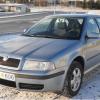
Skoda Octavia 1.8 Turbo 2002 Elegance
Featured Replies

I bought this car about half a year ago, and this is a car that I would like to own utill it dies, so I think I will spend a little money in it so I can enjoy it better.

Basic info

Skoda Octavia Elegance

Produced 2002

Driven 247K. km

1.8 Turbo 150 hp

Manual

This is how he looked like when I got him

dscn0366q.jpg

dscn0367w.jpg

dscn0368y.jpg

dscn0371x.jpg

dscn0372f.jpg

dscn0373bp.jpg

Have to change the lights, burned, probobly after to strong bulbs dscn0370o.jpg

Rims before:

dscn0369vu.jpg

After:

dscn0378j.jpg

At home, clean and nice:

dscn0379ts.jpg

dscn0380v.jpg

dscn0381b.jpg

dscn0382xl.jpg

dscn0383i.jpg

Ps. My english is probobly not the best but hopefully you will understand my decription :)

Update 14.09.2012

Got "new" used headlights.

img0203bd.jpg

Put led bulbs in the park light

img0205nm.jpg

Also the number lights

img0206rbn.jpg

And 8000K Xenon system

img0207bh.jpg

Update 12/10

Bought myself a Forge 007P Valve and cleand the throttle body, because the car was giving me proplems when cold.

New Valve

img0286jj.jpg

Comparing to orginal

img0287wi.jpg

Installed

img0291hn.jpg

Lots of dirt

img0293ya.jpg

img0294wg.jpg

Much better after cleaning

img0295my.jpg

img0296bw.jpg

And one of the engine bay, after quick wipe

img0298d.jpg

Looking good

Create an account or sign in to comment

Recently Browsing 0

  • No registered users viewing this page.

Important Information

Welcome to BRISKODA. Please note the following important links Terms of Use. We have a comprehensive Privacy Policy. We have placed cookies on your device to help make this website better. You can adjust your cookie settings, otherwise we'll assume you're okay to continue.

Account

Navigation

Configure browser push notifications

Chrome (Android)
  1. Tap the lock icon next to the address bar.
  2. Tap Permissions → Notifications.
  3. Adjust your preference.
Chrome (Desktop)
  1. Click the padlock icon in the address bar.
  2. Select Site settings.
  3. Find Notifications and adjust your preference.
