



Skip to content

Childish grin :)

Featured Replies

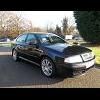
So, I just activated full closure on my mk1 vRS, now I'm sat at home, looking out at my car in the carpark, and keep opening and closing the windows like a child.

My neighbours are giving the car funny looks, and I'll probably have a flat battery in the morning, but I can't help grinning like a child! Small things eh?

So, I just activated full closure on my mk1 vRS, now I'm sat at home, looking out at my car in the carpark, and keep opening and closing the windows like a child.

My neighbours are giving the car funny looks, and I'll probably have a flat battery in the morning, but I can't help grinning like a child! Small things eh?

Yep you child lol.

i did that once and dam left windows down as must of been slightly out of range to close em.. :giggle: Went to car in morning and it had been raining. Teach me to mess about.........

Use to be fun back in the day, u could get a clifford button linked to a keyfob spare button :D

Flash lights

Huh

Flash lights

Huh

Flash lights

They walk off

Flash lights few times

They walk back..... Huh :D

U go out...... **** it !! Car wont start lol

  • Author

Yeah, I admit, she did sound a tad lethargic this morning :D

And it's rained on and off all day so no need to use it :(

How did you go about this?

Sent from my iPhone 4s

  • 3 weeks later...

Did this today, also activated auto locking when driving.

One thing to note, norton 360 does not like the program. I deactivated norton for 15mins downloaded, did the deed then after 15mins norton raised its head and deleted the program. WTF

Sent from my iPhone 4s

My windows close when I lock the car, how do you get them to open?

Hold down the unlock button on the fob

Sent from my GT-I9300 using Tapatalk 2

Use to be fun back in the day, u could get a clifford ...

I had one of those a six tone alarm

And a alarm brain that thought everyone would enjoy listening to it at 3am in the morning

Create an account or sign in to comment

Recently Browsing 0

  • No registered users viewing this page.

Important Information

Welcome to BRISKODA. Please note the following important links Terms of Use. We have a comprehensive Privacy Policy. We have placed cookies on your device to help make this website better. You can adjust your cookie settings, otherwise we'll assume you're okay to continue.

Account

Navigation

Configure browser push notifications

Chrome (Android)
  1. Tap the lock icon next to the address bar.
  2. Tap Permissions → Notifications.
  3. Adjust your preference.
Chrome (Desktop)
  1. Click the padlock icon in the address bar.
  2. Select Site settings.
  3. Find Notifications and adjust your preference.
