



Skip to content

double din head unit
Featured Replies

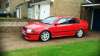
for sale my double din no longer needed,its a cool piece of kit and it boots up with a sony loading screen :rofl: fitted in my octavia very well,not sure what ive done with surround will update if i find but thier not expensive on fleebay


60posted

23iyws8.jpg

1690so3.jpg

23kuu7c.jpg

I'll have this from you today mate if you'd do it £50.00 posted.

Does this have all the sat nav in and tv tuner

  • Author

Does this have all the sat nav in and tv tuner

has it on the operating system,youd need to buy the sd cards with the maps on,not totally sure. be wanting alot more if it did have those already lol

  • Author

I'll have this from you today mate if you'd do it £50.00 posted.

gonna stick at 60 with this one :thumbup:

Can you actually watch tv on it?

  • Author

Can you actually watch tv on it?

what live tv? has the function dunno if you gotta wire it to Ariel or what another cd not sure,i bought this as a month temp so didnt look in to anything or setup it up literally slid it in tuned and listened lol oh and watched a dvd when i broke down waiting 2 hours for low loader lol

your more than welcome to come and play with it though

I believe you need to buy a freeview unit to watch tv on these. Not the normal type for your telly ;):D

  • Author

I believe you need to buy a freeview unit to watch tv on these. Not the normal type for your telly ;):D

:thumbup: :thumbup:

Would this fit in a Fabia?

  • Author

never seen a fab dash do they have 2slots like octy?

Yeah it has two slots.

Just wondering if I will need any additional wiring.

Hopefully someone who knows will be along soon.

  • Author

comes with the plug cant remember its proper name fits octy though cant see it being different

I've had a similar unit in my Fabia. No reason why this wouldn't. :thumbup:

Pm'd

  • Author

SOLD

Create an account or sign in to comment

Recently Browsing 0

  • No registered users viewing this page.

Important Information

Welcome to BRISKODA. Please note the following important links Terms of Use. We have a comprehensive Privacy Policy. We have placed cookies on your device to help make this website better. You can adjust your cookie settings, otherwise we'll assume you're okay to continue.

Account

Navigation

Configure browser push notifications

Chrome (Android)
  1. Tap the lock icon next to the address bar.
  2. Tap Permissions → Notifications.
  3. Adjust your preference.
Chrome (Desktop)
  1. Click the padlock icon in the address bar.
  2. Select Site settings.
  3. Find Notifications and adjust your preference.
