



Skip to content

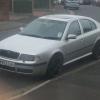
Octavia 1U Facelift bumper questions
Featured Replies

Hi guys 


Im starting work on my front bumper very soon and im after some info and advice. 


Ive seen pretty much everyone with a diesel swap their bumper for a VRS one. While im not saying anything about the bumper, as it does look nice, I do question the originality of this mod (no offence)! ;)


Im just modding my boring old standard bumper! Everyone says it will look crap so Im going to prove them wrong ;)


First thing is getting rid of the plastic inserts and fitting mesh (Obvious first step) :)


The next step requires some thought! I like the splitter that everyone uses and may need to for the next step. The next step is side splitters. Im sure youve seen them, kinda like upturned edges of a splitter. Ive seen several 'universal' ones, but, as the standard octy has a round bumper, maybe I need to fit the lip to flatten the bottom edge out? Would the 'cupra splitter' look good with wings?


My main interest is what other cars run the same size bumper? Im thinking I can look at mods for them and then apply to the Octy? I hear an A4 has the same size bumper? what about Cupras, Passats, Boras? Anyone have any ideas?


Also, If I got down the splitter route, how do I co it? Carbon wrap or just a standard paint job? Im intending to wrap the roof and maybe bonnet later on so a cf wrap might fit, or might not?


Ideas please guys ;)

Create an account or sign in to comment

Recently Browsing 0

  • No registered users viewing this page.

Important Information

Welcome to BRISKODA. Please note the following important links Terms of Use. We have a comprehensive Privacy Policy. We have placed cookies on your device to help make this website better. You can adjust your cookie settings, otherwise we'll assume you're okay to continue.

Account

Navigation

Configure browser push notifications

Chrome (Android)
  1. Tap the lock icon next to the address bar.
  2. Tap Permissions → Notifications.
  3. Adjust your preference.
Chrome (Desktop)
  1. Click the padlock icon in the address bar.
  2. Select Site settings.
  3. Find Notifications and adjust your preference.
