



Skip to content

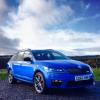
Just delivered.

Featured Replies

Looks awesome, I wish that I'd ordered the blue now, I have gone for the white with the DSG box but I won't get it till next year

Enjoy

Very nice indeed. I chose blue for my SE hatchback and am delighted 1 week or so in. I hope you have many enjoyable miles in it.

Now you get to enjoy it  :)

How long from order to delivery?

  • Author

It was about 8 weeks.

Looks very smart :)


Hopefully just another 5 weeks or so for my Race Blue SE hatch to arrive

Shave they changed the standard wheels now on the VRS?

Mine are just plain silver, and nothing like what was on the brochure. I thought it was something to so with the pic being a non UK spec car, therefore different wheels........

I'm starting to regret switching from Race Blue to White on mine. At least it's loaded with goodies and I'm picking it up tomorrow!


Enjoy yours!

Awesome looking car! Mine will also be a race blue. More pictures very appreciated. :)

Enjoy hundeds of thousands of miles :) congats

Fantastic looking car!


Were you in Sinclair Skoda around lunchtime today?


I was having a lift and noticed one like your car pulling into the car park.


I picked up my white vRS TDI DSG today from Sinclair Skoda.

  • Author

Fantastic looking car!


Were you in Sinclair Skoda around lunchtime today?


I was having a lift and noticed one like your car pulling into the car park.


I picked up my white vRS TDI DSG today from Sinclair Skoda.

Yes I was. As I was about to leave the salesman was fetching your car around the front of the showroom. He said it was about to be picked up. I've been driving mine all day. My face is hurting from smiling so much. Enjoy yours.

Create an account or sign in to comment

Recently Browsing 0

  • No registered users viewing this page.

Important Information

Welcome to BRISKODA. Please note the following important links Terms of Use. We have a comprehensive Privacy Policy. We have placed cookies on your device to help make this website better. You can adjust your cookie settings, otherwise we'll assume you're okay to continue.

Account

Navigation

Configure browser push notifications

Chrome (Android)
  1. Tap the lock icon next to the address bar.
  2. Tap Permissions → Notifications.
  3. Adjust your preference.
Chrome (Desktop)
  1. Click the padlock icon in the address bar.
  2. Select Site settings.
  3. Find Notifications and adjust your preference.
