



Skip to content

Wide Mouth Bumper

Featured Replies

Just after opinions really.

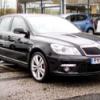
i like the wide mouth bumper look, but i don't have a fmic as yet, would it look ok without the fmic or will it just look silly. also do i fit a cupra r splitter at the same time?

also is it difficult to do, i have found Bowders HOWTO in tech guides, but like i said just wanted to get opinions.

thanks fellas

appreciate the guidance

It's east if you have the tools and the patience!

Just take your time and remember....measure twice,cut once!

Never got round to fitting a fmic on mine.

08042010411.jpg

A53E64CF-380F-4654-B62B-8D52391F2591.jpg

Just after opinions really. i like the wide mouth bumper look, but i don't have a fmic as yet, would it look ok without the fmic or will it just look silly. also do i fit a cupra r splitter at the same time? also is it difficult to do, i have found Bowders HOWTO in tech guides, but like i said just wanted to get opinions. thanks fellas appreciate the guidance


I think it will look ok. Anyway will prep you in advance of getting a FMIC.


It does make life easier fitting the LCR splitter with bumper off for sure, but not impossible to fit when bumper is on car as that is what i did.

Glad you found my guide.... :rofl:

Any one got a guide on how to do this really wanna do it to mine 

Ledge

  • Author

Thanks for the opinions guys.

I am going to wait for the weather to perk up, then give it a go :sweat:

keep your fingers crossed

Create an account or sign in to comment

Recently Browsing 0

  • No registered users viewing this page.

Important Information

Welcome to BRISKODA. Please note the following important links Terms of Use. We have a comprehensive Privacy Policy. We have placed cookies on your device to help make this website better. You can adjust your cookie settings, otherwise we'll assume you're okay to continue.

Account

Navigation

Configure browser push notifications

Chrome (Android)
  1. Tap the lock icon next to the address bar.
  2. Tap Permissions → Notifications.
  3. Adjust your preference.
Chrome (Desktop)
  1. Click the padlock icon in the address bar.
  2. Select Site settings.
  3. Find Notifications and adjust your preference.
