



Skip to content

De wiper bung size?

Featured Replies

Does anyone know what size bung i need for dewipering the rear? I could remove and measure but dont fancy it in this weather.

Cheers.

Ill measure mine when i go out if no one has answered since.

  • Author

Thanks mate that would be great.

You want how big the bung is or that actual hole size?

  • Author

The hole size please, so i know what to put in it.

I think you can get glass bungs on eBay Joe, they are expensive but look really good.

  • Author

Im cool with just black for now, cheers for the heads up though i will check them out.

Snap mine is the same one as Karl's, Joe order from that seller and mention Briskoda you may get a discount ;-) HTH.

  • Author

Thanks guys. Isit a flush fit like that aswell?

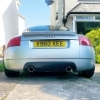
Any pics of that fitted Karl?

Yes it is Joe.

I broke mine so just went and bought the only one that was in halfords lol. Lucky it fitted! 

  • Author

Lovely, will be ordering shortly.

Any pics of that fitted Karl?


As requested Matt


Bung_zps36f48fb4.jpg


The kit I had also included some black mastic (Tiger Seal), one point to note when fitted it protruded about 2 mm further out then the rear screen so I just pushed it back a bit and held it in place with some masking tape until the mastic cured. Good job no leaks.


Karl   :thumbup:

About 30mm if you want the rubber grommit, hard to measure in the dark and rain :P

i fitted the one in the link above a couple of days ago, looks ace, cant fault it. Loads better than a rubber grommet imo!

Create an account or sign in to comment

Recently Browsing 0

  • No registered users viewing this page.

Important Information

Welcome to BRISKODA. Please note the following important links Terms of Use. We have a comprehensive Privacy Policy. We have placed cookies on your device to help make this website better. You can adjust your cookie settings, otherwise we'll assume you're okay to continue.

Account

Navigation

Configure browser push notifications

Chrome (Android)
  1. Tap the lock icon next to the address bar.
  2. Tap Permissions → Notifications.
  3. Adjust your preference.
Chrome (Desktop)
  1. Click the padlock icon in the address bar.
  2. Select Site settings.
  3. Find Notifications and adjust your preference.
