



Skip to content

Best HID kit for 2009 vrs ?
Featured Replies

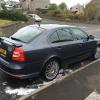
Am going to buy a HID H7 headlight bulb kit and what to know what one is best to go for. I have a 2009 preface lift octavia vRS Limited Edition model. So what kit is best to go for , do I need canbus or non canbus kit ? Not going mental just going to go for 4300k or 5000k. I know cheaper kits make errors or make the lights flicker so want to know what exact kit to buy that's proven to work with the vrs

^^ This post says it all.

  • Author

Cheers guys I emailed London colour with what car I had and what kinda thing I was after and they sent me the link with exact ally what to buy

Cheers guys I emailed London colour with what car I had and what kinda thing I was after and they sent me the link with exact ally what to buy

I would be careful with that as I believe London colour tend to recommend the can bus kit for the Octy whereas people on here suggest the non can bus kit and coding.

Would these also be the same for a 2010 face lift vrs? But I'd want the 5000k ones cheers as I've read loads of the HID threads and have a Monster headache now lol

Sent from my iPhone 5

using Tapatalk

Yes, whether the car is a pre-facelift or facelift doesn't affect which kit you choose.

  • Author

Ye they sent me canbus ones and they don't work. Anyway to make them work or swap for non canbus. I have maxidot but no access to coding equipment

Create an account or sign in to comment

Recently Browsing 0

  • No registered users viewing this page.

Important Information

Welcome to BRISKODA. Please note the following important links Terms of Use. We have a comprehensive Privacy Policy. We have placed cookies on your device to help make this website better. You can adjust your cookie settings, otherwise we'll assume you're okay to continue.

Account

Navigation

Configure browser push notifications

Chrome (Android)
  1. Tap the lock icon next to the address bar.
  2. Tap Permissions → Notifications.
  3. Adjust your preference.
Chrome (Desktop)
  1. Click the padlock icon in the address bar.
  2. Select Site settings.
  3. Find Notifications and adjust your preference.
