



Skip to content

2015 Name That Bike Game
Featured Replies

Ah...of course...Triton T100 or similar.

  • Replies 297
  • Views 15.2k
  • Created
  • Last Reply

Top Posters In This Topic

Most Popular Posts

Posted Images

Speaking for myself, I'm just a bike bore! Now for something a bit trickier.....

post-963-0-98994400-1432241686_thumb.jpg

4stroke 125 single looks jap anywhere close?

I recognise the round housing but I can't place it

Honda k5??????

Edit

I think that was a twin??

Honda CB100n............oh please tell me I am right. This thread has been doing my nut because I cannot recognise any of the bikes!

Honda CB100n............oh please tell me I am right. This thread has been doing my nut because I cannot recognise any of the bikes!


I think you've recognised this one  :D

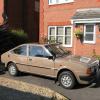
Nope, it is a Japanese smallish single from the early eighties tho'

CB125

Not Honda I'm afraid

Another pic maybe.......


post-963-0-73595500-1432417863_thumb.jpg

Please please please.......Suzuki GT200 xs

Kawasaki gto 125???

The wheels gave it away

The wheels gave it away

Right marque,  wrong model and capacity, 4 stroke not 2 and it was a UK model. Yes, the wheels are very distinctively Kawasaki

Perhaps another pic.....


post-963-0-12208000-1432488026_thumb.jpg

Just gotta gotta gotta be a Kawasaki Z250c

We have a winner! Over to you :clap:

Try this one. The flip screen is not standard by the way.

post-49472-0-57071300-1432539952_thumb.jpg

Edited by kevberlin

Suzuki veradero?

Kawasaki Z750? 

KLE 500?

I know its a kle500 as I'm picking mine up tomorrow

Yes boys. Good effort. KLE500.

Essexocty........there is an online owners manual for the bike. Link below:

http://www.manualslib.com/manual/693564/Kawasaki-Kle500.html#manual

I still own the KLE500 though I ride a new Honda. KLE500 is a great machine. Enjoy.

Over to Fatbloke then.

Edited by kevberlin

Try this


post-963-0-72301000-1432587150_thumb.jpg

Gsxr 400

Create an account or sign in to comment

Recently Browsing 0

  • No registered users viewing this page.

Important Information

Welcome to BRISKODA. Please note the following important links Terms of Use. We have a comprehensive Privacy Policy. We have placed cookies on your device to help make this website better. You can adjust your cookie settings, otherwise we'll assume you're okay to continue.

Account

Navigation

Configure browser push notifications

Chrome (Android)
  1. Tap the lock icon next to the address bar.
  2. Tap Permissions → Notifications.
  3. Adjust your preference.
Chrome (Desktop)
  1. Click the padlock icon in the address bar.
  2. Select Site settings.
  3. Find Notifications and adjust your preference.
