



Skip to content

Paint codes

Featured Replies

Just had a look in the boot and can't find the build sticker, Looks like it's been removed.

How else can I find out my paint code?

Also need the paint code for my Monza alloys, Is that listed online somewhere?

  • Author

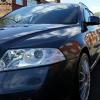
Black Pearl? My car is an LE but it's Anthracite. Done some digging and I think it's F8J or 9153.


Just need to find out if my wheels came from factory with a standard Silver colour.

You should also have it on a data sheet in the front of your service book.

Ah ok then for the Anthracite Grey Metallic. skoda use the RAL 9153.

Vw is VW LF8J. It's because brim mad jps has an le interior and he did have Monza style wheels originally so think of them being black

  • Author

Ah ok then for the Anthracite Grey Metallic. skoda use the RAL 9153.

Vw is VW LF8J. It's because brim mad jps has an le interior and he did have Monza style wheels originally so think of them being black


Cheers. Are VW and Skoda colours identical?

Yes and the wheels were from team dynamics not only they were just fitted to UK cars at the port like ie mk1 fabias were with the seats etc

  • Author

:thumbup:


I don't like the wheels personally but the centre caps need repainting until I get new wheels.

I have some Anthracite touch up that I no longer need

  • Author

Hi Chris, What brand is it?

Skoda

  • Author

Skoda

How much do you want for it delivered chap?

PM sent, due to Forum rules

  • Author

Sorry, New on here so little new picking up forum etiquette.


I'm used to Vauxhall forums where mob rules :thumbdown:


Replied to PM.

Sorted :thumbup:

Create an account or sign in to comment

Recently Browsing 0

  • No registered users viewing this page.

Important Information

Welcome to BRISKODA. Please note the following important links Terms of Use. We have a comprehensive Privacy Policy. We have placed cookies on your device to help make this website better. You can adjust your cookie settings, otherwise we'll assume you're okay to continue.

Account

Navigation

Configure browser push notifications

Chrome (Android)
  1. Tap the lock icon next to the address bar.
  2. Tap Permissions → Notifications.
  3. Adjust your preference.
Chrome (Desktop)
  1. Click the padlock icon in the address bar.
  2. Select Site settings.
  3. Find Notifications and adjust your preference.
