



Skip to content

Paint Colour Codes for Colout Concept Model
Featured Replies

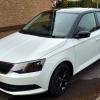
picked up my Colour Concept(not Edition) TSI90 in April and it's Moon White(Metallic?) with black roof, mirrors and wheels. I'm trying to get touch-ups for both the white and the black(looks metallic). In the front of my Service Book is a sticker; will the correct codes for the paints be there? If so, where exactly please?

There is a very similar sticker with the same details in the boot / spare tyre well.

usually the paint code is beside where it says Paint no.  or 'paint code'.

That is for the white'.


The Black Magic (metallic) should be easy enough to get the code for.

post-86161-0-46973100-1466869963_thumb.jpg

Edited by GoneOffSKi

  • Author

Cheers GoneOffSki, now found it on the sticker in the service book. LS9R-2Y1Z. The 1Z refers to the Black Magic Pearlescent whilst the rest is the Moon White Metallic. Halfords have their own make kits for both colours but not sure how accurate the colour will be. Looked on theskodashop.co.uk but they don't seem to stock the white.

Also found a site PaintRef.com that has a massive database covering all manufacturers.

  • 2 months later...

bump.

picked up my Colour Concept(not Edition) TSI90 in April and it's Moon White(Metallic?) with black roof, mirrors and wheels. I'm trying to get touch-ups for both the white and the black(looks metallic). In the front of my Service Book is a sticker; will the correct codes for the paints be there? If so, where exactly please?

Just go back to your local Skoda dealer and buy the official touch-up paints. Risk-free.

Create an account or sign in to comment

Recently Browsing 0

  • No registered users viewing this page.

Important Information

Welcome to BRISKODA. Please note the following important links Terms of Use. We have a comprehensive Privacy Policy. We have placed cookies on your device to help make this website better. You can adjust your cookie settings, otherwise we'll assume you're okay to continue.

Account

Navigation

Configure browser push notifications

Chrome (Android)
  1. Tap the lock icon next to the address bar.
  2. Tap Permissions → Notifications.
  3. Adjust your preference.
Chrome (Desktop)
  1. Click the padlock icon in the address bar.
  2. Select Site settings.
  3. Find Notifications and adjust your preference.
