



Skip to content

Time to say goodbye :-(
Featured Replies

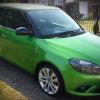
I just want to say a massive thank you to everyone for their help and advice over the last (nearly) 6 years of owning my Fabia vRS, even though it's had a new engine and additional fixes, the enjoyment this car has brought me and my wife can't be put into words, we are really sad to be letting it go.


I'll still be hanging around in the general car forum and if I see anything I can put input from my experience to on the Mk2 forum I will. This is such a good group, I haven't come across another forum like this on any car I have owned, you're a great bunch and I know I will probably be asking for some help with the new car(s) at some point.


Thanks for having me, I know I haven't put much into the group over those years but I want you all to know how much I appreciate you being there, keep it going!!


All the best :-) 

Adios MilgeS and family best of luck with your new venture, remember you can check out of Hotel Briskoda but never leave .;)

  • Author
7 minutes ago, JED said:

Adios MilgeS and family best of luck with your new venture, remember you can check out of Hotel Briskoda but never leave .;)

Thank you very much, still hanging in there until end of July when the new cars arrive but I know what I'm like for finding time so thought now would be the best time to check out :-)

Create an account or sign in to comment

Recently Browsing 0

  • No registered users viewing this page.

Important Information

Welcome to BRISKODA. Please note the following important links Terms of Use. We have a comprehensive Privacy Policy. We have placed cookies on your device to help make this website better. You can adjust your cookie settings, otherwise we'll assume you're okay to continue.

Account

Navigation

Configure browser push notifications

Chrome (Android)
  1. Tap the lock icon next to the address bar.
  2. Tap Permissions → Notifications.
  3. Adjust your preference.
Chrome (Desktop)
  1. Click the padlock icon in the address bar.
  2. Select Site settings.
  3. Find Notifications and adjust your preference.
