bobbest
Members
-
Joined
-
Last visited
-
Thank you both, the dealer confirmed abovementioned part number :-). They will install heated windscreen to my car. The rest stuff will be installed later.
-
He advised to contact with you as PR code is 4GW Heat insulating windshield. No info about heating. I came to the same number of windscreen by using ETKA, but I wanted to confirm it.
-
@Cairus can you please help? I have checked the windscreen from VIN number with @Breezy_Pete and it showed 3V0 845 011 AN NVB. Is that number correct for heated screen with UV filter, acoustic for 2q0 camera, rain/twilight sensor? I want to retrofit it to my car with normal windscreen - S3FL, 2021, camera 2q0, rain/twilight sensor. Thank you.
-
Yes, you are right
-
Can anybody help to define number of windshield from a VIN number? <Removed> Thank you Please use do not post your VIN or reg number on the public forums, as data scraping may use this information for vehicle cloning or other activities. Only send this information via the PM (Private Messaging) function to trusted members. If the PM function is not yet available to you, tagging the member and asking them to start a conversation will work. Briskoda Admin
-
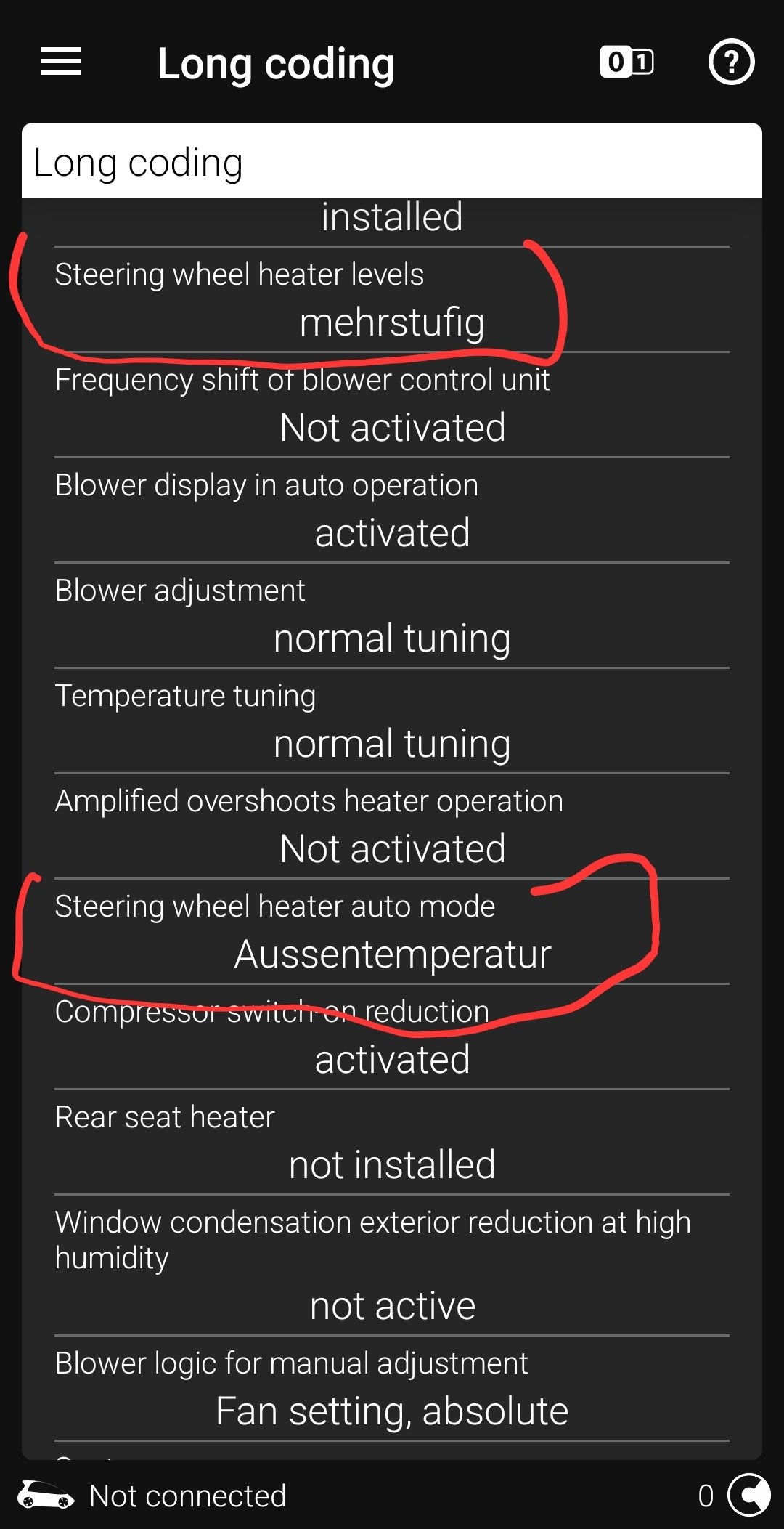
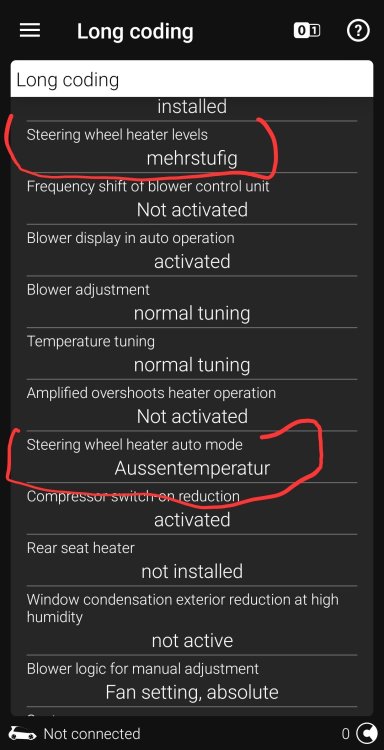
By these settings - autoheating with seats and tempetature works properly. Button on steering wheel does not change 3-2-1-0 but only on/off
-
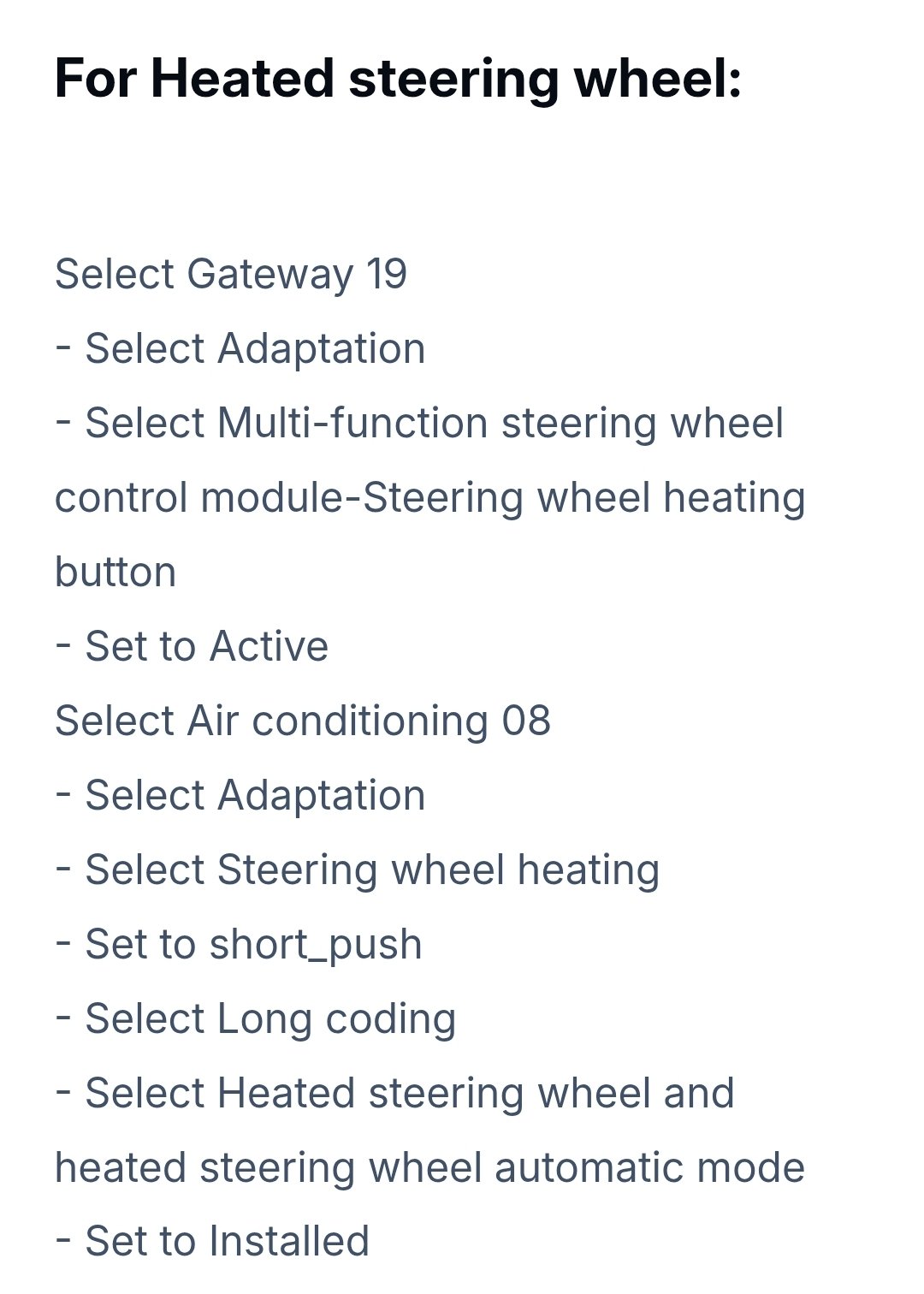
Is it possible to code 2 things to work: Changing the steering wheel heat level by the button on the wheel (3-2-1-0) And Automatic heating in low temperatures + automatic heating when seats are heated? New type of steering wheel from the factory. Heated steering wheel retrofitted.
-
Does anyone coded to switch on interior light after ignition off instead of after opening the doors? It annoys me a lot.
-
Nobody installed AliExpress module? How have you managed to sort out the Travel Assist Error?
-
Hi! Has anyone installed AliExpress KLR Module For Travel Assist Error to deal with "Travel Assist currently unavailable" error? I don't really find opinions from Skoda owners, but have found several from VW owners - they all were positive. I see that popular is Aiduauto KLR: https://a.aliexpress.com/_EIGlyFy I am searching for owers opinions.
-
I've coded that bit and I got big emotions - more than 50 errors occurred, even engine and transmission. I managed to clear everything, but something more is wrong :/. After coding, parking sensors became unavailable. Are you able to help to find what more shall I correct? Errors: 10. Parking Assistant 210. Parking Assistant 2 DTCs: 1 ---------------------------- 13632273 [0xD00311] U112100: Databus missing message Steuergerät für Anhängererkennung-J345 - Gateway_72.Anhaenger_01_alt - kein Signal/keine Kommunikation Bity stanu: 1 Priorytet: 6 Częstotliwość: 1 Indeks: 85 Status: Test się nie powiódł, Potwierdzona 76. Parking assistant76. Parking assistant DTCs: 1 ---------------------------- 13632273 [0xD00311] U112100: Databus missing message Steuergerät für Anhängererkennung-J345 - Gateway_72.Anhaenger_01_alt - kein Signal/keine Kommunikation Bity stanu: 1 Priorytet: 6 Częstotliwość: 1 Indeks: 85 Status: Test się nie powiódł, Potwierdzona
-
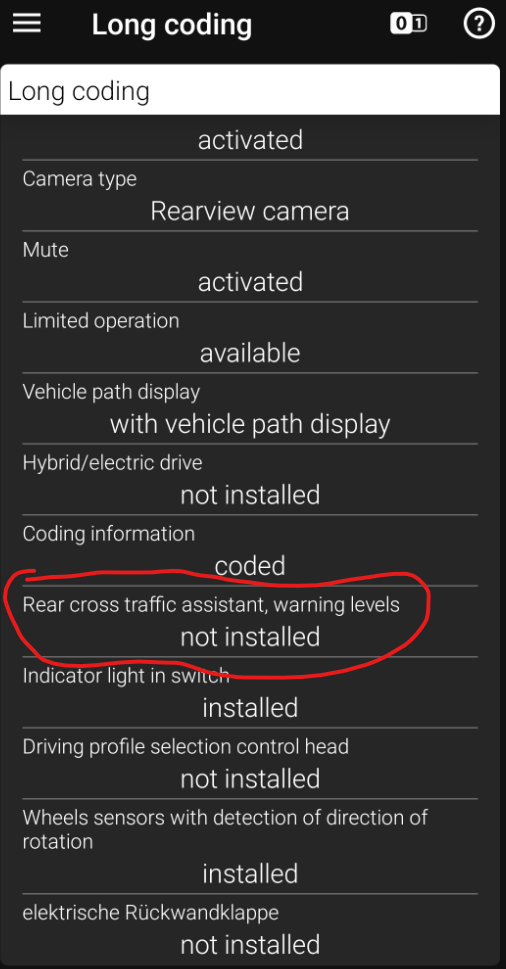
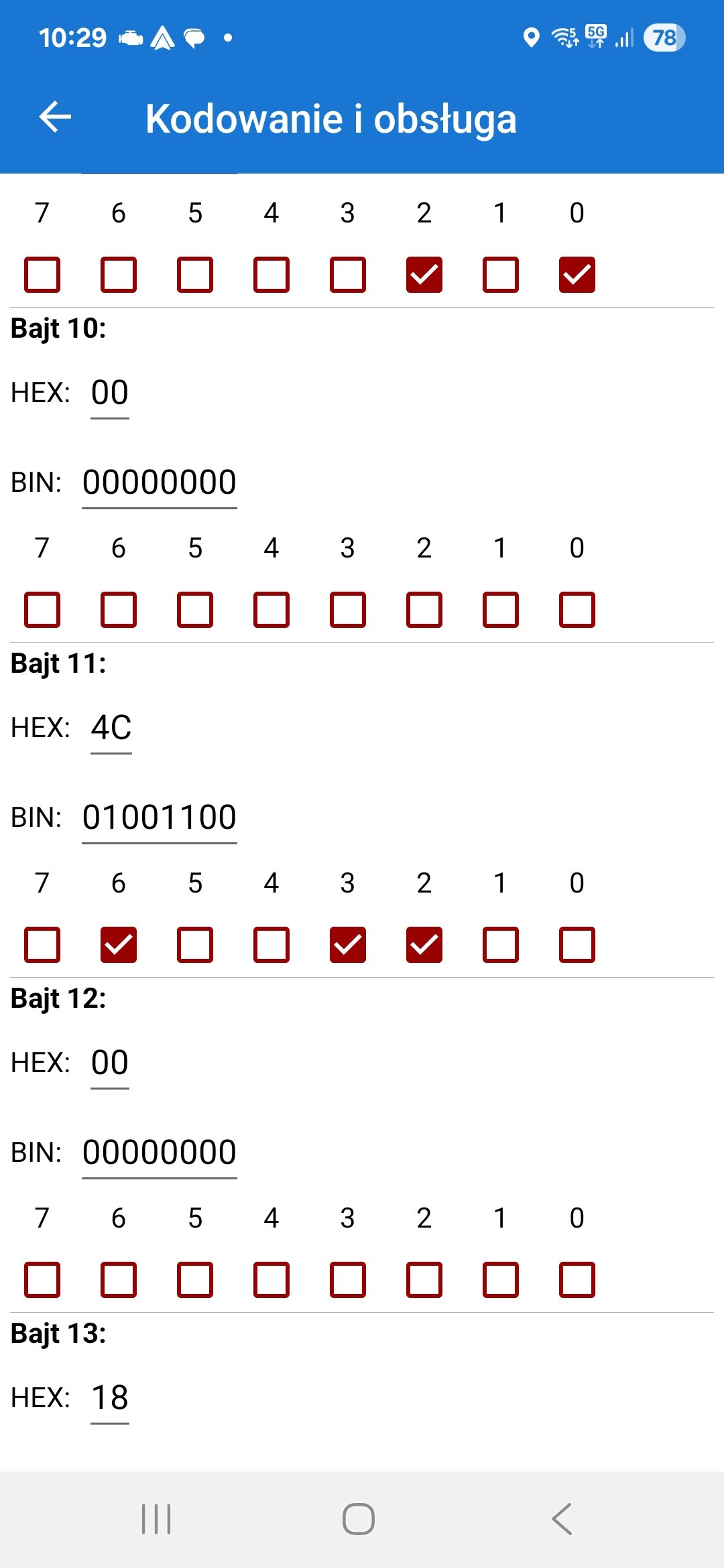
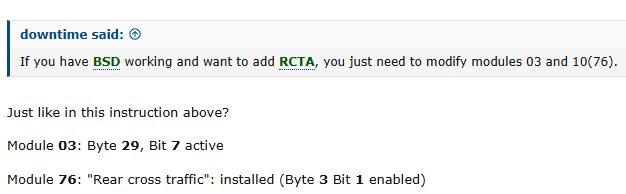
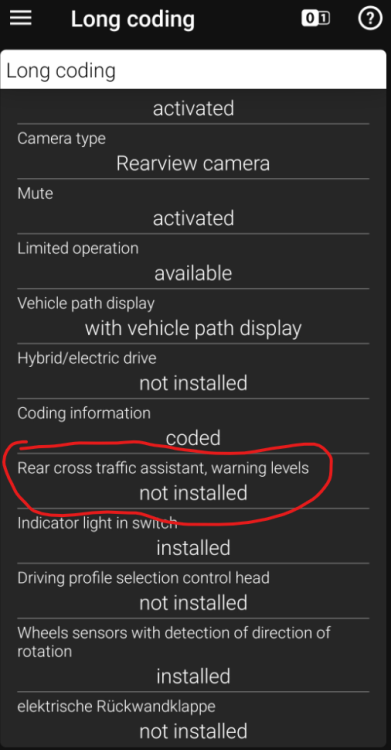
I am looking for help with my retrofit - Superb 2021; Virtual Cockpit, MIB3 infotainment . It was done some time ago, but it doesn't work properly from the start: side assist seems to work ok - it reacts on both sides. rear cross traffic assistant - not working at all (on the dash - error - unavailable). Usually not possible to tick on the dash; even if possible - each time I select "R" - beep + error on the dash. Carscanner shows error: 3C. Lane change assistant3C. Lane change assistant DTCs: 1 ---------------------------- 2240530 [0x223012] U112300: Databus error value received Parkhilfe_01::PH_Tongeber_H_verfuegbar. -> I was already asked if park buzzer works properly -> yes, it does. I think that hardware shall be done properly, but something is wrong with coding. I googled a lot, but was unable to find coding for similar car to check it :/. I found coding for 2016 Passat, but I doubt if this is the same: [MQB] [Skoda SuperB] - Rear Cross Traffic Alert - Coding Is anybody able to help me find the proper coding for Superb 3 FL (MIB3; VC)? I normally use Carscanner, if needed I will borrow OBD11. I can see a post in link Ross-tech topic: My car: ABS - byte 29, bit 7 is active Module 76 - byte 3; bit 12 is not enabled. Screen from ODB11 - Parking Assistance (76):
-
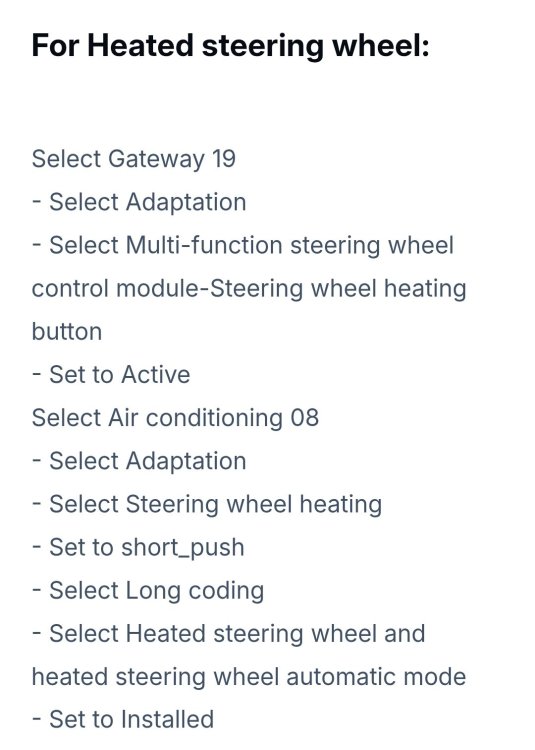
No, I had new style (2-spoke) and switched to new Style 3-spoke with heating. Maybe I expert too much but after installation I had 3-2-1-0 lvl by button on the steering wheel + heated sits activated heated steering wheel + heated steering wheel activated below 4 degrees of Celcius. Now I have only on/off by button on the steering wheel, no changing levels. Seat and temperature activation is present. I checked all options in Car Scanner and I don't find all adaptations from the thread: https://www.briskoda.net/forums/topic/534101-how-to-travel-assist-and-heated-steering-wheel-retrofit/ I guess that I have to find VCDS or OBD11 owner to check, but maybe someone could help to find them in CarScanner
-
-