




chelon
Members
-
Joined
-
Last visited
Everything posted by chelon
-
I fear you are correct and that will mean tons of work. I've just noticed that in windows explorer the art jpg is actually in the album folder (one with all the songs in it) Would be great if there was an option in itunes or via another piece of sw to copy all the embedded artwork to this location
-
Pairing with FM...wow that's a technology I think I last heard about in early days of mobile phones...thanks though I'll consider this if nothing else turns up
-
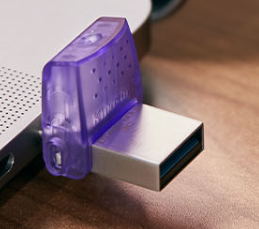
Just a quick update, I ended up getting a Kingston as suggested above and it's very good: When plugged into the car the purple flap offers a bit of support and stability if it does get knocked. So I copied my 44GB of music from my itunes library folder on the PC to it and in the car it seems to play fine - however - about 75% of the album art is missing. 100% is there on itunes but when I view the itunes library in windows explorer only 75% is visible - anyone know exactly why? (really don't fancy having to manually add all that artwork...) I might dl media monkey and have a play, maybe that will use all the artwork that's there and hopefully transfer it to the stick...
-
For Shure!
-
As I suspected I dont think its possible - unless I see a bluetooth one on offer...
-
I've tried plugging in a couple of USB connected players (Lenovo & LG branded) into the USB-C port. Result:- car doesn't seem to see any media - however when you exit the car you hear message "please disconnect USB device" so it is recognising something. I can see CD players for sale advertised as for "car use" - so my question is would these work in the Octavia Mk4 or is there a setting I'm missing which would allow the ones mentioned above to work? I know I can encode all my existing CDs to a usb stick but I also borrow a good many so the option to play them would be useful.
-
My last car was 11 years old so this brand new Octy feels so hi tech to me and even a month into driving it every day brings a fresh batch of beeps, buzzes, flashing graphics etc and the car seems to be bristling with sensors....so I just thought this may have some function rather than just being a piece of trim...
-
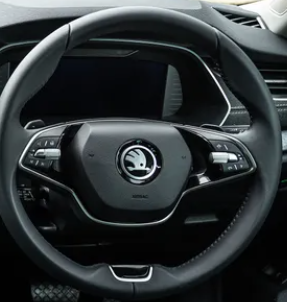
This is a stock photo as I'm not in car right now, but it's identical to this:-
-
It's a silly question? I'm just presuming it's got some function
-
I notice this feature which just looks like a touch screen for a mobile phone but doesn't seem to do anything when you do touch it. Anyone know what it's for exactly?
-
Sorry Steve probably not - it still looks a bit "vertical" - I've seen so many mini & micro USB sockets written off on laptops in the old days usually by something as innocuous as someone tripping over a cable and to my eyes usb-c looks no better. A quick Google seems to reveal that a lot of people have found them very fragile...
-
Possibly - but I was thinking more of a "short squat" stick, without an adapter that could survive the inevitable knocks
-
I was thinking about that but it may block the wireless phone charging?
-
Thanks that's a bit more like what I'm after - is that a female usb-a though? I'd ideally like a male so I could plug into the old pc for copying the music across
-
That's interesting, as I already have a 64GB card that I used in the old car - but it's still the long skinny shape - if anyone knocked it getting into the car etc it could well wreck the connector and even worse the socket - maybe I'm worrying too much but the older mini and micro USB sockets were murder for withstanding knocks, I'm not sure if usb-c is any better, it certainly looks fragile enough
-
So I've found that the usb-c port does indeed work if I put all my music on a stick. Now, next problem lol. I need to get a new stick as my biggest is only 32GB and I'm gonna need double that. Also as I see it a traditional usb stick (ie long and thin) is pretty vulnerable plugged into a tiny usb-c socket next to an area that passengers are gonna throw keys etc into. So I'll be looking for a flatter squarer shape hopefully that will be more robust. Can see this one but it's not usb-c and Sandisk don't do one yet, anyone suggest anything? Double ended usb-c and a would be ideal https://www.amazon.co.uk/SanDisk-reversible-connectors-smartphones-computers/dp/B01M0QR22B?th=1
-
So with this it looks quite shallow, does the big tray hinge up for access below or do you have to take whole tray out every time?
-
Got it now thanks all. I do carry a lot of stuff in the boot but struggling to think if I'd ever have need to use this at all.
-
The load cover, is that the black bar with the sliding blind? If so I can't see a silver bar on mine?
-
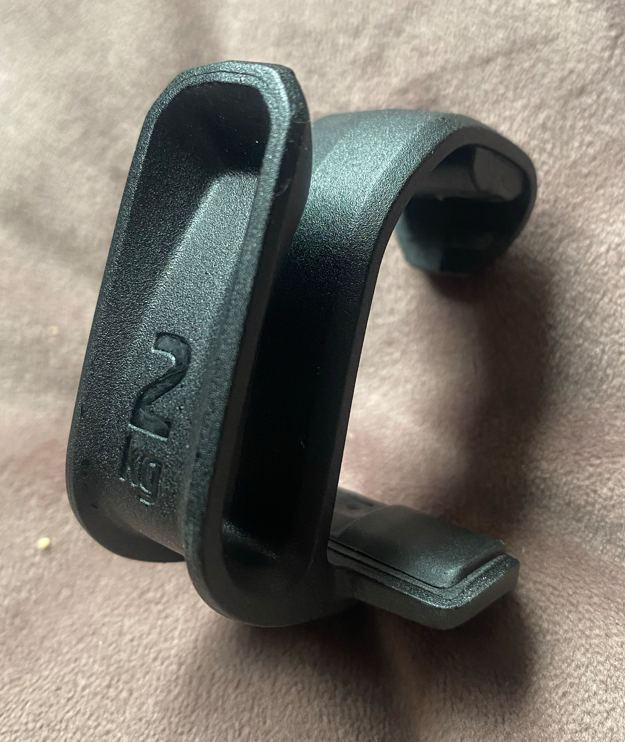
So it's basically just to stop stuff from sliding about in the boot? Seems overkill unless youre going round chicanes doing the ton lol. Also my car has the boot mat which covers those fixing points so I'd need to cut holes in it I think. While we're here, anyone know where these hooks are meant to fit?
-
Excellent video, shows you what a lot of the add ons are for
-
Are you sure? I did see this when I googled but this doesn't have the 2 plastic handles like mine?
-
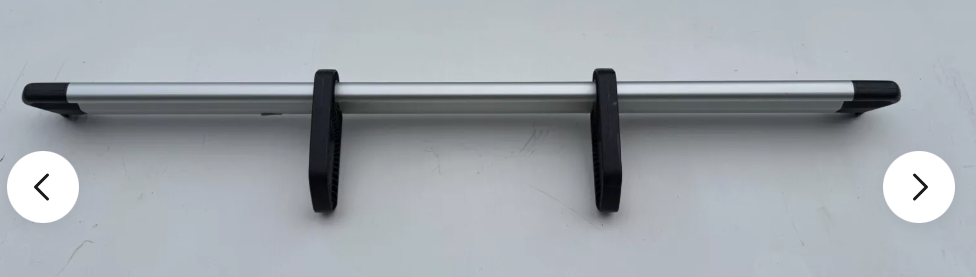
Got the new Mark 4 now and figured out what all the bits are for....apart from this:- Aluminium bar with what looks like 2 x plastic loop handles on it Anyone know?

-
My 64GB phone is quite full and I've got about 45GB of music on the iPod - I tried Spotify in the car today and was quite impressed by the sound quality. But I do have a lot of "curated" stuff on the ipod lol. So what I will probably do is dump it on a USB stick and also use Spotify etc when needed.
-
Got the new Mk4 Octy now, findings:- Wont pair with the old iPod via bluetooth - iPod runs v2.1 and car needs 4.1 I believe. I then got a usb-c to usb-A converter and plugged the iPod into a media socket. Result☠️ Sorry, USB device is not supported. I see this https://www.rockbox.org/ Which seems to present the iPod as media - anyone know if this will make it visible to the car? Alternatively I think I'm looking at a usb-c stick and Media Monkey as mentioned above

