




chelon
Members
-
Joined
-
Last visited
Everything posted by chelon
-
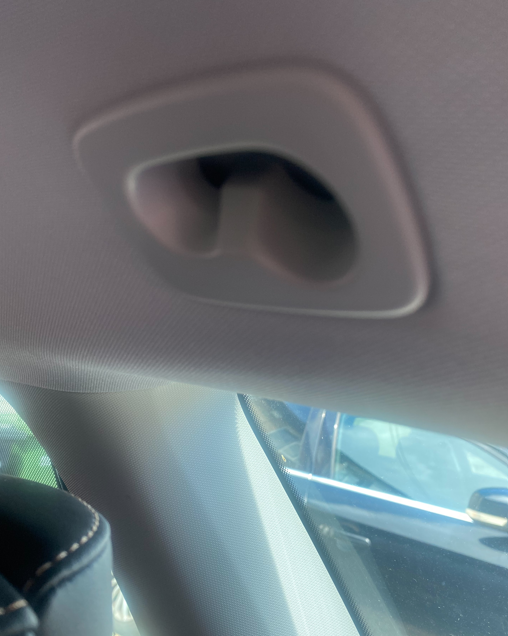
Seems pretty difficult to remove it without breaking the clips in behind. What I'm trying to achieve is a hole maybe 18mm across so I can insert a hanging rod across the car. I could just drill out the existing piece. If I then sold the car I'd maybe have to replace it though - anyone know if these parts can be bought anywhere?
-
Not sure what they're called maybe just "lugs". Had a quick search and cant see much online...let me try again in daylight tomorrow
-
Tried but it seems to want to stay put. Are there clips in behind? Just don't wanna break anything.
-
Thanks so much, I'd never have thought to do that - I prised the cover off with a knife then undid the screw. The piece just doesn't want to come off though, are there clips in behind as well?
-
That would be great thanks, can't really see that on my Octavia but I may be looking in wrong place
-
Anyone know best way to remove these without breaking any clips etc?
-
Didn't know that, how can you tell? It was new in Feb last year
-
Guess it could be any or all of those things, but as it plays perfectly in the PC could be a lot of work involved in the root cause, but maybe I'll try a diff stick first as thats an easy one to try. With my previous Octy I used an iPod so the decompression etc all done before it hits the cars audio, but with this new car...as with everything else...totally dependent on the car computer which seems to struggle with just about everything...
-
Couldn't think how to describe this one, in a nutshell - New Octy Mk4 - put all my music on a stick which plays perfectly in the PC at home...but... In the car, some tracks play perfectly...but around 30-40% of them have an issue ie it's hard to describe but the tone seems to fluctuate every 5-10 seconds, ie it seems to lose midrange and treble and sounds pretty flat....then a few seconds later it seems to correct itself but only for a few seconds then the issue returns and so on all the way through the song. Radio and music from other sources don't have this issue. Anyone notice this on their Octy?
-
Further testing complete Steve and apols, I think you may be correct re the info you supplied above - However...when you enable Carplay as you say the contacts list vanishes, but you can still make manual calls via the car app (the speed dial entries and contacts list disappear). So what is going on, it's like it's half connected Also I'm now seeing a message on the dash "please connect a bluetooth phone" or similar - yet when you manually make a call this message vanishes (without you having to touch Bluetooth settings at all). Tres tres confusing...
-
I'll do more testing but I'm pretty sure that's not how it works on my car - as the contacts list was never visible I've only been using Siri to make phone calls up until a week ago. Then just for fun I added a few Speed Dial entries to the basic car phone app...and hey presto all my contacts are there...even with Carplay connected....until the other day when I entered the car and back to square 1, for no apparent reason , I've not changed anything, I can only put this down to flaky Bluetooth (as experienced on every single one of the dozens of BT devices I've ever owned, which is why I'm not a fan).
-
So did a bit of testing over the weekend, findings:- When you enable wifi via tethering to your mobile, Carplay disconnects...BUT it will then reconnect if you then manually enable it. So...you then have BOTH Carplay & tethering active at once. If you then leave the car for a couple of minutes then re-enter the tethering will reconnect - but it seems to take about a minute to do so. However if you leave the car then enter it say the next day the old issue of having to re-enable tethering on the iphone returns (is there a way to have it always on?) As a side issue - the phone function on the car never used to display my contacts (until I created a few speed dials a week ago, its been ok since then....) until today, contacts all missing again. Then I found that I had to reconnect via Bluetooth and all contacts are there again. This seems to happen maybe once or twice a week. surely this shouldn't be happening? SOOO many issues with this car...
-
A mate has one of these:- https://www.amazon.co.uk/dp/B0B9ZQRDFQ?ref=cm_sw_r_cso_fm_apan_dp_NKD75V19J6G3A00GBE4B&ref_=cm_sw_r_cso_fm_apan_dp_NKD75V19J6G3A00GBE4B&social_share=cm_sw_r_cso_fm_apan_dp_NKD75V19J6G3A00GBE4B Got me thinking of getting one for the Mk4. Won't be for sleeping in, just sitting in and fishing when the weather gets rough, big enough for a couple of camping chairs would be enough. 2 requirements: Has to be able to be used on a solid surface (ie tarmac) Has to be not much wider than the car when erected. Anyone got any ideas or got one themselves?
-
From the digi dash? How exactly?
-
Main reason I want internet radio to work is, you can store stations as a favourite alongside the trad radio stations, making all accessible from one screen (favourites). You cant seem to be able to add to favourites from apps like tunein radio etc.
-
The 3G/4G SIM in the car - is that the one used in the emergency call system or is there another one?
-
Let me test it tomorrow by trying the tether with Carplay enabled also. But I suspect it might be a function of the iPhone since even when you tether the laptop to the phone then disconnect and try to tether later you always have to toggle the tethering off & on on the phone to get it to work.
-
It's a valid point, and in fairness the voice recognition most of the time works fairly well. It's just (yet) another function I'm getting used to....6 months in... Most times when you get a new car there's a few things different that you have to get used to...with the Mk4 about the only things the same as my old Mk3 are the wipers and indicators, everything else is vastly different, it's a lot to get used to.
-
ok, but why when I look at the phone is wifi disabled and if I try to enable it I get the message mentioned above? Also, as you seem to have some knowledge 😊 I got the "internet radio" working by tethering the car to the phone - but every time I leave & re-enter the car this is broken and you have to set it up again - any way to have it always on?
-
It's so annoying. On the Mk3 the scroll wheel was all powerful and you could scroll through recent calls which appeared right in front of your eyes on the dash display. On another thread I was told the Mk 4 can't do this and you have to look at the screen. What a backward step...
-
I find CarPlay works most of the time, but still get the occasional disconnect and have to reconnect so trying to understand how it works. If I disable Bluetooth on the iPhone then CarPlay won't connect. So it works via Bluetooth yes? But when connected if I look at the phone the wifi is always disabled - and when I try to enable it I get the message "Enabling wi-fi will disconnect CarPlay". Why would that be the case if it connects via Bluetooth?
-
Kind of related issue, on mine from brand new the VC always couldnt find any contacts on the phone...of course I imported them several times..every time you left the car then re-entered the contacts were gone. 2 days ago just for a laugh I added a few "speed dial" contacts and now all contacts seem to be retained. Like most issues there doesn't seem to be any logic to it. Is it all due to buggy software or does anyone think it's more "how to use" to blame, ie the car should come with a 2 day training course...?
-
Was gonna start a new thread but seen this one. Had the Mk4 for 6 months now. When I'm asked "how's the new car" I reply "its not a car. It's a toy" I'm being serious, an over-engineered toy. I have a list of issues typed up that I'll show to the dealer at first service time but not holding my breath for fixes. The toy leaves me shaking my head in disbelief almost on a daily basis. Yesterdays issues:- Listening to a few tunes from a USB stick plugged into the front port. All of a sudden music stops followed by around 30 seconds of silence then music resumes (did it twice and never did this before in 6 months before yesterday). A little cracking noise followed by the infotainment rebooting itself (never did this before either) It just seems to be a different thing almost every day and reviewing this thread makes me think it's not a fault with the car - do they all do stuff like this or is it worth asking the dealer to fix the almost endless list of issues?
-
This is the worry and how anyone can say it's not a major issue is beyond me. Another scenario is where you're pulling out say from a T junction into a major road and cars are flying along, there may be a bend involved and poor visibility etc. All very well saying it's their fault for not braking as you're getting rear ended...
-
Thanks Steve, like a lot of things on this car a subject in itself. I've not even tried to understand the air-con settings on the car yet (too many other things to try to learn about) but that's interesting re the ACC settings. In all seriousness, my initial impression is this is a car that's too clever for its' own good. There's just so many things that could go wrong compared to an "old" car. Computers don't often get stuff wrong but as we all know they do run slow/hang/need rebooted etc. As another example recently I couldnt get the handbrake to release no matter what I did...ended up getting out the car unlocking doors again and trying again and handbrake did release ok. A minor quibble yes but does not fill you with confidence re the cars' myriad systems just waiting to hang up when you're travelling at speed...
