clarksonline
Finding my way
-
Joined
-
Last visited
-
In my 2018, if anything is plugged into the 9v sockets then this degrades the signal. If you have anything plugged in this might be the problem.
-
Or you can pull on the ACC stalk after the 3 seconds.
-
I think you're talking about the cornering lights. At night when turning the steering wheel left or right, the corresponding fog light comes on an acts as a cornering light, until the steering wheel is straightened again.
-
Video here https://www.youtube.com/watch?v=MSKIeY5EEZE
-
You should be able to find your answer here https://timingbeltorchain.net/skoda-superb-iii-typ-3v-2015-3th-generation-timing-belt-or-chain-2137
-
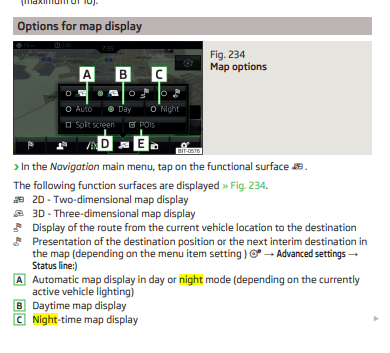
Just select Day Mode, rather than Auto
-
You can quite easily start it again to move off, just by pulling the ACC stalk towards you or a slight press on the accelerator.
-
Guide on now easy it is to remove it
-
I had this on my Superb MKII, and it was because the windows had lost their limit settings for some reason. However you can reset them by doing something like this (I can't remember exactly): Turn the ignition on (not the engine) Using the window switch send the window all the way down and press 5 times down and hold it for 3sec on the last time. Using the window switch send the window all the way up and press 5 times down and hold it for 3sec on the last time. Do it for each of the windows individually.
-
My Superb is an estate, and so MQB-Cam B was the fit for mine. Not sure of what is needed for the Saloon.
-
I fitted one of these, and works perfectly fine for me on my 2018 with Columbus 2.5 https://www.aliexpress.com/item/4000230897829.html?spm=a2g0s.12269583.0.0.7603299fn2Z4cN
-
Push the cruise control stalk all the way back, you'll then see the total mileage in the Maxidot
-
I'm pretty certain that if you deactivated in the infotainment menu, or push the remote lock button twice in succession, this not only does this deactivate the interior sensor but also deactivates the tilt sensors. Therefore the alarm is totally deactivated.
-
A double press of the 'lock' button on the key, will disable internal monitoring and deadlocks but won't turn the alarm off.
-
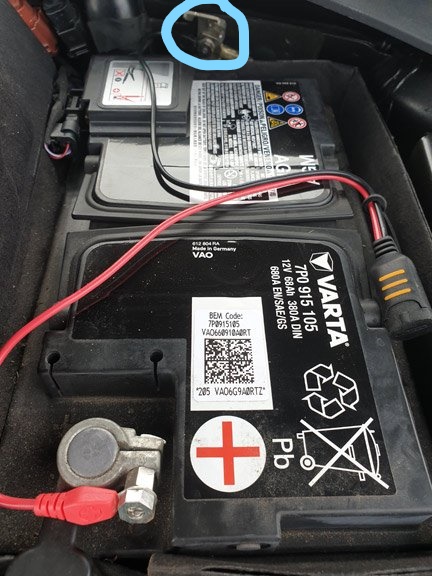
The chassis mount is here at the top of the picture.