johnthomas99
Members
-
Joined
-
Last visited
-
A little more complicated than just a coding then! In my naevity I didn't consider that I'd need to change the lights. Thank you very much for your replies. Much appreciated.
-
Hi Folks. I own a 2016 Superb 2.0 TDI SeL executive and I am looking to find out if I can code the vehicle to change the indicators from standard to dynamic (sweeping) with OBDeleven. (Unfortunately there is no one-click app?) Any help appreciated. TIA
-
That's good news. Thanks for sharing. I've just done a 144 mile journey and have obdeleven scanned with ignition on / engine off. No gearbox error codes, so that confirms that the above error codes will be present if the engine is running. Many thanks for your help.
-
That's interesting. Thank you. Let me know After you get round to scanning yours again?
-
Thanks for your reply. I didn't scan whilst driving but the engine was running/car stationary whilst scanning. Would this have caused it maybe?
-
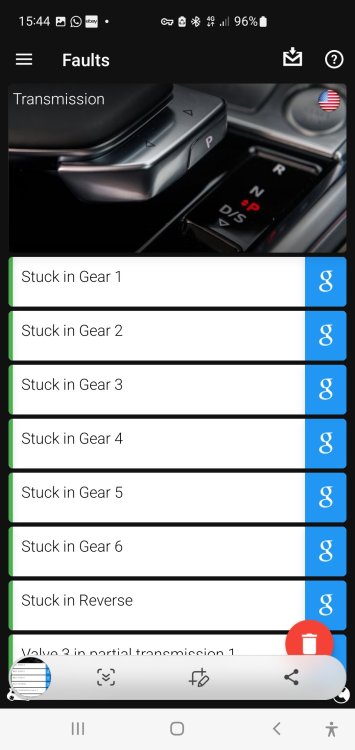
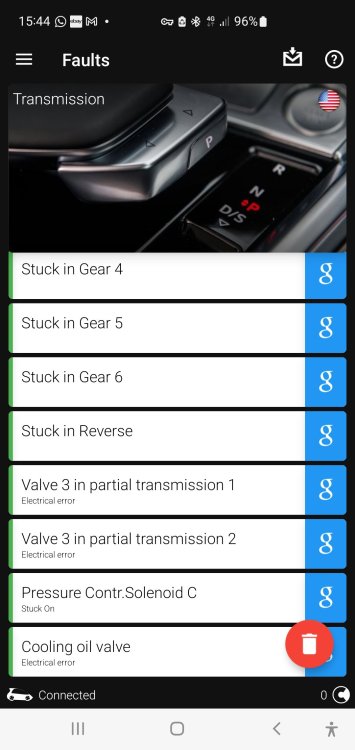
Hi Folks, I need some advice regarding a series of gearbox error codes on my 16' Superb 2.0tdi DSG (6 speed) detected during a scan with OBDeleven. I have attached a screenshot of the error codes. The car has been running fine and the gearbox behaving as it should but this is the 2nd time I have had these codes present after clearing the same fault codes a few weeks back. Should I be concerned? Thank you
-
Is there anyway of monitoring the Dpf using theVAGObdeleven app ?
-
Thank you for your replies. It's a shame the App doesn't work with the OBDeleven adapter. I bought it for this purpose thinking this would work to monitor the Dpf. I'll have to buy a cheap ELM dongle. Many thanks.
-
I am looking to monitor the Dpf on my 2016 Skoda Superb 2.0tdi DSG and having purchased the OBDeleven adapter / downloaded the OBDVaG app. Can anyone offer any advice on how to do this, what Readings I need to monitor and how to set this up so that I know when there might be a Dpf issue? Many thanks.
-
Just a quick update for others with this issue. Identified the part number required for the OSR door lock (with help from a really helpful, long standing member on this forum) and fitted it this morning (Took about an hour, for me anyway!) nice, easy job and now works perfectly. Door lock part came from a 24' model Seat Arona as it'sthe same but superceeded part. Many thanks for all your help. (What a great useful forum this is - I've been a member for some years)
-
Thank you all. Yes, it seems to be working fine now, after the joystick 'wiggle' but if it happens again I will try some contact cleaner. Many thanks. 😊
-
Many thanks for your help and advice. It's much appreciated. 🙂
-
Sorry.......also where did you buy your repair manual from? Thank you. 😊
-
That's brilliant and very detailed, Thank you. How did you ID the correct part needed?
-
Thank you both for your replies. The vehicle battery is fairly new so I've kind of discounted this. The fault has changed and now means that the drivers side rear door does not lock at all now, even though the other doors are locked, so I think as NikiB has suggested it may have a faulty door lock? NikiB, was this an fairly straight forward job once the door card is removed? Any advice regarding the steps to replace this would be greatly appreciated as I've not long bought the vehicle.