JXS
Finding my way
-
Joined
-
Last visited
Everything posted by JXS
-
I can confirm the oil can light does not illuminate on start up on my mkIII. I only noticed that it was like this when doing its first oil change. Seems a bit strange but that's what it says in the manual, so no bulb check on startup, just have to assume it's going to work if the oil pressure does drop. Simply Clever? or not?
-
On my 2018 Fabia with incandescent DRLs, when both failed in quick succession I was constantly nagged on the MFD every time I turned on the ignition so they must be monitored somehow.
-
I can't remember to be honest but they were no trouble to fit so I suspect they were direct fit.
-
I fitted some this time last year from Wiperblades.co.uk 1 x Aerotwin Plus Flat Windscreen Wiper Blade AP24U Skoda Fabia Estate 2015 Onwards 1 x Aerotwin Plus Flat Windscreen Wiper Blade AP16U Skoda Fabia Estate 2015 Onwards 1 x Specific Fit Flat Rear Wiper Blade A403H Skoda Fabia Estate 2015 Onwards
-
On my 2018 1.0 TSI Fabia, essentially the same control panel, this is how it works. If you turn the temperature knob fully anticlockwise to the max cold position then the recirculation will come on. It says this in the manual. In this position the recirc will always come on when the aircon is turned on even if you have turned it off during a previous drive. If you don't want this to happen then you need to leave the temperature control knob about 5 to 10 degrees away from the max cold stop. It doesn't affect the temperature. Try it and see.
-
If it's any help? I've got a 2018 Fabia Estate in Quartz Grey Metallic bought new. In the spec sheet for the car, looked up on Erwin by VIN number, it is shown as Colour code : F6, Lacquer Number : LF7Y, Quartz Grey Metallic. Whereas, when I looked up the same spec sheet by Vin number on https://carinfo.kiev.ua/cars/vin/skoda/vin_check? it gave the information as:- Colour of body F6 (GREY: metal grey)
-
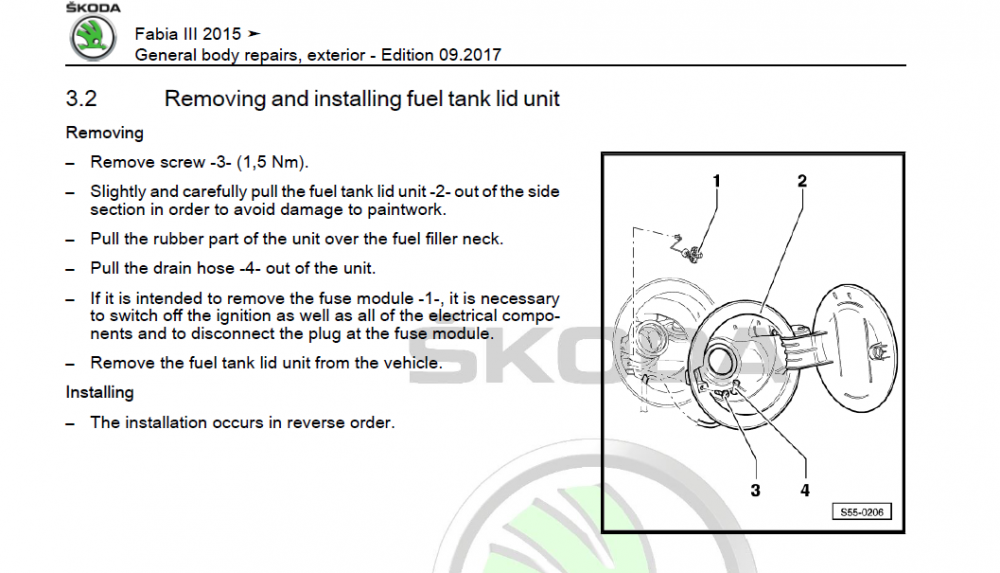
Not sure if this will appear correctly or not but here goes. These are the instructions from the Skoda Manual. It appears that you just remove the screw, 3, and judiciously pull it out
-
Thanks Expatman, that's exactly the information I was after. So the T_Cross seat is higher than the Kamiq by 46mm at the lowest setting and 39mm at the highest setting, so about 1.5 inches higher at the highest setting. The overall car height just gives you more headroom it is basically the design of the seat that accounts for the difference in driving height. e-Roottoot - thanks for your info too, obviously I will be trying them out when the time comes but I was just curious as to what accounted for the difference.
-
Ok so the T-Cross is 53mm higher, about 2 inches. But, all other things being equal, that would just mean 2in extra headroom.
-
I've been following this thread with interest as the Kamiq is on my list when the time comes to change my Fabia and I prefer a higher driving position. Does anyone know what the actual difference is between the T-Cross and the Kamiq to give the increased driving height. My understanding is that they are both built on the same platform. So, is it a different seat frame, a higher floor or is the whole car higher? Anyone Know?