Dean_C
Finding my way
-
Joined
-
Last visited
-
DPF has been replaced, stated above. "If a vehicle is doing too frequent re-gens, It's wise to look at the cause not the environmental solution." And this is exactly what I'm trying to establish, what is the cause of my too frequent regenerations?
-
It does, you tell the ECU that the DPF has been replaced and set the oil/ash content to zero.
-
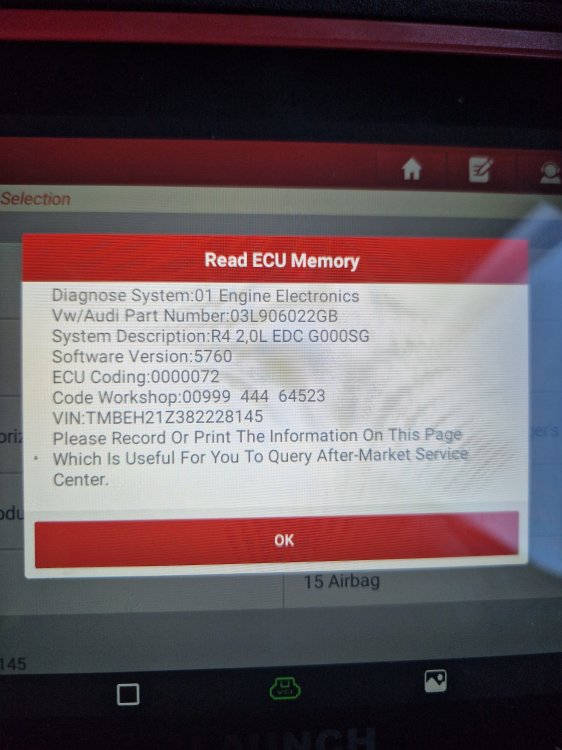
Sorry if I chose the wrong thread but my 2008 octavia is having ongoing issues regards frequent regens. Almost every drive. I was thinking along the lines of software because new (Aftermarket) DPF from Germany fitted (all values ok, except for high ash volume) Full adaptation carried out which reset ash volume, differential pressure still good, soot load miniscule. Exhaust temp sensor before DPF replaced as I thought the reading was a bit low, lower reading than the sensor after DPF. Same readings present with new sensor. (No black soot in exhaust tip) EGR valve seems to work as it should, cooler doesn't appear blocked, no engine codes ever present. I will attach a picture from my diag tool stating what software it's running currently (5760) All the help I can get is welcome cause I'm at my witts end and really don't want to map the dpf out
-
Can anybody help me please. 2.0 tdi octavia 2008, removed anti shudder valve (throttle body) & EGR valve for cleaning. All went well when re-installing or so I thought. I now have a crank no start with no fault codes being shown
-
Ok thanks for this. Mine need replacing and had to be purchased as complete Antiroll bar with bushes attached. Will be fitting this long weekend
-
If guide bolts are not used and I experience crabbing from the steering or steering pull, won't a 4 wheel alignment solve this afterward?